Local Hosting vs Deployment

What Actually Changes When Your Python Web App Goes Live

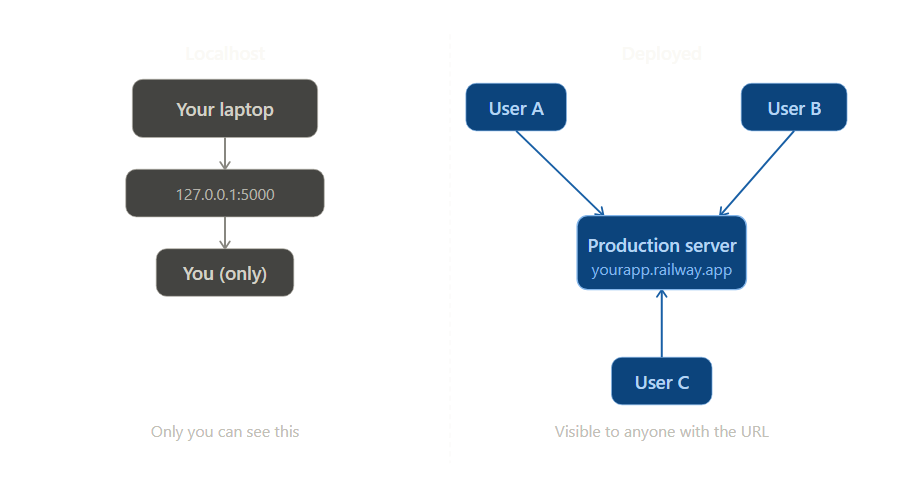
Your web app works. You run it, open the browser, click around, and everything looks fine on localhost. For a beginner, that can feel like deployment. But it is not. Local hosting means your app is running on your own machine for your own browser. Deployment means it is running somewhere other people can reach it reliably.

"It works on my machine" is not deployment. It is rehearsal.
A split illustration showing a web app running on a local computer on one side and deployed publicly in the cloud on the other.

This guide shows you what changes between those two worlds. You will see what localhost really means, why a development server is not the same as a production server, what packages like Gunicorn and Uvicorn actually do, and how platforms like Render, Railway, and Fly.io fit into the picture.

What This Chapter Is Really About

This chapter is not a deep dive into one cloud provider. It is about understanding the difference between "my app runs on my computer" and "my app is available on the internet." Once you understand that difference, the tooling starts to make sense.

1. Why Local Hosting Is Not Deployment

When you run a Flask or FastAPI app locally, you are proving something useful: the code starts, the routes work, and the browser can talk to your app. But all of that is still happening on your own machine. Your laptop is acting as both the server and the first user.

That is why local hosting feels so close to deployment. The app is real. The browser is real. The responses are real. But the environment is still private, temporary, and designed around you.

  • Your machine is private. Other people cannot usually reach localhost on your computer.
  • Your machine is temporary. Close the terminal or shut the laptop and the app disappears.
  • Your environment is personal. File paths, secrets, and installed packages may only work on your setup.
  • Your server is usually a development server. It is designed to help you build, not to face real traffic from the public internet.
The Core Difference

Local hosting proves your app can run. Deployment proves your app can live somewhere other people can reliably access.

2. The Three Things Deployment Adds

You do not need a giant infrastructure lecture to understand deployment. Most beginner confusion disappears once you see that deployment adds three practical things.

1.

A public machine

Your app stops living only on your laptop and starts running on a server or platform that other people can reach over the internet.

2.

A production app runner

Instead of relying on a development server, production usually uses something like Gunicorn, Uvicorn, or Waitress to run the app more appropriately.

3.

A public route to your app

Users need a URL, open network access, and usually HTTPS. A platform or reverse proxy often handles much of that for you.

The Plan for the Rest of This Chapter

We are going to walk through all three using one tiny Flask app. That keeps the ideas concrete. You will see the local version first, then the production pieces, then the deployment options that wrap around them.

3. The Small Web App We Will Use

Here is the smallest possible web app we need for this chapter. It returns a short message at the home page. That is enough to demonstrate the difference between local hosting and deployment.

app.py
Python
from flask import Flask

app = Flask(__name__)


@app.route("/")
def home():
    return "<h1>Hello from my web app</h1>"


if __name__ == "__main__":
    app.run(debug=True)

If you run this file and open the browser, the app works. That is a real success. But it is still only step one. The app is available to you because your own browser is talking to your own computer.

4. What localhost Really Means

A lot of beginner confusion comes from the word localhost. It sounds like a public address. It feels like a website. But it is just a special name that points back to the same machine you are already on.

Running the app locally
Bash
python app.py
# or
flask run

After that, Flask might show you something like this:

Terminal Output
Running on http://127.0.0.1:5000

127.0.0.1 is the loopback address. It means "this same computer." So when your browser opens that address, it is not traveling across the internet to some distant server. It is simply talking back to your own machine.

What localhost Means

localhost does not mean your app is public. It means your browser is speaking to a server running on the same computer you are sitting in front of.

5. Why Development Servers Are Not Production Servers

Frameworks like Flask and FastAPI make local development easy. They give you a built-in server so you can write code, refresh the browser, and get feedback quickly. That is exactly what you want while building.

But when the app goes public, the job changes. Now the server process needs to start consistently, stay running, handle real requests properly, and fit into a wider deployment environment. That is why production often uses a dedicated application server package.

  • Gunicorn is a common production runner for WSGI apps like Flask and Django.
  • Waitress is another production WSGI server, often appreciated for its simplicity.
  • Uvicorn is a common production runner for ASGI apps like FastAPI.
The Important Shift

Your framework gives you a development server so you can build. Deployment usually swaps that out for a production runner so the app can operate more appropriately in the real world.

Do Not Memorize the Acronyms Yet

Beginners often get stuck on WSGI and ASGI. The important idea for now is simpler: one tool helps you develop locally, another tool is commonly used to run the app in production.

6. The Main Deployment Options

Once you understand the app runner, the next question is where the app should live. For beginners, there are three main paths.

1.

Managed platforms

Services like Render, Railway, and Fly.io host the app for you. You push code, connect a repository, configure a start command, and the platform handles much of the surrounding infrastructure.

2.

A VPS you manage yourself

You rent a Linux server, install Python and your dependencies, run the app with a production server, and often place something like Nginx or Caddy in front of it.

3.

Containers

With Docker, you package the app and its environment together. You still need somewhere to run the container, but the packaging becomes much more portable and predictable.

A Good Beginner Rule

Start with a managed platform first. It teaches the deployment flow without forcing you to become a Linux administrator on day one.

7. The Packages and Tools You Will Hear About

A lot of deployment confusion comes from vocabulary. Beginners often think deployment is one thing. In reality, deployment is a stack of responsibilities, and different tools handle different layers.

  • Flask, FastAPI, Django are web frameworks. They define your routes and application logic.
  • Gunicorn, Waitress, Uvicorn run the Python web app in production.
  • Nginx or Caddy often sit in front of the app and handle incoming web traffic.
  • systemd is commonly used on Linux servers to keep processes running.
  • Docker packages the app and its environment together.
  • Render, Railway, Fly.io are hosting platforms that provide a place to deploy.
  • requirements.txt or pyproject.toml tell the environment which Python dependencies to install.
A Simple Mental Model

The package runs the app. The platform hosts the app. The proxy helps traffic reach the app. The dependency file tells the environment what to install.

8. A Simple First Deployment Flow

Let us choose the least overwhelming path: a small Flask app deployed on a managed platform. The exact clicks vary between providers, but the overall flow is usually the same.

requirements.txt
Text
flask
gunicorn
Typical production start command
Bash
gunicorn app:app

The flow usually looks like this:

  1. Build the app locally. Confirm it works on your own machine first.
  2. Declare your dependencies. Add Flask and the production runner to your dependency file.
  3. Push the code to GitHub. Most beginner-friendly platforms deploy directly from a repository.
  4. Connect the repository to the platform. The platform clones the code and installs the dependencies.
  5. Set the start command. This tells the platform how to run the app in production.
  6. Receive a public URL. Your app is now available beyond your own laptop.
What Changed?

The app code barely changed. The real difference was the environment around it: a public machine, a production runner, and a platform that exposes the app to the web.

9. What Changes When Your App Goes Public

The moment your app leaves your laptop, you have to think differently. A deployed app is not just code. It is an environment, a process, and a public service.

  • Environment variables matter more. Secrets should not be hardcoded into the source code.
  • Debug mode should be off. Development conveniences are not the same as production safety.
  • Logs matter. When something breaks, you need to inspect output from the server, not guess.
  • Startup commands matter. The platform needs to know exactly how to launch the app.
  • The filesystem may be temporary. Some platforms do not treat local disk storage the same way your laptop does.
  • The database may live somewhere else. In production, the app and the database are often separate services.
The Mindset Shift

When the app is local, you are the only user and operator. When the app is deployed, your code must survive real traffic, real mistakes, and real infrastructure rules.

10. What Deployment Actually Proves

Deployment does not prove your app is perfect. It proves something narrower and more important.

  • Your code can start outside your laptop.
  • Your dependencies can be installed in a fresh environment.
  • Your startup command works.
  • Your environment variables are configured correctly.
  • Your app can answer requests from real users on the public internet.

That is why first deployment feels so important. It is the moment your project stops being only a local exercise and becomes a public application.

The Habit to Keep

Every time you move an app toward production, ask the same three questions: where is it running, what is running it, and how are users reaching it? If you can answer all three clearly, the deployment architecture will stop feeling mysterious.

11. Checkpoint Quiz

Test your understanding with these questions. If you can answer confidently, you have mastered the material:

Select question to reveal the answer:
What does localhost actually mean?

localhost is a special name that points back to the same computer you are already using. It does not mean your app is public. It means your browser is communicating with a server process running on your own machine.

Why is flask run not the same thing as production deployment?

Because it starts a development server for local building and testing. A deployed app usually runs in a different environment, often with a production runner such as Gunicorn or Uvicorn, and is exposed publicly through a platform or server configuration.

What is the difference between a framework and a deployment platform?

A framework like Flask or FastAPI defines your routes and application logic. A platform like Render, Railway, or Fly.io gives your app somewhere public to run and often handles much of the infrastructure around it.

What does Gunicorn, Waitress, or Uvicorn do?

These packages run your Python web app in a production-style environment. They are not hosting companies. They are the server processes that actually launch and serve the application code.

Why is a managed platform often the best beginner deployment path?

Because it teaches the deployment flow without forcing you to configure every piece of infrastructure yourself. You still learn about dependencies, start commands, and public URLs, but the platform handles much of the server setup.

What extra responsibility do you take on with a VPS?

With a VPS, you usually manage more of the environment yourself: installing packages, configuring the app runner, keeping the process alive, setting up the reverse proxy, and maintaining the server. You gain more control, but also more operational work.

This guide showed you the difference between running a web app locally and deploying it for real. That difference matters because it is one of the first steps from "I made something" to "I shipped something."

In the full book, we take that next step seriously. You do not just learn how to start a development server. You learn how to build projects with authentication, databases, background work, Docker, and production deployment patterns that prepare you for real application development.

Mastering APIs with Python

30 chapters taking you from your first API call to production deployment. Six portfolio projects covering Flask, OAuth, SQLite, Postgres, Docker, CI/CD, and AWS. Everything in this guide is a stepping stone toward that larger journey.

Chapter 3 is free — no signup required.