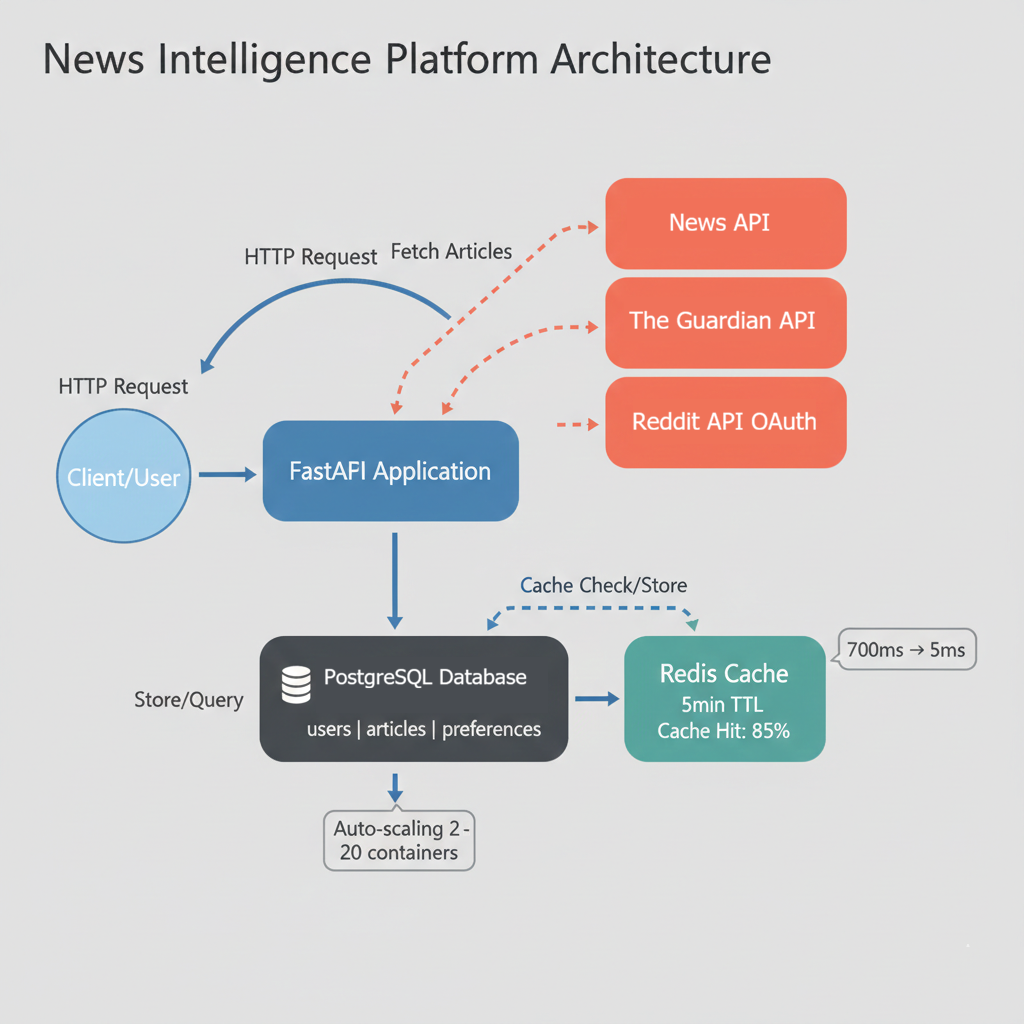
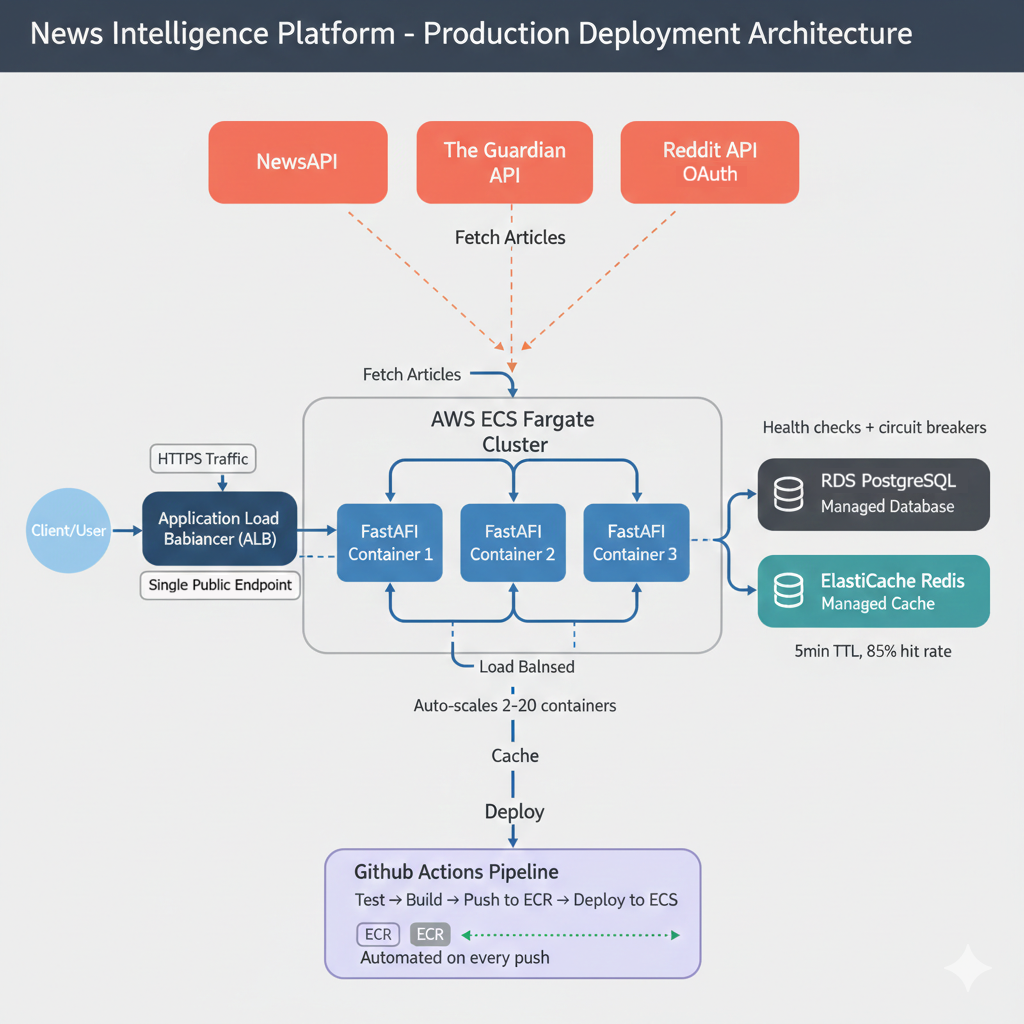
You've spent 29 chapters learning to build, test, deploy, and operate APIs. You've written code that fetches data from external services. You've implemented OAuth flows, designed database schemas, containerized applications, deployed to AWS, configured auto-scaling, and built CI/CD pipelines. Each chapter taught you one skill. Now you'll combine them all.
This capstone project asks you to build a complete production system from scratch. Not a tutorial where you copy code line-by-line. Not a chapter where I guide every decision. You'll make the architectural choices, write the implementation, debug the problems, and deploy the infrastructure. This is where learning becomes mastery.
The project: A multi-source News Intelligence Platform that aggregates articles from three different APIs, implements OAuth authentication, caches aggressively for performance, deploys to AWS with professional monitoring, and scales automatically under load. Everything you've learned, applied to one coherent system.
Learning Objectives
By the end of this chapter, you'll be able to:
- Design and implement a multi-service production API that integrates three external data sources (NewsAPI, The Guardian, Reddit) with different authentication patterns (API keys, no auth, OAuth 2.0)
- Build a complete PostgreSQL database schema with proper relationships, foreign key constraints, indexes for performance, and migrations using Alembic
- Deploy a containerized application to AWS ECS Fargate with supporting infrastructure including RDS PostgreSQL, ElastiCache Redis, and Application Load Balancer
- Implement comprehensive caching strategies using Redis that improve API response times from 700ms to under 5ms for cached requests
- Configure CI/CD pipelines with GitHub Actions that automatically run tests, build Docker images, push to ECR, and deploy to ECS on every commit to main
- Monitor production systems using CloudWatch to track Golden Signals (latency, traffic, errors, saturation), configure auto-scaling policies, and respond to production incidents
Why This Specific Project
I chose the News Intelligence Platform deliberately. It hits every major concept from the book while remaining understandable and achievable. Here's how this single project demonstrates everything you've learned:
External API integration (Chapters 1-8)
You'll integrate NewsAPI (API key authentication), The Guardian API (no authentication), and Reddit API (OAuth 2.0). Three different authentication patterns, three different response formats, three opportunities to practice API client development. You'll handle rate limits, parse inconsistent JSON structures, and implement the defensive programming patterns from early chapters.
OAuth 2.0 (Chapters 11-13)
Reddit's OAuth flow lets users authenticate and personalize their experience. You'll implement the authorization code grant type, manage access tokens, handle token refresh, and secure user sessions. This is production OAuth, not simplified examples. The full flow: authorization URL generation, token exchange, refresh token rotation, and session management.
Database design (Chapters 14-19)
Your PostgreSQL schema tracks users, articles from multiple sources, user preferences, and search history. You'll design relationships, write migrations with Alembic, implement indexes for performance, and handle data integrity across external API updates. The schema supports both current features and future extensions without requiring migrations.
Your API (Chapters 24-26)
You'll build a FastAPI application with proper input validation using Pydantic, comprehensive error handling, pagination, filtering, and rate limiting. The API doesn't just fetch data. It adds value through aggregation, caching, personalization, and intelligent search. Your endpoints combine data from multiple sources and present it through a unified interface.
Testing (Chapters 20-21)
This project has clear test cases: external API integration tests with mocked responses, database operation tests, endpoint behavior tests, and OAuth flow tests. You'll write them all and achieve 70%+ coverage before deployment. The tests give you confidence that code changes don't break existing functionality.
Containerization (Chapter 27)
Docker Compose orchestrates your API, PostgreSQL, and Redis locally. Multi-stage builds optimize your production image size. Everything runs identically on your laptop and in AWS. One command (docker compose up) starts your entire stack.
AWS deployment (Chapter 28)
You'll deploy to ECS Fargate with RDS PostgreSQL, ElastiCache Redis, and an Application Load Balancer. This is production infrastructure, not a toy deployment. You'll configure security groups, IAM roles, environment variables, and health checks. The result: a publicly accessible API serving real traffic.
CI/CD and operations (Chapter 29)
GitHub Actions automates deployment on every push. CloudWatch monitors your Golden Signals (latency, traffic, errors, saturation). Auto-scaling responds to load. You'll operate this system professionally, not just deploy it once and forget it.
The News Intelligence Platform demonstrates every skill from this book because I designed it to do exactly that. When recruiters ask "Can you build production APIs?", you'll point to this deployed system and walk them through every architectural decision.
What Success Looks Like
By the time you complete this project, you'll have concrete artifacts that demonstrate professional competency. Here are the specific, measurable criteria that define success:
Functional Requirements
- ✓ All endpoints return 200 OK with valid requests
- ✓ Response time <100ms for cached requests, <1s for fresh API calls
- ✓ Test coverage ≥70% (measured with
pytest --cov) - ✓ Docker image size <300MB (verified with
docker images) - ✓ Health check endpoint consistently returns 200 with database connectivity status
Production Deployment
- ✓ ECS service running with 2+ healthy tasks
- ✓ Application Load Balancer health checks passing at 100%
- ✓ CloudWatch showing zero 5xx errors in last 24 hours
- ✓ CI/CD pipeline completing deployment in <8 minutes
- ✓ Auto-scaling responds to load within 90 seconds
Professional Operations
- ✓ CloudWatch dashboards visualizing Golden Signals (latency p50/p90/p99, traffic, errors, saturation)
- ✓ Secrets managed via AWS Secrets Manager (no plain-text credentials in code)
- ✓ Redis cache hit rate >80% for repeated queries
- ✓ Database queries optimized with proper indexes (verified with
EXPLAIN ANALYZE) - ✓ GitHub Actions pipeline with automated rollback on test failures
Portfolio Quality
- ✓ Comprehensive README with architecture diagram, setup instructions, and API documentation
- ✓ Live demo URL accessible to recruiters (with sample API key provided)
- ✓ Code follows consistent style (PEP 8 for Python, formatted with
black) - ✓ Commit history shows iterative development (not one massive commit)
- ✓ Can explain every technical decision and discuss alternatives
These metrics aren't arbitrary. They reflect professional engineering standards. When recruiters evaluate your project, they'll check these concrete deliverables. You can confidently claim production experience because you have measurable proof.
Timeline and Expectations
This project requires 24-46 hours spread across 1-2 weeks of focused work. Professional engineers spend weeks on systems like this. You're demonstrating production-ready skills, not completing a tutorial.
Realistic Time Breakdown
Section 3: Core API (8-12 hours)
Integrate external APIs, design database schema, implement Alembic migrations, build FastAPI endpoints, add Redis caching, write tests. By completion, your API runs locally and handles real requests with proper validation and error handling.
Section 4: Deployment (6-8 hours)
Containerize with Docker Compose for local testing. Create multi-stage production Dockerfile. Deploy to AWS: ECS Fargate, RDS PostgreSQL, ElastiCache Redis, Application Load Balancer. Configure security groups, IAM roles, environment variables, health checks. Verify production deployment.
Section 5: Testing & CI/CD (4-6 hours)
Write comprehensive tests achieving 70%+ coverage. Set up GitHub Actions pipeline for automated testing, building, and deployment. Configure CloudWatch monitoring and auto-scaling. Load test to verify scalability.
Section 6: Extensions (6-20 hours depending on choice)
Choose and implement one extension feature: sentiment analysis (10-15 hours), real-time alerts (12-16 hours), smart recommendations (12-16 hours), email digests (10-14 hours), advanced caching (8-12 hours), or multi-language support (16-20 hours). First-time estimates may be 1.5-2x these times.
Recommended Approach
Week 1: Complete core API locally. Get Docker working. Deploy basic version to AWS.
Week 2: Add tests, set up CI/CD, implement one extension, write documentation.
This isn't a race. Quality matters more than speed. If debugging AWS networking takes an extra day, that's normal. Professional development includes troubleshooting time.
The Extension System
After completing the core project, you'll choose one or two extension features to add. Extensions are optional advanced features that let you specialize in an area that interests you.
The core project ensures everyone demonstrates the same fundamental skills: API integration, database design, deployment, monitoring. Extensions let you differentiate. When employers review your project, they see consistent fundamentals plus your chosen specialization.
Available extensions
- Real-time alerts: WebSocket notifications when articles matching user keywords are published. Demonstrates event-driven architecture and persistent connections.
- Sentiment analysis: ML-powered scoring showing whether news coverage is positive, negative, or neutral. Demonstrates integration of machine learning libraries with production APIs.
- Smart recommendations: Personalized article ranking based on user behavior and preferences. Demonstrates collaborative filtering and recommendation algorithms.
- Email digests: Scheduled summaries sent via SendGrid based on user preferences. Demonstrates background job processing with Celery.
- Advanced caching: Multi-tier caching strategy with cache warming and intelligent invalidation. Demonstrates performance optimization and caching patterns.
- Multi-language support: International news sources with automatic translation. Demonstrates internationalization and third-party translation API integration.
Extensions range from 10-15 hours (sentiment analysis) to 16-20 hours (multi-language support). First-time estimates may be 1.5-2x these times. Section 5 provides complete implementation guidance for sentiment analysis as a reference pattern. Other extensions include specifications and architectural guidance, but you implement them independently.
Extensions demonstrate depth beyond the core requirements. They're your opportunity to show specialization in an area that interests you: real-time systems, machine learning, email infrastructure, or performance optimization.
Chapter Roadmap
This chapter provides structure and guidance without hand-holding. You'll make real decisions, face real problems, and build real solutions. Here's how the chapter progresses:
System Architecture
Understand what you're building and why each component exists before writing code. Trace a complete request through the system, examine the database schema, and learn why specific technologies were chosen.
Phase 1: Core Implementation
Build core functionality with detailed guidance. Implement external API clients, database setup, FastAPI endpoints, caching, and testing. You'll reference previous chapters but write the code yourself.
Phase 2: Production Deployment
Deploy to AWS with professional operations. Docker Compose for local testing, multi-stage builds, ECS Fargate, RDS PostgreSQL, ElastiCache Redis, Application Load Balancer, and comprehensive troubleshooting.
Phase 3: Choose Your Extension
Add advanced features to differentiate your project. Sentiment analysis walkthrough provides a complete reference pattern. Other extensions include specifications for real-time alerts, recommendations, email digests, and more.
Documentation & Presentation
Transform technical work into professional presentation. Write comprehensive README, create architecture diagrams, prepare interview talking points, and learn how to present your project to recruiters.
Evaluation & Submission
Know exactly what "done" looks like with a 100-point rubric. Technical implementation (60 points), professional practices (25 points), portfolio quality (15 points).
What's Next?
Explore what comes after completion. Advanced features, open source contributions, interview strategies, and career paths for API developers.
This isn't a step-by-step tutorial. It's a structured challenge with clear requirements and guidance. You'll make decisions, face problems, debug issues, and build something real. That's how mastery develops.
Before You Begin
Confirm your environment
Python 3.10+ installed and accessible via python --version. Docker Desktop installed and running (verify with docker ps). AWS CLI configured with your credentials (aws sts get-caller-identity should return your account info). GitHub account ready with an empty repository created for this project. Test each tool independently before starting the project. Debugging environment issues is frustrating when you're trying to write code.
Register for API keys
NewsAPI, Guardian API, and Reddit API all offer free developer tiers. Registration takes 10 minutes total. Keep credentials secure from the start. Add .env to .gitignore before your first commit. Section 3.1 provides step-by-step registration instructions for each service.
Set expectations with yourself
You'll get stuck. That's intentional. Professional development involves problem-solving, documentation reading, and systematic debugging. When you encounter an error, read it completely. Check the documentation for the library you're using. Search for similar issues. Test your hypotheses one at a time. This troubleshooting practice builds the competence that makes you valuable professionally.
Reference previous chapters freely. Chapter 7 covers API authentication. Chapters 14-19 cover database design. Chapter 27 covers Docker. These chapters provide implementation patterns you'll apply here. The capstone tests whether you can combine these patterns independently, not whether you've memorized syntax.
Ready? Let's see what you're building.