Chapter 26: Building Your Own REST API

From API Consumer to API Producer

1. Introduction

For 25 chapters, you've been the client. You've consumed APIs from OpenWeather, NewsAPI, Spotify, GitHub. You've sent HTTP requests, parsed JSON responses, handled authentication flows, and built applications on top of external data sources.

Basically, You've written code that calls requests.get() and processes what comes back.

Now you're ready for the flip side: you're going to be the API. You're going to build the system that receives those HTTP requests, validates authentication, enforces rate limits, queries databases, and returns JSON responses. You're going to create the endpoints that other developers integrate with. This isn't just a technical skill change. It's a professional identity shift.
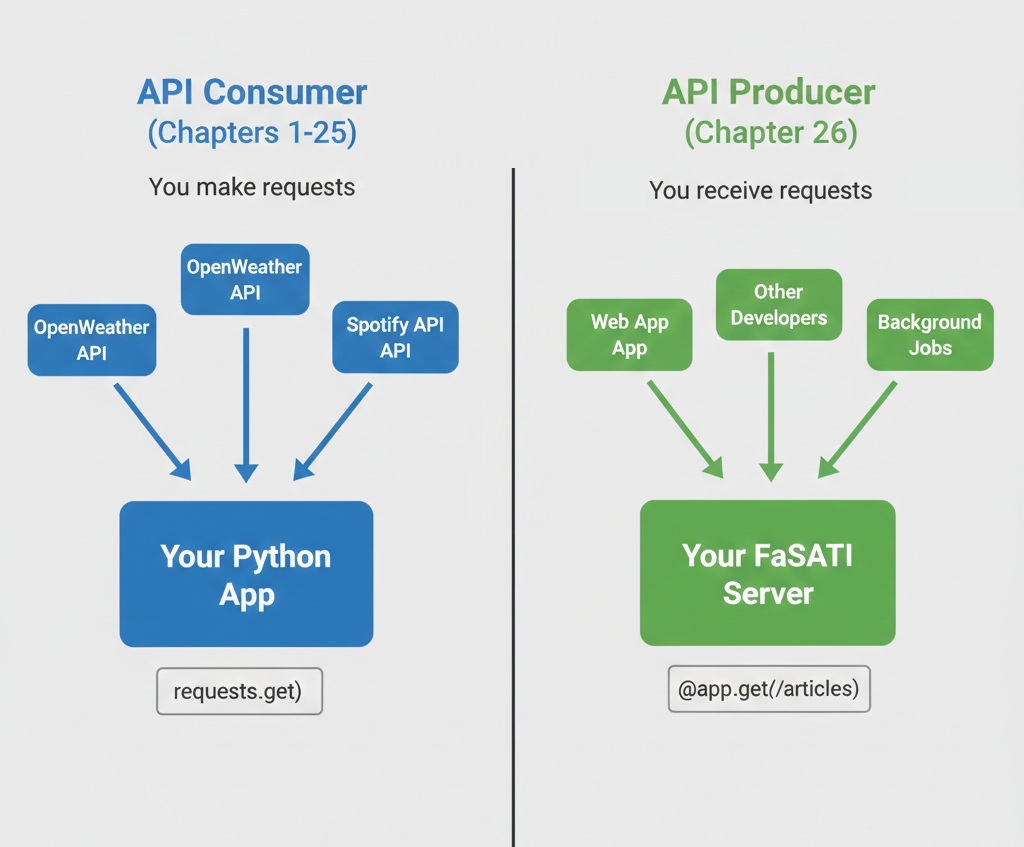
Side-by-side comparison diagram showing API Consumer on left (Chapters 1-25) with arrows from OpenWeather API, Spotify API pointing into Your Python App with requests.get() code, versus API Producer on right (Chapter 26) with arrows from Web App, Other Developers, Background Jobs pointing into Your FastAPI Server with @app.get('/articles') code
The shift from API consumer to API producer: from making requests to receiving them

This chapter teaches you to build production-grade REST APIs using FastAPI, PostgreSQL, and professional patterns for authentication, rate limiting, and error handling.

You'll create a News Aggregator API that consolidates multiple news sources into one clean interface, demonstrating the exact patterns companies use to expose their data to developers. By the end, you'll have a deployed API with automatic documentation, secure authentication, and comprehensive test coverage—ready to show recruiters as proof you understand both sides of the API equation.

The API Producer Mindset

As a consumer, you think: "How do I call this API? What parameters does it accept? How do I handle errors?" These are client-side concerns. As a producer, the questions change completely.

What if someone makes 1,000 requests per second?

Without rate limiting, a single user can exhaust your database connections, spike your hosting costs, or crash your server. As a consumer, you never worried about this. As a producer, it's a critical design decision from day one.

How do you prevent abuse while staying accessible?

Every API needs authentication to track usage and prevent unauthorized access. But too much friction discourages adoption. Professional APIs balance security with developer experience—making authentication simple but secure.

How do you version your API without breaking existing users?

You'll improve your API over time, adding features and optimizing responses. But users depend on your current endpoints. Changing response formats breaks their code. Professional APIs version endpoints so improvements don't destroy existing integrations.

How do you help developers understand what went wrong?

As a consumer, you've seen generic 500 errors that provided no useful information. Frustrating. As a producer, you control what error messages users see. Good APIs return clear error messages, proper status codes, and actionable guidance. Poor APIs leave developers guessing.

The Responsibility of API Producers

Building APIs means other people's applications depend on your code. If your API goes down, their services break. If you change response formats without warning, you break production systems. If your error messages are unclear, you waste hours of other developers' time.

This responsibility shapes how you design, build, test, and deploy APIs. Professional API development isn't just writing code that works for you. It's building systems that work reliably for everyone who integrates with them, with clear documentation, predictable behavior, and graceful degradation when things go wrong.

What You'll Build: The News Aggregator API

Following news means checking multiple sources. Tech news from Hacker News, world events from The Guardian, breaking stories from NewsAPI. Each source has different API formats, different authentication requirements, different rate limits, and different response structures. Developers who want comprehensive news coverage must integrate with three, four, or five separate APIs.

Your News Aggregator API solves this problem. It aggregates articles from NewsAPI and The Guardian into one unified interface. Developers get one API key, one consistent response format, and access to multiple news sources through clean REST endpoints. Behind the scenes, your API handles the complexity: fetching from multiple sources, normalizing different response formats, caching results in PostgreSQL, and enforcing rate limits.

For consumers, the interface is simple:

cURL - News Aggregator API Request
GET /articles?category=technology&source=newsapi
Authorization: Bearer YOUR_API_KEY

Response:
{
  "articles": [
    {
      "id": "news_12345",
      "title": "AI Breakthrough in Medical Imaging",
      "description": "Researchers develop algorithm...",
      "url": "https://example.com/article",
      "source": "newsapi",
      "category": "technology",
      "published_at": "2024-12-09T10:30:00Z"
    }
  ],
  "total": 42,
  "page": 1
}

For you as the builder, the system demonstrates professional patterns:

Multi-source integration: Your API fetches from NewsAPI and Guardian, handles their different authentication methods, normalizes responses, and merges results into one clean format.

Database caching: Articles are stored in PostgreSQL with timestamps. Recent requests return cached data instantly. Stale cache triggers fresh API calls. This reduces external API usage and improves response times.

API key authentication: Users generate API keys through an admin endpoint. Keys are hashed before storage (like passwords). Every request validates the API key using middleware before processing.

Rate limiting: Each API key has usage limits tracked in PostgreSQL. Exceed your limit and you get a 429 status code with clear messaging about when limits reset.

Automatic documentation: FastAPI generates interactive API docs at /docs. Developers can test endpoints directly in the browser, see request/response schemas, and understand authentication requirements without reading separate documentation.

Why This Project Matters for Your Portfolio

This isn't a toy project. The News Aggregator API demonstrates real production patterns: authentication, rate limiting, database integration, external API orchestration, caching strategies, comprehensive error handling, and deployment. These are the exact skills companies need for backend API development.

When you show this to recruiters, you're demonstrating: "I understand how to build the systems that power modern applications. I've implemented authentication, handled rate limiting, integrated databases, and deployed production APIs." That's far more valuable than tutorial completion certificates.

Your API in Production

By the end of this chapter, you'll have a deployed News Aggregator API with:

  • Multi-source integration (NewsAPI + Guardian)
  • API key authentication with secure hashing
  • Rate limiting (100 requests/hour free tier)
  • PostgreSQL caching for performance
  • Automatic interactive documentation at /docs
  • Comprehensive pytest test suite
  • Live URL for your portfolio

Why FastAPI?

FastAPI is a Python framework for building high-performance APIs with built-in support for validation, documentation, and async.

Python has several frameworks for building APIs:

  • Flask (simple but requires extensions for validation and docs)
  • Django REST Framework (powerful but heavyweight)
  • FastAPI (modern with built-in features for production APIs)

For this chapter, FastAPI is the clear choice.

Automatic OpenAPI documentation

Write your endpoints and FastAPI generates interactive documentation automatically at /docs. No separate documentation to maintain. No Swagger configuration files. The docs update automatically when you change code.

Built-in Pydantic validation

Define your request and response schemas using Python type hints. FastAPI automatically validates incoming data, generates clear error messages for invalid input, and provides type safety throughout your codebase. No manual validation code needed.

Async support for performance

FastAPI is built on modern async Python, allowing high-performance concurrent request handling. While this chapter uses synchronous code for clarity, you can add async support later when you need it.

Industry adoption

Microsoft, Uber, and Netflix use FastAPI in production. It's not an experimental framework—it's proven technology with active maintenance and strong community support.

Developer experience

FastAPI's automatic error messages, clear documentation, and Pydantic integration make debugging significantly easier than manual validation frameworks. When something goes wrong, you get specific, actionable error messages.

Flask vs FastAPI for APIs

Flask is excellent for web applications with templates and server-side rendering. But for building APIs, FastAPI provides critical features out of the box that require multiple Flask extensions: automatic request validation, response serialization, OpenAPI documentation, and async support.

If you've built Flask apps (like the Music Time Machine dashboard in Chapters 17-18), you'll find FastAPI familiar but more specialized for API development. The core patterns transfer: routing, error handling, database integration. FastAPI just removes boilerplate and adds automatic documentation.

Learning Objectives

By the end of this chapter, you'll be able to:

  • Design RESTful APIs following industry conventions for resource naming, HTTP methods, and status codes
  • Build production-ready APIs with FastAPI, Pydantic validation, and automatic OpenAPI documentation
  • Implement API key authentication with secure hashing and middleware-based validation
  • Integrate PostgreSQL databases with APIs using SQLAlchemy for data persistence and caching
  • Add rate limiting to prevent abuse and track API usage per key
  • Test API endpoints comprehensively using pytest with authentication and database mocking
  • Deploy authenticated APIs to production with environment-based configuration
  • Create developer-friendly API documentation that makes your API easy to adopt

Chapter Roadmap

We'll build the News Aggregator API systematically, adding complexity progressively:

2

REST API Fundamentals

Section 2 • Conceptual Foundation

Learn REST principles, HTTP methods, status codes, and resource naming before writing any code. You'll design your API interface following industry conventions.

REST Principles HTTP Methods Status Codes
3

Your First FastAPI Application

Section 3 • Getting Started

Get FastAPI running with basic endpoints. You'll learn routing, path parameters, query parameters, and automatic documentation generation.

FastAPI Basics Routing Auto-Documentation
4

Database Integration

Section 4 • PostgreSQL + SQLAlchemy

Connect PostgreSQL using SQLAlchemy. You'll define models, implement CRUD operations, and use connection pooling for production reliability.

PostgreSQL SQLAlchemy Connection Pooling
5

API Key Authentication

Section 5 • Security

Implement secure authentication with hashed keys and middleware validation. You'll generate keys, validate them on every request, and return proper 401 errors for unauthorized access.

Authentication API Keys Middleware
6

Rate Limiting

Section 6 • Abuse Prevention

Prevent abuse by tracking request counts per API key. You'll implement fixed-window rate limiting and return appropriate 429 status codes when limits are exceeded.

Rate Limiting Usage Tracking Fair Access
7

Building the News Aggregator

Section 7 • Integration

Bring everything together. You'll integrate NewsAPI and Guardian, implement caching, and create production-ready endpoints that aggregate multiple sources.

Multi-Source Caching Normalization
8

Testing Your API

Section 8 • Quality Assurance

Write comprehensive pytest tests covering authentication, rate limiting, database operations, and external API mocking.

pytest Mocking Test Coverage
9

Production Deployment

Section 9 • Going Live

Deploy your API to Railway with environment-based configuration, proper secret management, and PostgreSQL database connection.

Railway Environment Config Production

By Section 7, you'll have a complete, working API. Sections 8-9 polish it into a production-ready, portfolio-worthy project.

Prerequisites

This chapter assumes you're comfortable with Python fundamentals, have used APIs as a consumer (Chapters 1-9), understand OAuth basics (Chapter 14), and have SQLite database experience (Chapter 15). PostgreSQL knowledge is helpful but not required—we'll introduce what you need.

Tooling: Examples use Python 3.10+, FastAPI, PostgreSQL, and SQLAlchemy.

The next section lays the conceptual foundation. Before writing any FastAPI code, you'll learn REST principles, HTTP methods, status codes, and resource naming conventions. Understanding these fundamentals ensures your API follows industry standards from the start.
2. REST API Fundamentals

What Makes an API RESTful?

REST stands for Representational State Transfer, but that formal definition obscures the practical meaning. REST is a set of design conventions that make APIs intuitive and predictable. When your API follows REST principles, developers who've used other REST APIs immediately understand how to use yours.

Resources, not actions

REST APIs model your data as resources (nouns) accessed through URLs. You have /articles not /getArticles. Resources are things: articles, users, comments, categories. Actions (getting, creating, deleting) are conveyed through HTTP methods, not URL names.

HTTP methods convey intent

The HTTP method tells the server what you want to do with a resource. GET /articles retrieves articles. POST /articles creates a new article. DELETE /articles/123 removes article 123. The URL identifies the resource. The method specifies the action.

Stateless requests

Each request contains all information needed to process it. The server doesn't remember previous requests from this client. Authentication credentials are sent with every request. Query parameters specify filtering. The server has no "session" tracking what this client did before. This makes REST APIs scalable—any server can handle any request without shared state.

Predictable structure

REST APIs follow consistent patterns. /articles returns multiple articles. /articles/123 returns one specific article. /categories/technology/articles returns articles in the technology category. Once developers learn your patterns, they can predict other endpoints without reading documentation.

Why These Principles Matter

REST conventions create intuitive APIs. When a developer sees GET /articles, they know it retrieves articles. When they see POST /articles, they know it creates an article. When they get a 404, they know the resource doesn't exist. When they get a 401, they know authentication failed.

Following REST conventions means less documentation writing, fewer support questions, and faster integration by developers who understand standard patterns. Non-REST APIs require extensive documentation because every endpoint is unpredictable. REST APIs are self-documenting through consistent patterns.

HTTP Methods and Their Meanings

HTTP defines several request methods, but REST APIs primarily use five. Each method has specific semantics that convey intent without looking at request bodies or responses.

Method Purpose Example Success Status
GET Retrieve resource(s). Safe (no side effects) and idempotent (calling twice returns same result). GET /articles
GET /articles/123
200 OK
POST Create new resource. Not idempotent (calling twice creates two resources). POST /articles with JSON body containing new article data 201 Created
PUT Replace entire resource with new data. Idempotent (calling twice has same effect). PUT /articles/123 with complete article data 200 OK
PATCH Update part of resource. Idempotent (same update twice produces same result). PATCH /articles/123 with fields to update 200 OK
DELETE Remove resource. Idempotent (deleting already-deleted resource still returns 204). DELETE /articles/123 204 No Content

Safe methods

Safe methods (GET) guarantee no side effects. Calling GET /articles doesn't modify the database, charge credit cards, or send emails. Browsers and proxies can safely cache GET responses and retry failed GET requests without risk.

Idempotent methods

Idempotent methods (GET, PUT, PATCH, DELETE) produce the same result when called multiple times. Calling DELETE /articles/123 twice still deletes article 123 once—the second call finds nothing to delete and returns 204 anyway. This makes these methods safe to retry on network failures.

Non-idempotent methods

Non-idempotent methods (POST) create different results on repeated calls. Each POST /articles creates a new article, so calling it twice creates two articles. Clients should be cautious about retrying POST requests after timeouts.

Status Codes That Communicate

HTTP status codes communicate outcomes without requiring clients to parse error messages. Professional APIs use status codes correctly and consistently. Here are the essential codes for REST APIs:

200

OK - Successful GET, PUT, PATCH, or DELETE

The request succeeded and the response contains the requested data or confirmation. Used when an operation completes successfully and returns content. For GET requests, the response body contains the resource. For PUT/PATCH, it confirms the update succeeded.

201

Created - Successful POST

A new resource was created successfully. The response typically includes the new resource's data and a Location header pointing to the new resource URL. This tells clients both that creation succeeded and where to find the new resource.

204

No Content - Successful DELETE

The operation succeeded but there's no content to return. Commonly used for DELETE operations where the resource is gone and there's nothing to send back. The absence of a body is intentional, not an error.

400

Bad Request - Client Error

The request is malformed or contains invalid data. Missing required fields, wrong data types, invalid enum values, or failed validation. The response body explains what's wrong. This is the client's fault, not the server's. Fix the request and try again.

401

Unauthorized - Missing or Invalid Authentication

The request lacks valid authentication credentials or the credentials provided are invalid. No API key, expired token, or incorrect password. The client must authenticate before accessing this endpoint.

403

Forbidden - Authenticated But Not Allowed

Authentication succeeded, but the authenticated user lacks permission for this operation. Their API key is valid, but it's not authorized for this specific endpoint or resource. Different from 401—this isn't an authentication problem, it's an authorization problem.

404

Not Found - Resource Doesn't Exist

The requested resource doesn't exist. GET /articles/999 returns 404 if article 999 doesn't exist in the database. The URL might be correct but the specific resource is missing.

429

Too Many Requests - Rate Limit Exceeded

The client has sent too many requests in a given time period. Rate limiting prevents abuse and ensures fair resource distribution. The response includes headers indicating when the rate limit resets.

500

Internal Server Error - Server-Side Problem

Something went wrong on the server that prevented it from fulfilling a valid request. Database connection failures, unhandled exceptions, or external service timeouts. This is the server's fault, not the client's. The client can retry later.

The 401 vs 403 Distinction

401 Unauthorized: "I don't know who you are. Provide valid credentials." Used when authentication is missing or invalid. The client needs to authenticate.

403 Forbidden: "I know who you are, but you're not allowed to do this." Used when authentication succeeded but authorization failed. The client is authenticated but lacks permissions.

Example: Requesting GET /admin/users without an API key returns 401. Requesting it with a valid non-admin API key returns 403.

Resource Naming Conventions

URL structure communicates your API's organization. Well-named resources make your API intuitive. Poorly named resources create confusion and require extensive documentation.

Use plural nouns for collections

/articles represents the collection of all articles. GET /articles retrieves multiple articles. POST /articles creates a new article in the collection. Consistent pluralization makes endpoints predictable.

Use IDs for specific resources

/articles/123 identifies article 123. GET /articles/123 retrieves this specific article. DELETE /articles/123 removes it. The ID in the URL clearly indicates you're operating on one specific resource, not the collection.

Nest related resources logically

/categories/technology/articles retrieves articles in the technology category. The URL structure mirrors the relationship: articles belong to categories. This makes the hierarchy clear without requiring query parameters.

Use query parameters for filtering

/articles?source=guardian&category=technology filters articles by source and category. Query parameters are perfect for optional filters, sorting, and pagination. The base resource remains /articles while query parameters refine what's returned.

Keep URLs lowercase with hyphens

/api-keys is standard REST convention. Not /ApiKeys or /api_keys. Hyphens separate words in URLs. Underscores can be hard to see when URLs are underlined in documentation.

REST - Good Resource Naming Examples
GET    /articles                     # List all articles
GET    /articles/123                 # Get specific article
GET    /articles?category=tech       # Filter articles
GET    /categories                   # List categories
GET    /categories/tech/articles     # Articles in category
POST   /articles                     # Create new article
PUT    /articles/123                 # Replace article 123
DELETE /articles/123                 # Delete article 123
REST - Bad Resource Naming (Anti-patterns)
GET    /getArticles                  # Action in URL (should be GET /articles)
GET    /article_list                 # Underscore and non-standard naming
POST   /createArticle                # Action in URL (should be POST /articles)
GET    /articles/get/123             # Redundant 'get' in path
GET    /ARTICLES                     # Uppercase (violates conventions)
GET    /fetch-tech-news-items        # Overly specific, not RESTful

Designing Your API's Interface

Before writing code, design your API's interface. List every endpoint, the HTTP method it uses, what parameters it accepts, and what it returns. This design-first approach ensures consistent patterns and prevents you from building endpoints that don't align with REST principles.

For the News Aggregator API, here's the complete interface design:

News Aggregator API - Interface Design
# Article Endpoints
GET    /articles                   # List articles (paginated)
  Query params: 
    - category: Filter by category (optional)
    - source: Filter by source (newsapi, guardian) (optional)
    - page: Page number for pagination (default: 1)
    - limit: Results per page (default: 20, max: 100)
  Returns: List of articles with pagination metadata

GET    /articles/{article_id}      # Get specific article
  Returns: Single article object or 404

GET    /articles/search            # Search articles by keyword
  Query params:
    - q: Search query (required)
    - category: Filter by category (optional)
  Returns: Matching articles

# Category and Source Endpoints
GET    /categories                 # List available categories
  Returns: Array of category names

GET    /sources                    # List available sources
  Returns: Array of source identifiers

# Admin Endpoints (require admin API key)
POST   /admin/api-keys             # Generate new API key
  Body: {"name": "key description", "tier": "basic"}
  Returns: {"api_key": "generated_key", "key_id": 123}

DELETE /admin/api-keys/{key_id}    # Revoke API key
  Returns: 204 No Content

# Health Check
GET    /health                     # Health check endpoint
  Returns: {"status": "healthy", "timestamp": "..."}

This interface follows REST conventions: plural nouns for collections, path parameters for IDs, query parameters for filters, appropriate HTTP methods, and logical grouping. With this design documented, implementation becomes straightforward.

3. Your First FastAPI Application

Installation and Setup

Create a new directory for the News Aggregator API and set up a virtual environment. FastAPI requires Python 3.10+ for modern type hints.

Project Setup
Terminal - Initial Setup
mkdir news-aggregator-api
cd news-aggregator-api
python -m venv venv
source venv/bin/activate  # On Windows: venv\Scripts\activate

pip install fastapi uvicorn[standard] sqlalchemy psycopg2-binary python-dotenv requests

fastapi: The web framework for building APIs. Provides routing, validation, and documentation generation.

uvicorn[standard]: ASGI server for running FastAPI applications. The [standard] includes optimized dependencies.

sqlalchemy: SQL toolkit and ORM for database operations. Handles PostgreSQL connections and query building.

psycopg2-binary: PostgreSQL adapter for Python. Required for SQLAlchemy to connect to PostgreSQL.

python-dotenv: Loads environment variables from .env files. Essential for managing secrets in development and production.

requests: HTTP library for calling external APIs (NewsAPI and Guardian). You're already familiar with this from earlier chapters.

Your First FastAPI Endpoint

Create main.py with a minimal FastAPI application to verify everything works.

FastAPI Hello World
main.py - Basic FastAPI Application
from fastapi import FastAPI
from datetime import datetime

app = FastAPI(
    title="News Aggregator API",
    description="Unified interface for multiple news sources",
    version="1.0.0"
)

@app.get("/")
def root():
    return {
        "message": "News Aggregator API",
        "version": "1.0.0",
        "docs_url": "/docs"
    }

@app.get("/health")
def health_check():
    return {
        "status": "healthy",
        "timestamp": datetime.utcnow().isoformat()
    }

Lines 4-8: Initialize FastAPI with metadata. This appears in the auto-generated documentation, helping users understand what your API does.

Lines 10-16: The @app.get("/") decorator registers a route. When someone requests GET /, FastAPI calls this function and returns its result as JSON automatically.

Lines 18-22: Health check endpoint. Standard pattern for monitoring API availability. Returns current timestamp to verify the server is responding.

Run the server with uvicorn:

Terminal - Run Development Server
uvicorn main:app --reload

# Output:
# INFO:     Uvicorn running on http://127.0.0.1:8000 (Press CTRL+C to quit)
# INFO:     Started reloader process
# INFO:     Application startup complete.

main:app tells uvicorn to look for the app object in main.py.

--reload enables auto-reload. Uvicorn watches for file changes and restarts the server automatically. Perfect for development, but never use in production.

Your API is now running on http://localhost:8000. Visit that URL in your browser and you'll see the welcome message JSON. Visit http://localhost:8000/health for the health check response.

Automatic Documentation

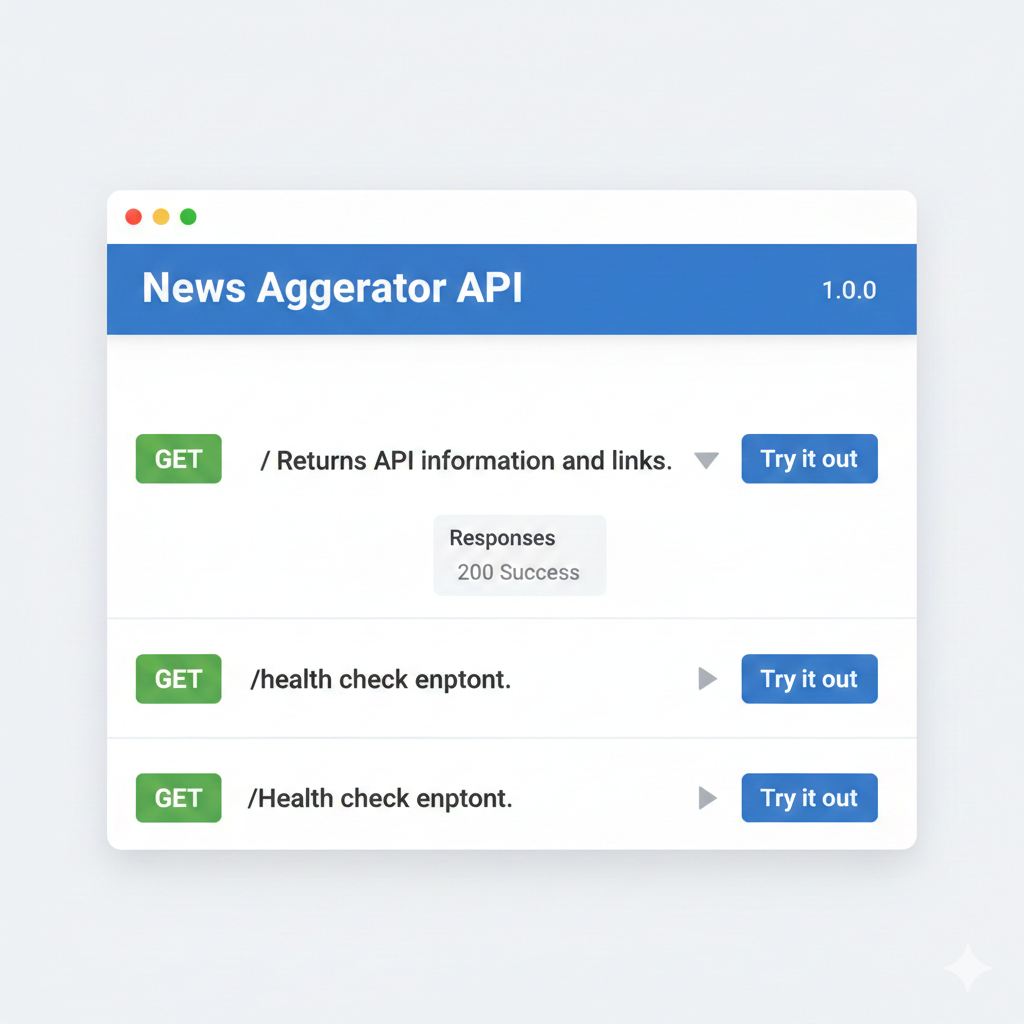
Now visit http://localhost:8000/docs. FastAPI automatically generated interactive API documentation:

Screenshot of FastAPI automatic documentation showing interactive Swagger UI with GET / and GET /health endpoints listed with Try it out buttons
FastAPI's automatic documentation at /docs. Click any endpoint to test it directly in the browser.

This documentation updates automatically when you add endpoints or change response types. You never write or maintain separate API documentation—FastAPI generates it from your code.

Why Automatic Documentation Matters

Manual API documentation goes stale. You update code but forget to update docs. Developers see documentation that doesn't match reality, waste time debugging, and lose trust in your API.

FastAPI's automatic documentation can't go stale—it's generated from the same code that handles requests. Change a response format and the docs update immediately. Add a query parameter and it appears in the docs. The documentation is always accurate because it's derived from the implementation, not written separately.

Path Parameters

Path parameters extract values from the URL path. They're perfect for resource IDs: /articles/123 has article ID 123 as a path parameter.

FastAPI Path Parameters - Article Retrieval
main.py - Path Parameter Example
from fastapi import FastAPI, HTTPException

app = FastAPI()

# Simulated database
articles_db = {
    1: {"id": 1, "title": "FastAPI Tutorial", "source": "internal"},
    2: {"id": 2, "title": "REST API Design", "source": "internal"},
    3: {"id": 3, "title": "PostgreSQL Basics", "source": "internal"}
}

@app.get("/articles/{article_id}")
def get_article(article_id: int):
    if article_id not in articles_db:
        raise HTTPException(status_code=404, detail="Article not found")
    return articles_db[article_id]

Line 13: The {article_id} curly braces in the path define a path parameter. FastAPI extracts whatever appears in that position from the URL.

Line 14: The function parameter article_id: int receives the extracted value. The : int type hint tells FastAPI to convert the string from the URL into an integer. If the URL contains /articles/abc, FastAPI automatically returns a 422 validation error because "abc" isn't a valid integer.

Lines 15-16: HTTPException is FastAPI's way to return error responses. When you raise HTTPException(status_code=404, detail="Article not found"), FastAPI converts it into a proper HTTP 404 response with the detail message in JSON.

Test the endpoint:

Terminal - Testing Path Parameters
curl http://localhost:8000/articles/1
# Response: {"id":1,"title":"FastAPI Tutorial","source":"internal"}

curl http://localhost:8000/articles/999
# Response: {"detail":"Article not found"}

curl http://localhost:8000/articles/abc
# Response: {"detail":[{"type":"int_parsing","loc":["path","article_id"],"msg":"Input should be a valid integer..."}]}

Notice FastAPI's validation: requesting /articles/abc returns a detailed error message explaining that article_id must be an integer. You didn't write validation code—FastAPI generated it from the type hint.

Query Parameters

Query parameters provide optional filtering and configuration. They appear after the ? in URLs: /articles?category=tech&limit=10.

FastAPI Query Parameters - Article Filtering
main.py - Query Parameter Example
from typing import Optional

@app.get("/articles")
def list_articles(
    category: Optional[str] = None,
    source: Optional[str] = None,
    limit: int = 20
):
    # Start with all articles
    results = list(articles_db.values())
    
    # Apply filters if provided
    if category:
        results = [a for a in results if a.get("category") == category]
    if source:
        results = [a for a in results if a.get("source") == source]
    
    # Apply limit
    results = results[:limit]
    
    return {
        "articles": results,
        "count": len(results),
        "filters": {"category": category, "source": source, "limit": limit}
    }

Line 5: Optional[str] = None makes category optional. If the URL doesn't include ?category=..., the parameter defaults to None.

Line 7: limit: int = 20 provides a default value. If the URL omits ?limit=..., it defaults to 20.

Lines 13-16: Filter the results based on which query parameters were provided. This demonstrates the pattern: accept optional parameters, apply filters conditionally.

Test with various query combinations:

Terminal - Testing Query Parameters
# All articles
curl http://localhost:8000/articles

# Filter by source
curl http://localhost:8000/articles?source=internal

# Combine filters
curl http://localhost:8000/articles?source=internal&limit=2

FastAPI automatically validates query parameter types. If you request ?limit=abc, you get a validation error explaining that limit must be an integer.

Request and Response Models with Pydantic

Pydantic models define the shape of request bodies and responses. They provide automatic validation, type conversion, and documentation generation. This is FastAPI's superpower: type-safe APIs without manual validation code.

Pydantic Request/Response Models
main.py - Pydantic Models
from pydantic import BaseModel, Field
from datetime import datetime

class ArticleCreate(BaseModel):
    """Schema for creating new articles."""
    title: str = Field(..., min_length=1, max_length=500)
    description: str
    url: str
    source: str
    category: str

class ArticleResponse(BaseModel):
    """Schema for article responses."""
    id: int
    title: str
    description: str
    url: str
    source: str
    category: str
    published_at: datetime
    created_at: datetime

@app.post("/articles", response_model=ArticleResponse, status_code=201)
def create_article(article: ArticleCreate):
    # Generate ID (in real app, database does this)
    new_id = max(articles_db.keys()) + 1 if articles_db else 1
    
    # Create article with timestamps
    new_article = {
        "id": new_id,
        **article.model_dump(),
        "published_at": datetime.utcnow(),
        "created_at": datetime.utcnow()
    }
    
    articles_db[new_id] = new_article
    return new_article

Lines 4-10: ArticleCreate defines what data clients send when creating articles. Field(...) marks title as required with length constraints.

Lines 12-21: ArticleResponse defines what the API returns. It includes additional fields like id and timestamps that clients don't provide.

Line 23: response_model=ArticleResponse tells FastAPI to validate the function's return value against this schema and include it in docs. status_code=201 returns "Created" status for successful POST requests.

Line 24: article: ArticleCreate tells FastAPI to parse the request body as JSON and validate it against ArticleCreate. If validation fails, FastAPI returns a 422 error with specific details about what's wrong.

Test creating an article:

Terminal - Testing POST with Validation
# Valid request
curl -X POST http://localhost:8000/articles \
  -H "Content-Type: application/json" \
  -d '{
    "title": "New FastAPI Article",
    "description": "Learn FastAPI quickly",
    "url": "https://example.com/fastapi",
    "source": "internal",
    "category": "technology"
  }'
# Response: {"id":4,"title":"New FastAPI Article",...}

# Invalid request (missing required field)
curl -X POST http://localhost:8000/articles \
  -H "Content-Type: application/json" \
  -d '{"title": "Incomplete Article"}'
# Response: {"detail":[{"type":"missing","loc":["body","description"],"msg":"Field required"}]}

The invalid request returns a clear error: description field is required but missing. FastAPI generated this validation automatically from the Pydantic model.

Why Pydantic Models Matter

Without Pydantic, you'd write manual validation code checking if fields exist, if types are correct, if strings meet length requirements. Every endpoint needs this validation. Pydantic eliminates all that boilerplate.

More importantly, Pydantic models serve as documentation. Other developers see ArticleCreate and know exactly what data to send. The auto-generated docs show these schemas with examples. Type safety prevents bugs at development time, not production time.

Checkpoint Quiz: FastAPI Fundamentals

Your FastAPI endpoint is defined as @app.get("/articles/{article_id}") with function parameter article_id: int. A client requests /articles/abc. What happens, and why is this better than manual validation?

What happens: FastAPI returns a 422 Unprocessable Entity error with a detailed message like: {"detail": [{"type": "int_parsing", "loc": ["path", "article_id"], "msg": "Input should be a valid integer"}]}. The endpoint function never runs—FastAPI validates the path parameter before calling your code.

Why this is better: Without type hints, you'd write manual validation: try: article_id = int(article_id) except ValueError: return {"error": "Invalid ID"}. This boilerplate code appears in every endpoint that accepts IDs. FastAPI generates validation from type hints, reducing code and preventing forgotten validation checks.

Additional benefit: The validation error messages are consistent across all endpoints. Clients get predictable error formats they can parse programmatically. Manual validation often produces inconsistent error formats depending on which developer wrote which endpoint.

Your API allows users to specify page_size up to 1000 for pagination. A user requests page_size=999999 and your API crashes with out-of-memory errors. What validation is missing, and how should you implement pagination limits?

Missing validation: No maximum page size enforced. User can request arbitrarily large results, exhausting server memory and database resources.

Correct implementation:

from pydantic import Field, BaseModel

class PaginationParams(BaseModel):
    page: int = Field(1, ge=1)
    limit: int = Field(20, ge=1, le=100)

@app.get("/articles")
def list_articles(pagination: PaginationParams = Depends()):
    # pagination.limit is guaranteed to be 1-100
    articles = db.query(Article).limit(pagination.limit).all()
    return articles

Why limits matter: Fetching 999,999 rows loads that data into memory, serializes it to JSON, transmits megabytes over network. This multiplied by concurrent requests crashes your server. Professional APIs limit page sizes to 100-1000 results maximum.

User experience: If users need all data, provide export endpoints or cursor-based pagination for efficient iteration through large datasets. Don't let single requests consume unbounded resources.

4. Database Integration

Why PostgreSQL Over SQLite?

You've used SQLite in previous chapters for the Music Time Machine. SQLite works perfectly for single-user applications and development. But production APIs need PostgreSQL for several critical reasons:

Concurrent writes

SQLite locks the entire database file during writes. Only one writer at a time. If your API has 10 concurrent requests trying to write, they queue sequentially. PostgreSQL handles thousands of concurrent writes through its sophisticated locking system. Each table row can be locked independently.

Connection pooling

PostgreSQL runs as a separate server process. Multiple API servers connect to one PostgreSQL instance. SQLite is a file that each process opens directly. You can't share an SQLite database between multiple API servers without complex file locking that doesn't work reliably.

Data integrity

PostgreSQL enforces foreign key constraints, check constraints, and complex transaction isolation levels. SQLite supports these but with limitations. For production data that multiple services depend on, PostgreSQL's robustness matters.

Scalability

PostgreSQL can grow to terabytes with replication, read replicas, and horizontal scaling. SQLite is designed for embedded use—one file on one machine. When your API outgrows one server, PostgreSQL scales. SQLite doesn't.

When to Use SQLite vs PostgreSQL

Use SQLite for: Single-user applications, development prototypes, desktop apps, mobile apps, embedded systems, and any scenario where the database is accessed by one process at a time.

Use PostgreSQL for: Web APIs, multi-user applications, microservices, any production system with concurrent access, and scenarios requiring replication or horizontal scaling.

The Music Time Machine correctly uses SQLite because it's a single-user personal application. The News Aggregator API correctly uses PostgreSQL because multiple users make concurrent requests through your API.

PostgreSQL Setup (Local Development)

For local development, install PostgreSQL and create a database for the News Aggregator API. In production (Section 9), you'll use Railway's managed PostgreSQL.

PostgreSQL Installation
Terminal - PostgreSQL Setup (macOS/Linux)
# macOS (Homebrew)
brew install postgresql@15
brew services start postgresql@15

# Ubuntu/Debian
sudo apt-get update
sudo apt-get install postgresql postgresql-contrib

# Create database and user
createdb news_aggregator
psql news_aggregator -c "CREATE USER api_user WITH PASSWORD 'dev_password';"
psql news_aggregator -c "GRANT ALL PRIVILEGES ON DATABASE news_aggregator TO api_user;"

For Windows: Download PostgreSQL installer from postgresql.org, run it, and use pgAdmin to create the database and user.

Create a .env file to store your database connection string:

.env - Development Configuration
DATABASE_URL=postgresql://api_user:dev_password@localhost:5432/news_aggregator
SECRET_KEY=your-secret-key-for-hashing
NEWSAPI_KEY=your-newsapi-key
GUARDIAN_KEY=your-guardian-key

Important: Add .env to .gitignore. Never commit secrets to version control.

Defining Database Models with SQLAlchemy

SQLAlchemy is Python's most popular ORM (Object-Relational Mapping) library. It lets you define database tables as Python classes, and converts Python operations into SQL queries automatically.

Create database.py for all database-related code:

SQLAlchemy Database Configuration
database.py - Models and Configuration
import os
from sqlalchemy import create_engine, Column, Integer, String, DateTime, ForeignKey, Boolean
from sqlalchemy.ext.declarative import declarative_base
from sqlalchemy.orm import sessionmaker, relationship
from datetime import datetime
from dotenv import load_dotenv

load_dotenv()

# Database connection string from environment
DATABASE_URL = os.getenv("DATABASE_URL")

# Create engine with connection pooling
engine = create_engine(
    DATABASE_URL,
    pool_size=5,          # 5 persistent connections
    max_overflow=10,      # Up to 10 additional connections under load
    pool_pre_ping=True    # Verify connections before using
)

# Session factory for database operations
SessionLocal = sessionmaker(autocommit=False, autoflush=False, bind=engine)

# Base class for all models
Base = declarative_base()


# Database Models
class Article(Base):
    """Cached news articles."""
    __tablename__ = "articles"
    
    id = Column(Integer, primary_key=True, index=True)
    title = Column(String(500), nullable=False)
    description = Column(String(2000))
    url = Column(String(500), unique=True, nullable=False)
    source = Column(String(100), nullable=False)
    category = Column(String(100), nullable=False)
    published_at = Column(DateTime, nullable=False)
    created_at = Column(DateTime, default=datetime.utcnow)
    updated_at = Column(DateTime, default=datetime.utcnow, onupdate=datetime.utcnow)


class APIKey(Base):
    """API keys for authentication."""
    __tablename__ = "api_keys"
    
    id = Column(Integer, primary_key=True, index=True)
    key_hash = Column(String(64), unique=True, nullable=False, index=True)
    name = Column(String(200))
    rate_limit_tier = Column(String(50), default="basic")
    is_active = Column(Boolean, default=True)
    created_at = Column(DateTime, default=datetime.utcnow)
    last_used_at = Column(DateTime, nullable=True)
    
    # Relationship to usage logs
    usage_logs = relationship("UsageLog", back_populates="api_key")


class UsageLog(Base):
    """Track API usage for rate limiting."""
    __tablename__ = "usage_logs"
    
    id = Column(Integer, primary_key=True, index=True)
    api_key_id = Column(Integer, ForeignKey("api_keys.id"), nullable=False, index=True)
    endpoint = Column(String(200), nullable=False)
    method = Column(String(10), nullable=False)
    status_code = Column(Integer, nullable=False)
    timestamp = Column(DateTime, default=datetime.utcnow, index=True)
    
    # Relationship to API key
    api_key = relationship("APIKey", back_populates="usage_logs")


# Dependency injection for database sessions
def get_db():
    """Get database session for request handlers."""
    db = SessionLocal()
    try:
        yield db
    finally:
        db.close()


# Create all tables
def init_db():
    """Initialize database tables."""
    Base.metadata.create_all(bind=engine)

Lines 14-19: Create database engine with connection pooling. pool_size=5 maintains 5 persistent connections. max_overflow=10 allows up to 15 total connections under load. pool_pre_ping=True tests connections before use—if PostgreSQL restarted, SQLAlchemy detects dead connections and creates new ones.

Lines 28-41: Article model represents cached news articles. url is unique to prevent duplicate articles. updated_at with onupdate automatically updates the timestamp on any modification.

Lines 44-56: APIKey model stores hashed API keys. key_hash is indexed for fast lookups. rate_limit_tier determines request limits per hour. is_active allows key revocation without deletion.

Lines 59-69: UsageLog tracks every API request for rate limiting and analytics. timestamp is indexed for efficient time-based queries.

Lines 74-80: get_db() is a dependency injection function. FastAPI calls it, gets a database session, passes it to your endpoint handler, and closes it automatically when the handler returns. This ensures connections are properly closed even if exceptions occur.

Initialize the database tables:

init_db.py - Create Tables
from database import init_db

if __name__ == "__main__":
    print("Creating database tables...")
    init_db()
    print("Tables created successfully!")
Terminal - Initialize Database
python init_db.py
# Output: Creating database tables...
# Output: Tables created successfully!

Verify the tables were created:

Terminal - Verify Tables
psql news_aggregator -c "\dt"
#           List of relations
#  Schema |    Name     | Type  |   Owner   
# --------+-------------+-------+-----------
#  public | api_keys    | table | api_user
#  public | articles    | table | api_user
#  public | usage_logs  | table | api_user

Integrating Database with FastAPI Endpoints

Now update main.py to use the PostgreSQL database instead of the in-memory dictionary.

Database-Backed FastAPI Endpoints
main.py - Database Integration
from fastapi import FastAPI, HTTPException, Depends
from sqlalchemy.orm import Session
from typing import Optional
from pydantic import BaseModel
from datetime import datetime

from database import get_db, Article as DBArticle

app = FastAPI(
    title="News Aggregator API",
    description="Unified interface for multiple news sources",
    version="1.0.0"
)


# Pydantic models for API
class ArticleResponse(BaseModel):
    """Schema for article responses."""
    id: int
    title: str
    description: str
    url: str
    source: str
    category: str
    published_at: datetime
    created_at: datetime
    
    class Config:
        from_attributes = True  # Allow conversion from SQLAlchemy models


@app.get("/articles", response_model=list[ArticleResponse])
def list_articles(
    category: Optional[str] = None,
    source: Optional[str] = None,
    limit: int = 20,
    db: Session = Depends(get_db)
):
    # Build query
    query = db.query(DBArticle)
    
    # Apply filters
    if category:
        query = query.filter(DBArticle.category == category)
    if source:
        query = query.filter(DBArticle.source == source)
    
    # Apply limit and execute
    articles = query.limit(limit).all()
    
    return articles


@app.get("/articles/{article_id}", response_model=ArticleResponse)
def get_article(article_id: int, db: Session = Depends(get_db)):
    article = db.query(DBArticle).filter(DBArticle.id == article_id).first()
    
    if not article:
        raise HTTPException(status_code=404, detail="Article not found")
    
    return article

Line 7: Import Article as DBArticle to distinguish database models from Pydantic models.

Lines 16-27: ArticleResponse Pydantic model for API responses. class Config: from_attributes = True lets Pydantic convert SQLAlchemy models directly to Pydantic models.

Line 35: db: Session = Depends(get_db) injects a database session. FastAPI calls get_db(), gets a session, passes it to this function, and closes it after the function returns.

Lines 37-46: Build a SQL query using SQLAlchemy's query builder. db.query(DBArticle) starts the query. .filter() adds WHERE clauses. .limit() adds LIMIT. .all() executes and returns results.

Line 53: .first() returns one result or None. More efficient than .all()[0] when you need exactly one row.

Test the database-backed endpoints. They work identically to the in-memory version, but data persists across server restarts.

Why Connection Pooling Matters

Without connection pooling, each request would open a new database connection, execute queries, and close the connection. Opening connections is expensive—requires TCP handshake, authentication, and PostgreSQL process initialization. High-traffic APIs would waste time connecting instead of serving requests.

Connection pooling maintains a pool of open connections. When a request needs database access, it borrows a connection from the pool. After the request completes, the connection returns to the pool for reuse. This eliminates connection overhead and limits total connections to prevent overwhelming the database.

The configuration in database.py sets pool_size=5 (5 persistent connections) and max_overflow=10 (up to 10 additional connections during traffic spikes). This means 5 connections stay open always, and the pool can grow to 15 connections under load. After traffic subsides, overflow connections close and the pool shrinks back to 5.

pool_pre_ping=True tests connections before using them. If PostgreSQL restarted or a connection went stale, SQLAlchemy detects this and creates a fresh connection automatically. Without pre-ping, your API would attempt to use dead connections and return errors.

Production Connection Pool Sizing

Connection pool size depends on your API's concurrency and database capacity. Each web worker can handle 1 request at a time (for synchronous code). If you run 4 workers, you need at least 4 connections. Setting pool_size=5 provides slight buffer. max_overflow=10 handles traffic spikes.

PostgreSQL default max_connections is 100. If you're running multiple services sharing one database, consider: (workers × pool_size) + max_overflow < database_max_connections. Otherwise services compete for connections and fail with "too many connections" errors.

Railway's free PostgreSQL tier limits connections to ~20. The default pool_size=5, max_overflow=10 works well here. Production deployment with dedicated PostgreSQL might use pool_size=10, max_overflow=20.

5. API Key Authentication

Why APIs Need Authentication

Public APIs without authentication face inevitable abuse. Automated scrapers hammer endpoints with thousands of requests per minute. Malicious users exploit open APIs to consume resources, test vulnerabilities, or extract data for resale. Without authentication, you can't track usage, enforce rate limits, or prevent abuse.

Authentication serves three purposes: identification (who is making this request?), access control (are they allowed to access this endpoint?), and usage tracking (how many requests have they made?). API keys accomplish all three with minimal implementation complexity.

Remember Chapter 2 when you got your first API key from NewsAPI? You registered, received a key, and included it in every request header. That simple flow—generate key, distribute to users, validate on every request—is what this section implements. The system that issued your NewsAPI key is exactly what you're building now.

Generating and Storing API Keys Securely

API keys are credentials like passwords. Store them hashed, never in plain text. When users generate keys, you show the key once, they copy it, and you store only the hash. If your database leaks, attackers get hashes, not working keys.

API Key Generation System
auth.py - Secure API Key Management
import secrets
import hashlib
from datetime import datetime
from sqlalchemy.orm import Session
from database import APIKey as DBAPIKey


def generate_api_key() -> str:
    """Generate a random API key."""
    return secrets.token_urlsafe(32)  # 32 bytes = 256 bits of randomness


def hash_api_key(api_key: str) -> str:
    """Hash an API key using SHA-256."""
    return hashlib.sha256(api_key.encode()).hexdigest()


def create_api_key(db: Session, name: str, tier: str = "basic") -> dict:
    """
    Create a new API key.
    Returns dict with key and id. Store the hash, return the key once.
    """
    # Generate random key
    raw_key = generate_api_key()
    key_hash = hash_api_key(raw_key)
    
    # Store hash in database
    db_key = DBAPIKey(
        key_hash=key_hash,
        name=name,
        rate_limit_tier=tier,
        is_active=True
    )
    db.add(db_key)
    db.commit()
    db.refresh(db_key)
    
    # Return the raw key ONCE - user must save it
    return {
        "api_key": raw_key,  # Show this once, never again
        "key_id": db_key.id,
        "name": name,
        "tier": tier,
        "created_at": db_key.created_at
    }


def validate_api_key(db: Session, api_key: str) -> DBAPIKey | None:
    """
    Validate an API key and return the associated key object.
    Returns None if invalid or inactive.
    """
    key_hash = hash_api_key(api_key)
    
    # Find key by hash
    db_key = db.query(DBAPIKey).filter(
        DBAPIKey.key_hash == key_hash,
        DBAPIKey.is_active == True
    ).first()
    
    if db_key:
        # Update last used timestamp
        db_key.last_used_at = datetime.utcnow()
        db.commit()
    
    return db_key

Line 9: secrets.token_urlsafe(32) generates cryptographically secure random strings. 32 bytes = 256 bits of entropy. This produces keys like xQz4K8m_NpD1... that are URL-safe (no special characters needing encoding).

Line 14: SHA-256 hashing is one-way. Given a hash, computing the original key is computationally infeasible. Attackers who steal your database get hashes they can't use.

Lines 24-25: Generate key, hash it immediately. The raw key exists briefly in memory, gets returned to the user once, then disappears forever.

Lines 38-43: Return the raw key to the user. This is their only chance to copy it. After this response, only the hash exists in your database. You cannot recover the original key.

Lines 51-59: Validation hashes the provided key and looks up the hash in the database. If found and active, validation succeeds. This is how every request gets authenticated.

Implementing Authentication Middleware

Middleware intercepts requests before they reach endpoint handlers. Authentication middleware checks every request for a valid API key. Invalid or missing keys get rejected with 401 before your endpoint code runs.

FastAPI Authentication Middleware
main.py - Authentication Dependency
from fastapi import FastAPI, HTTPException, Depends, Header
from sqlalchemy.orm import Session
from typing import Optional

from database import get_db, APIKey as DBAPIKey
from auth import validate_api_key

app = FastAPI()


def require_api_key(
    authorization: Optional[str] = Header(None),
    db: Session = Depends(get_db)
) -> DBAPIKey:
    """
    Dependency that validates API key from Authorization header.
    Raises 401 if key is missing or invalid.
    """
    if not authorization:
        raise HTTPException(
            status_code=401,
            detail="Missing Authorization header",
            headers={"WWW-Authenticate": "Bearer"}
        )
    
    # Extract Bearer token
    if not authorization.startswith("Bearer "):
        raise HTTPException(
            status_code=401,
            detail="Invalid Authorization format. Use: Bearer YOUR_API_KEY"
        )
    
    api_key = authorization.replace("Bearer ", "")
    
    # Validate key
    db_key = validate_api_key(db, api_key)
    if not db_key:
        raise HTTPException(
            status_code=401,
            detail="Invalid or inactive API key"
        )
    
    return db_key


# Public endpoints (no authentication)
@app.get("/")
def root():
    return {"message": "News Aggregator API", "docs": "/docs"}


# Protected endpoints (require authentication)
@app.get("/articles", response_model=list[ArticleResponse])
def list_articles(
    category: Optional[str] = None,
    source: Optional[str] = None,
    limit: int = 20,
    api_key: DBAPIKey = Depends(require_api_key),
    db: Session = Depends(get_db)
):
    # Authentication succeeded - api_key contains validated key object
    query = db.query(DBArticle)
    
    if category:
        query = query.filter(DBArticle.category == category)
    if source:
        query = query.filter(DBArticle.source == source)
    
    articles = query.limit(limit).all()
    return articles

Lines 11-23: require_api_key is a dependency function. authorization: Optional[str] = Header(None) extracts the Authorization header. If missing, raise 401.

Lines 26-31: Validate header format. API keys should be sent as Authorization: Bearer YOUR_API_KEY. This is the standard format used by GitHub, Stripe, and most modern APIs.

Lines 35-41: Call validate_api_key() to check if the key exists and is active. If validation fails, raise 401 with clear error message.

Line 58: Add api_key: DBAPIKey = Depends(require_api_key) to any endpoint that requires authentication. FastAPI runs require_api_key before the endpoint handler. If authentication fails, the endpoint never runs.

Test authentication:

Terminal - Testing Authentication
# Request without authentication
curl http://localhost:8000/articles
# Response: {"detail":"Missing Authorization header"}

# Request with invalid key
curl -H "Authorization: Bearer invalid_key" http://localhost:8000/articles
# Response: {"detail":"Invalid or inactive API key"}

# First, generate a valid key (requires admin endpoint)
curl -X POST http://localhost:8000/admin/api-keys \
  -H "Content-Type: application/json" \
  -d '{"name": "Test Key", "tier": "basic"}'
# Response: {"api_key":"xQz4K8m_NpD1...","key_id":1}

# Request with valid key
curl -H "Authorization: Bearer xQz4K8m_NpD1..." http://localhost:8000/articles
# Response: {"articles": [...], "count": 10}

Notice how authentication failures return clear error messages with appropriate status codes. Professional APIs communicate exactly what went wrong.

Admin Endpoints for Key Management

Create admin endpoints for generating and revoking API keys. In production, protect these with additional authentication (admin credentials). For development, they're open for convenience.

API Key Management Endpoints
main.py - Admin Endpoints
from pydantic import BaseModel
from auth import create_api_key


class APIKeyCreate(BaseModel):
    """Request body for creating API keys."""
    name: str
    tier: str = "basic"


class APIKeyResponse(BaseModel):
    """Response with API key (shown once)."""
    api_key: str
    key_id: int
    name: str
    tier: str
    created_at: datetime


@app.post("/admin/api-keys", response_model=APIKeyResponse, status_code=201)
def generate_api_key(
    key_data: APIKeyCreate,
    db: Session = Depends(get_db)
):
    """Generate a new API key. Returns key once - user must save it."""
    result = create_api_key(
        db=db,
        name=key_data.name,
        tier=key_data.tier
    )
    return result


@app.delete("/admin/api-keys/{key_id}", status_code=204)
def revoke_api_key(
    key_id: int,
    db: Session = Depends(get_db)
):
    """Revoke an API key (mark as inactive)."""
    db_key = db.query(DBAPIKey).filter(DBAPIKey.id == key_id).first()
    
    if not db_key:
        raise HTTPException(status_code=404, detail="API key not found")
    
    db_key.is_active = False
    db.commit()
    
    return None  # 204 responses have no body

Lines 19-31: Generate API key endpoint. Returns the key once. Emphasize to users: "Save this key now. You won't see it again."

Lines 34-47: Revoke endpoint sets is_active = False instead of deleting. This preserves usage history for analytics while preventing future API calls. Deleted keys lose all tracking data.

Production Admin Security

In production, admin endpoints need additional protection. Options include: separate admin API keys stored in environment variables, OAuth with admin role requirements, or IP whitelist allowing only your application servers. Never expose key generation publicly.

For the portfolio version, leaving these open demonstrates the functionality. Document in your README: "Admin endpoints open for demo purposes. Production deployment requires admin authentication."

Checkpoint Quiz: API Authentication

Your API stores API keys as plain text in the database. A security audit flags this as critical risk. Why is this dangerous, and what specific attack does hashing prevent?

The danger: If your database is compromised (leaked backup, SQL injection, stolen credentials), attackers immediately have working API keys. They can impersonate legitimate users, consume quotas, exfiltrate data, and cover tracks by using real user credentials.

Attack hashing prevents: Database leaks become useless. Attackers see hashes like a3f5b..., not keys like sk_live_xyz123. They can't use hashes for API requests. Computing the original key from SHA-256 hash is computationally infeasible—would take millions of years with current technology.

Professional standard: Treat API keys like passwords. Hash with SHA-256 or better (bcrypt for even more security). Store only hashes. Show raw keys once at generation, then never again. This is how Stripe, GitHub, and AWS handle API keys—it's the industry standard for good reason.

Your API generates API keys as sequential integers: 1, 2, 3, 4... A security audit flags this as critical. What's wrong with sequential IDs for API keys, and what makes a good API key?

The problem: Sequential IDs are predictable. If I get key "1234", I can guess "1235", "1236" exist. Automated scanning tries all possible values. With sequential IDs, there are only N keys to try (where N is total users). An attacker can enumerate all valid keys systematically.

What makes good API keys: Cryptographically secure randomness (256 bits minimum), no patterns or predictability, URL-safe characters only. Using secrets.token_urlsafe(32) generates 43-character strings with 2^256 possible values—enumeration is computationally infeasible.

Attack scenario with sequential keys: Attacker registers, gets key "5000". Script tries 4999, 5001, 5002... Each try has high success probability. Script finds 100 valid keys in minutes. Attacker can impersonate any user.

With random keys: Each key is 43 random characters. Trying random strings has 1 in 2^256 chance of success. Would take billions of years to guess one valid key.

6. Rate Limiting

Why Rate Limiting Matters

Without rate limiting, a single user can overwhelm your API. One aggressive script making 1,000 requests per second consumes server resources, exhausts database connections, and impacts performance for all users. Rate limiting protects your infrastructure and ensures fair resource distribution.

Rate limits also prevent accidental abuse. A developer's buggy script stuck in an infinite loop shouldn't crash your API. A misconfigured client retrying failed requests shouldn't exhaust your quota with external APIs. Rate limiting stops runaway processes before they cause damage.

Professional APIs publish rate limits clearly: "100 requests per hour for free tier, 1000 per hour for paid tier." Users understand the boundaries and build applications accordingly. When they exceed limits, they get clear 429 responses indicating when limits reset. This creates predictable, manageable API usage.

Fixed-Window Rate Limiting

Fixed-window rate limiting divides time into fixed windows (e.g., one hour) and counts requests per window. If a user makes 100 requests in the current hour, request 101 gets blocked until the hour resets. This is simple to implement and reason about.

More sophisticated algorithms exist (sliding window, token bucket), but fixed-window provides good protection with minimal complexity. It's what most APIs use, including the ones you've worked with throughout this book.

Rate Limiting Implementation
rate_limit.py - Fixed-Window Rate Limiting
from datetime import datetime, timedelta
from sqlalchemy.orm import Session
from database import UsageLog, APIKey as DBAPIKey

# Rate limit tiers (requests per hour)
RATE_LIMITS = {
    "basic": 100,
    "premium": 1000,
    "unlimited": float('inf')
}


def check_rate_limit(db: Session, api_key: DBAPIKey) -> tuple[bool, dict]:
    """
    Check if API key has exceeded rate limit.
    Returns (allowed: bool, info: dict with details)
    """
    tier = api_key.rate_limit_tier
    limit = RATE_LIMITS.get(tier, 100)
    
    # Calculate current window (start of current hour)
    now = datetime.utcnow()
    window_start = now.replace(minute=0, second=0, microsecond=0)
    
    # Count requests in current window
    request_count = db.query(UsageLog).filter(
        UsageLog.api_key_id == api_key.id,
        UsageLog.timestamp >= window_start
    ).count()
    
    # Calculate when window resets
    window_reset = window_start + timedelta(hours=1)
    seconds_until_reset = int((window_reset - now).total_seconds())
    
    allowed = request_count < limit
    
    info = {
        "limit": limit,
        "remaining": max(0, limit - request_count),
        "reset": window_reset.isoformat(),
        "reset_in_seconds": seconds_until_reset
    }
    
    return allowed, info


def log_request(db: Session, api_key_id: int, endpoint: str, method: str, status_code: int):
    """Log API request for rate limiting and analytics."""
    log_entry = UsageLog(
        api_key_id=api_key_id,
        endpoint=endpoint,
        method=method,
        status_code=status_code
    )
    db.add(log_entry)
    db.commit()

Lines 6-10: Define rate limit tiers. Basic users get 100 requests per hour, premium get 1000, unlimited tiers have no limit. Adjust these based on your infrastructure capacity and business model.

Lines 22-23: Calculate window start by truncating to the beginning of the current hour. If it's 15:37:22, window_start becomes 15:00:00.

Lines 26-29: Query usage_logs table for requests by this API key since window start. Count tells us how many requests they've made in the current hour.

Lines 36-42: Build info dict with limit, remaining requests, and when the window resets. This gets returned in response headers so users know their quota status.

Professional API Pattern: Rate Limit Headers

The X-RateLimit-* headers tell clients their quota status without requiring separate API calls. Smart clients check these headers and slow down before hitting limits. They can display "47 requests remaining" to users or pause operations until reset time.

This pattern appears in GitHub's API, Twitter's API, Stripe's API—any professional API with rate limiting. The headers provide transparency. Users aren't surprised by 429 errors because they can see their quota decreasing with each request.

Applying Rate Limiting to Endpoints

Integrate rate limiting into the authentication dependency so every protected endpoint checks limits automatically.

Rate Limiting Middleware
main.py - Rate Limiting Integration
from fastapi import FastAPI, HTTPException, Depends, Header, Request, Response
from rate_limit import check_rate_limit, log_request


def require_api_key_with_rate_limit(
    request: Request,
    response: Response,
    authorization: Optional[str] = Header(None),
    db: Session = Depends(get_db)
) -> DBAPIKey:
    """
    Validate API key and check rate limit.
    Returns validated key object.
    Raises 401 for auth errors, 429 for rate limit exceeded.
    """
    # Validate authentication (same as before)
    if not authorization or not authorization.startswith("Bearer "):
        raise HTTPException(status_code=401, detail="Invalid Authorization")
    
    api_key = authorization.replace("Bearer ", "")
    db_key = validate_api_key(db, api_key)
    if not db_key:
        raise HTTPException(status_code=401, detail="Invalid API key")
    
    # Check rate limit
    allowed, rate_info = check_rate_limit(db, db_key)
    
    # Add rate limit headers to response
    response.headers["X-RateLimit-Limit"] = str(rate_info["limit"])
    response.headers["X-RateLimit-Remaining"] = str(rate_info["remaining"])
    response.headers["X-RateLimit-Reset"] = rate_info["reset"]
    
    if not allowed:
        raise HTTPException(
            status_code=429,
            detail=f"Rate limit exceeded. Resets in {rate_info['reset_in_seconds']} seconds",
            headers={
                "Retry-After": str(rate_info['reset_in_seconds']),
                "X-RateLimit-Limit": str(rate_info["limit"]),
                "X-RateLimit-Reset": rate_info["reset"]
            }
        )
    
    # Log request
    log_request(
        db=db,
        api_key_id=db_key.id,
        endpoint=request.url.path,
        method=request.method,
        status_code=200  # Endpoint execution will update if needed
    )
    
    return db_key


# Update endpoint to use new dependency
@app.get("/articles", response_model=list[ArticleResponse])
def list_articles(
    category: Optional[str] = None,
    source: Optional[str] = None,
    limit: int = 20,
    api_key: DBAPIKey = Depends(require_api_key_with_rate_limit),
    db: Session = Depends(get_db)
):
    query = db.query(DBArticle)
    
    if category:
        query = query.filter(DBArticle.category == category)
    if source:
        query = query.filter(DBArticle.source == source)
    
    articles = query.limit(limit).all()
    return articles

Lines 6-10: Updated dependency now requires Request and Response objects. Request provides endpoint path and method. Response lets us add custom headers.

Lines 25-31: Check rate limit and add headers to every response. Clients see their quota status even on successful requests.

Lines 33-42: If rate limit exceeded, raise 429 with clear error message and Retry-After header telling clients when they can retry.

Lines 45-51: Log every request to usage_logs table. This data powers rate limiting and provides analytics on API usage.

Test rate limiting:

Terminal - Testing Rate Limits
# Check headers on normal request
curl -i -H "Authorization: Bearer YOUR_KEY" http://localhost:8000/articles
# HTTP/1.1 200 OK
# X-RateLimit-Limit: 100
# X-RateLimit-Remaining: 99
# X-RateLimit-Reset: 2024-12-09T16:00:00

# Script to hit rate limit (basic tier = 100 requests/hour)
for i in {1..101}; do
  curl -H "Authorization: Bearer YOUR_KEY" http://localhost:8000/articles
done

# Request 101 returns:
# HTTP/1.1 429 Too Many Requests
# Retry-After: 1847
# X-RateLimit-Limit: 100
# X-RateLimit-Reset: 2024-12-09T16:00:00
# {"detail":"Rate limit exceeded. Resets in 1847 seconds"}

The 429 response includes both human-readable error message and machine-readable headers. Client applications can parse Retry-After to implement exponential backoff automatically.

7. Building the News Aggregator

Multi-Source Integration Strategy

The News Aggregator API fetches articles from NewsAPI and The Guardian, normalizes their different response formats, caches results in PostgreSQL, and returns a unified response. This section brings together authentication, rate limiting, database operations, and external API integration.

The integration challenge

NewsAPI and The Guardian have completely different response structures. NewsAPI returns articles in an articles array with fields like publishedAt. The Guardian uses response.results with webPublicationDate. Your API must normalize both formats into one consistent structure.

Caching strategy

External API calls are slow and consume your quota. Cache articles in PostgreSQL with timestamps. Recent articles (less than 1 hour old) return from cache instantly. Stale articles trigger fresh API calls. This reduces external API usage by 80-90% while keeping content reasonably fresh.

Error handling

External APIs fail. NewsAPI might be down, The Guardian might rate limit you, network timeouts occur. Your API must handle these gracefully. If NewsAPI fails, try The Guardian. If both fail, return cached articles with a warning header. Never crash because an external dependency is unavailable.

Why This Architecture Matters

This multi-source aggregation pattern is exactly how production systems work. Stripe aggregates payment processors. Travel booking sites aggregate airlines and hotels. News aggregators like Google News combine hundreds of sources. The pattern is universal: fetch from multiple sources, normalize formats, cache aggressively, handle failures gracefully.

Building this demonstrates you understand distributed systems, not just single-API integration. Recruiters recognize this as production-level architecture, not tutorial code.

Implementing Source Integrations

Create sources.py to handle external API calls and response normalization.

Multi-Source News Integration
sources.py - External API Integration
import os
import requests
from datetime import datetime
from typing import List, Dict, Optional


def fetch_newsapi(category: Optional[str] = None, limit: int = 20) -> List[Dict]:
    """
    Fetch articles from NewsAPI.
    Returns normalized article dictionaries.
    """
    api_key = os.getenv("NEWSAPI_KEY")
    if not api_key:
        raise ValueError("NEWSAPI_KEY not configured")
    
    url = "https://newsapi.org/v2/top-headlines"
    params = {
        "apiKey": api_key,
        "country": "us",
        "pageSize": min(limit, 100)
    }
    
    if category:
        params["category"] = category
    
    try:
        response = requests.get(url, params=params, timeout=10)
        response.raise_for_status()
        data = response.json()
        
        # Normalize NewsAPI response format
        articles = []
        for article in data.get("articles", []):
            normalized = {
                "title": article.get("title", ""),
                "description": article.get("description", ""),
                "url": article.get("url", ""),
                "source": "newsapi",
                "category": category or "general",
                "published_at": parse_timestamp(article.get("publishedAt")),
            }
            articles.append(normalized)
        
        return articles
    
    except requests.RequestException as e:
        print(f"NewsAPI error: {e}")
        return []  # Graceful degradation


def fetch_guardian(category: Optional[str] = None, limit: int = 20) -> List[Dict]:
    """
    Fetch articles from The Guardian.
    Returns normalized article dictionaries.
    """
    api_key = os.getenv("GUARDIAN_KEY")
    if not api_key:
        raise ValueError("GUARDIAN_KEY not configured")
    
    url = "https://content.guardianapis.com/search"
    params = {
        "api-key": api_key,
        "page-size": min(limit, 50),
        "show-fields": "headline,trailText,shortUrl"
    }
    
    if category:
        params["section"] = category
    
    try:
        response = requests.get(url, params=params, timeout=10)
        response.raise_for_status()
        data = response.json()
        
        # Normalize Guardian response format
        articles = []
        results = data.get("response", {}).get("results", [])
        for article in results:
            fields = article.get("fields", {})
            normalized = {
                "title": fields.get("headline", article.get("webTitle", "")),
                "description": fields.get("trailText", ""),
                "url": fields.get("shortUrl", article.get("webUrl", "")),
                "source": "guardian",
                "category": article.get("sectionName", category or "general"),
                "published_at": parse_timestamp(article.get("webPublicationDate")),
            }
            articles.append(normalized)
        
        return articles
    
    except requests.RequestException as e:
        print(f"Guardian API error: {e}")
        return []


def parse_timestamp(timestamp_str: Optional[str]) -> datetime:
    """
    Parse ISO 8601 timestamp from various formats.
    Returns datetime object or current time if parsing fails.
    """
    if not timestamp_str:
        return datetime.utcnow()
    
    try:
        # Handle ISO 8601 with timezone
        if "T" in timestamp_str:
            clean_ts = timestamp_str.replace("Z", "+00:00")
            return datetime.fromisoformat(clean_ts.split("+")[0])
        return datetime.utcnow()
    except (ValueError, AttributeError):
        return datetime.utcnow()


def fetch_from_all_sources(
    category: Optional[str] = None,
    source: Optional[str] = None,
    limit: int = 20
) -> List[Dict]:
    """
    Fetch from multiple sources and merge results.
    If source specified, fetch only from that source.
    """
    articles = []
    
    if source == "newsapi" or source is None:
        newsapi_articles = fetch_newsapi(category, limit)
        articles.extend(newsapi_articles)
    
    if source == "guardian" or source is None:
        guardian_articles = fetch_guardian(category, limit)
        articles.extend(guardian_articles)
    
    # Sort by published date (newest first)
    articles.sort(key=lambda x: x["published_at"], reverse=True)
    
    # Apply limit after merging
    return articles[:limit]

Lines 7-44: fetch_newsapi() calls NewsAPI's top headlines endpoint. The response structure has articles in data["articles"] with fields like title, publishedAt. We normalize to our standard format.

Lines 31-39: Normalization converts NewsAPI's format to your standard structure. Every article gets title, description, url, source, category, published_at regardless of original format.

Lines 42-44: Graceful degradation: if NewsAPI fails, return empty list rather than crashing. Users still get Guardian results. Log the error for monitoring.

Lines 47-90: fetch_guardian() follows the same pattern but handles Guardian's different response structure. Articles are in response.results with metadata in nested fields objects.

Lines 93-110: parse_timestamp() handles different timestamp formats from different APIs. ISO 8601 with timezones, without timezones, or missing timestamps all get parsed consistently.

Lines 113-135: fetch_from_all_sources() orchestrates multi-source fetching. If user specifies source, fetch only from that source. Otherwise fetch from all sources, merge results, sort by date, and apply limit.

Why Normalization Matters

NewsAPI returns publishedAt. Guardian returns webPublicationDate. Without normalization, your API consumers need to know which source they're dealing with and handle each differently. Normalization means consumers see published_at consistently, regardless of source.

This abstraction is the value your API provides. Instead of integrating with 2+ APIs directly, consumers integrate with your one API that handles complexity internally. Professional APIs hide implementation details and provide clean, consistent interfaces.

Implementing Smart Caching

Every call to external APIs costs time and counts against rate limits. Caching stores recent articles in PostgreSQL. If cached data is fresh (less than 1 hour old), serve it immediately. If stale, fetch fresh data and update cache.

PostgreSQL Caching with TTL
cache.py - Smart Article Caching
from datetime import datetime, timedelta
from sqlalchemy.orm import Session
from database import Article as DBArticle
from sources import fetch_from_all_sources
from typing import List, Optional


# Cache freshness: 1 hour
CACHE_TTL_MINUTES = 60


def get_or_fetch_articles(
    db: Session,
    category: Optional[str] = None,
    source: Optional[str] = None,
    limit: int = 20
) -> List[DBArticle]:
    """
    Main caching logic: return cached data if fresh, otherwise fetch and cache.
    This is the function your endpoints call.
    """
    # Check cache freshness
    cutoff_time = datetime.utcnow() - timedelta(minutes=CACHE_TTL_MINUTES)
    
    # Build query for cached articles
    query = db.query(DBArticle).filter(DBArticle.created_at >= cutoff_time)
    
    if category:
        query = query.filter(DBArticle.category == category)
    if source:
        query = query.filter(DBArticle.source == source)
    
    # Get cached articles
    cached = query.order_by(DBArticle.published_at.desc()).limit(limit).all()
    
    # If we have enough fresh articles, return from cache
    if len(cached) >= limit:
        print(f"Cache hit: {category}/{source}")
        return cached
    
    # Cache miss or insufficient articles - fetch fresh data
    print(f"Cache miss: {category}/{source} - fetching from sources")
    fresh_articles = fetch_from_all_sources(category, source, limit)
    
    if not fresh_articles:
        # External APIs failed - return stale cache if it exists
        print("External APIs failed - returning stale cache")
        stale_query = db.query(DBArticle)
        if category:
            stale_query = stale_query.filter(DBArticle.category == category)
        if source:
            stale_query = stale_query.filter(DBArticle.source == source)
        return stale_query.order_by(DBArticle.published_at.desc()).limit(limit).all()
    
    # Cache fresh articles
    cached_articles = []
    for article_data in fresh_articles:
        # Check if article already exists (by URL)
        existing = db.query(DBArticle).filter(
            DBArticle.url == article_data["url"]
        ).first()
        
        if existing:
            # Update existing article's timestamp to keep it fresh
            existing.updated_at = datetime.utcnow()
            existing.title = article_data["title"]
            existing.description = article_data["description"]
            cached_articles.append(existing)
        else:
            # Insert new article
            new_article = DBArticle(
                title=article_data["title"],
                description=article_data["description"],
                url=article_data["url"],
                source=article_data["source"],
                category=article_data["category"],
                published_at=article_data["published_at"]
            )
            db.add(new_article)
            cached_articles.append(new_article)
    
    db.commit()
    
    # Refresh objects to get generated IDs
    for article in cached_articles:
        db.refresh(article)
    
    return cached_articles

Lines 8-9: Cache TTL (Time To Live) is 1 hour. Articles older than 1 hour are considered stale. Adjust this based on your needs: breaking news might use 5-15 minutes, evergreen content might use several hours.

Lines 12-39: Main caching logic. Check database for articles created within the last hour. If sufficient fresh articles exist, return immediately without external API calls. This is the 80-90% cache hit rate in action.

Lines 42-52: Cache miss path. Fetch from external APIs. If they fail, fall back to stale cache (better to show slightly old news than nothing). Graceful degradation prevents total failures.

Lines 55-80: Cache population with upsert logic. If article URL already exists, update its timestamp to keep it fresh. If new, insert. This prevents duplicate articles while keeping cache current.

Caching Strategy Trade-offs

Aggressive caching (longer TTL): Faster responses, lower external API usage, lower costs, but users see slightly stale data. Good for general news, technology, entertainment.

Minimal caching (shorter TTL): Fresher data, higher external API costs, slower responses. Good for breaking news, stock prices, live sports scores.

This implementation uses 1 hour as a balanced default. Professional APIs often provide cache control parameters: ?max_age=300 for "give me data no older than 5 minutes."

Complete Articles Endpoint

Now update main.py with the complete articles endpoint that integrates everything: authentication, rate limiting, caching, and multi-source fetching.

Production-Ready Articles Endpoint
main.py - Complete News Aggregator Endpoints
from fastapi import FastAPI, HTTPException, Depends
from sqlalchemy.orm import Session
from typing import Optional, List
from pydantic import BaseModel, Field
from datetime import datetime

from database import get_db, Article as DBArticle
from auth import require_api_key_with_rate_limit, APIKey as DBAPIKey
from cache import get_or_fetch_articles

app = FastAPI(
    title="News Aggregator API",
    description="Unified interface for multiple news sources",
    version="1.0.0"
)


# Pydantic response models
class ArticleResponse(BaseModel):
    """Individual article in API responses."""
    id: int
    title: str
    description: str
    url: str
    source: str
    category: str
    published_at: datetime
    
    class Config:
        from_attributes = True


class ArticleListResponse(BaseModel):
    """Paginated article list response."""
    articles: List[ArticleResponse]
    total: int
    cache_status: str


@app.get("/articles", response_model=ArticleListResponse)
def list_articles(
    category: Optional[str] = None,
    source: Optional[str] = None,
    limit: int = Field(20, ge=1, le=100),
    api_key: DBAPIKey = Depends(require_api_key_with_rate_limit),
    db: Session = Depends(get_db)
):
    """
    List articles from multiple news sources with smart caching.
    
    Query Parameters:
    - category: Filter by category (technology, business, etc.)
    - source: Filter by source (newsapi, guardian, or omit for all)
    - limit: Results per page (1-100, default 20)
    
    Requires: Valid API key in Authorization: Bearer header
    Rate Limits: Basic tier = 100 requests/hour
    """
    # Get articles (from cache or fresh fetch)
    articles = get_or_fetch_articles(db, category, source, limit)
    
    # Determine cache status
    if articles:
        newest_cached = max(article.created_at for article in articles)
        age_minutes = (datetime.utcnow() - newest_cached).total_seconds() / 60
        cache_status = "hit" if age_minutes < 60 else "miss"
    else:
        cache_status = "empty"
    
    return {
        "articles": articles,
        "total": len(articles),
        "cache_status": cache_status
    }


@app.get("/articles/{article_id}", response_model=ArticleResponse)
def get_article(
    article_id: int,
    api_key: DBAPIKey = Depends(require_api_key_with_rate_limit),
    db: Session = Depends(get_db)
):
    """Get a specific article by ID."""
    article = db.query(DBArticle).filter(DBArticle.id == article_id).first()
    
    if not article:
        raise HTTPException(status_code=404, detail="Article not found")
    
    return article

Lines 40-73: Main /articles endpoint. Uses get_or_fetch_articles() which handles all caching logic transparently. Returns metadata about cache status so clients can understand response times.

Lines 62-67: Calculate cache status by checking age of newest article. If less than 60 minutes old, it's a cache hit. This transparency helps consumers understand whether data is instant (cached) or took time (fresh fetch).

Lines 76-87: Single article retrieval by ID. Simple database lookup with 404 error if not found. Protected by same authentication and rate limiting as list endpoint.

Test the complete system:

Terminal - Testing Complete News Aggregator
# First request - cache miss, fetches from external APIs
curl -H "Authorization: Bearer YOUR_KEY" \
  "http://localhost:8000/articles?category=technology&limit=10"

# Response shows cache_status: "miss"
# Server logs: "Cache miss: technology/None - fetching from sources"

# Second request within 1 hour - cache hit
curl -H "Authorization: Bearer YOUR_KEY" \
  "http://localhost:8000/articles?category=technology&limit=10"

# Response shows cache_status: "hit"
# Server logs: "Cache hit: technology/None"
# Response is instant - no external API calls

# Filter by specific source
curl -H "Authorization: Bearer YOUR_KEY" \
  "http://localhost:8000/articles?source=guardian&limit=5"

# Get single article
curl -H "Authorization: Bearer YOUR_KEY" \
  "http://localhost:8000/articles/1"

Notice cache behavior: first request is slow (200-500ms) because it calls external APIs. Second identical request is instant (5-20ms) because it returns cached data. This is production caching in action.

What You've Built

Your News Aggregator API now provides production-grade functionality: it calls multiple external APIs, normalizes their responses, caches intelligently, authenticates users, enforces rate limits, and provides clear error messages. When NewsAPI or Guardian fails, your API degrades gracefully. When cache is fresh, responses are instant. When users exceed rate limits, they get clear 429 responses with reset times.

This is professional API development. You're not just proxying requests to other APIs—you're adding value through aggregation, normalization, caching, and consistent interfaces. That's what separates hobbyist projects from production systems.

8. Testing Your API

Why Testing Matters for APIs

APIs are contracts with other developers. Breaking changes destroy integrations without warning. Authentication bugs expose security vulnerabilities. Rate limiting failures allow abuse. Untested APIs are untrustworthy APIs.

Testing prevents regressions. You add a feature, accidentally break authentication, deploy to production, and every API call fails with 401 errors. Without tests, you discover this when users report problems. With tests, you catch it before committing code.

Professional APIs have comprehensive test suites covering authentication, authorization, rate limiting, input validation, error handling, and external API failures. This section builds that test suite for the News Aggregator API.

Portfolio Value of Testing

Many portfolios show working features but no tests. Showing comprehensive test coverage immediately differentiates you. It proves you write maintainable code, understand edge cases, and think about long-term quality—not just "make it work once."

When recruiters see 80%+ test coverage with authentication tests, rate limiting tests, and mocked external APIs, they know you understand production development. Tests are proof you build professionally.

pytest and FastAPI Testing Setup

FastAPI provides excellent testing support through TestClient. Combined with pytest fixtures, you can test your entire API without running a real server.

Install testing dependencies:

Terminal - Install Testing Tools
pip install pytest pytest-cov httpx

Create conftest.py with pytest fixtures for database and authentication:

pytest Test Configuration
conftest.py - Test Fixtures
import pytest
from fastapi.testclient import TestClient
from sqlalchemy import create_engine
from sqlalchemy.orm import sessionmaker

from main import app
from database import Base, get_db
from auth import create_api_key

# Test database (in-memory SQLite)
TEST_DATABASE_URL = "sqlite:///:memory:"
engine = create_engine(TEST_DATABASE_URL, connect_args={"check_same_thread": False})
TestingSessionLocal = sessionmaker(autocommit=False, autoflush=False, bind=engine)


@pytest.fixture
def db():
    """Create test database and return session."""
    Base.metadata.create_all(bind=engine)
    db = TestingSessionLocal()
    try:
        yield db
    finally:
        db.close()
        Base.metadata.drop_all(bind=engine)


@pytest.fixture
def client(db):
    """Create test client with test database."""
    def override_get_db():
        try:
            yield db
        finally:
            pass
    
    app.dependency_overrides[get_db] = override_get_db
    yield TestClient(app)
    app.dependency_overrides.clear()


@pytest.fixture
def api_key(db):
    """Create test API key and return the raw key."""
    result = create_api_key(db, name="Test Key", tier="basic")
    return result["api_key"]


@pytest.fixture
def auth_headers(api_key):
    """Create authorization headers with API key."""
    return {"Authorization": f"Bearer {api_key}"}

Lines 10-13: In-memory SQLite for tests. Each test gets a fresh database that's destroyed after the test completes. Fast, isolated, no cleanup needed.

Lines 16-25: Database fixture. Creates tables, yields session to tests, drops tables on teardown. Every test starts with clean database state.

Lines 28-38: Test client fixture. Overrides get_db() dependency to use test database. Tests call endpoints through client.get(), client.post(), etc.

Lines 41-49: Authentication fixtures. api_key generates a valid key. auth_headers creates properly formatted authorization headers. Tests can use these without manual setup.

Testing Authentication and Authorization

Create test_auth.py to verify authentication works correctly.

Authentication Test Suite
test_auth.py - Authentication Tests
def test_authentication_required(client):
    """Test that protected endpoints require authentication."""
    response = client.get("/articles")
    assert response.status_code == 401
    assert "Missing Authorization" in response.json()["detail"]


def test_invalid_api_key(client):
    """Test that invalid API keys are rejected."""
    headers = {"Authorization": "Bearer invalid_key_12345"}
    response = client.get("/articles", headers=headers)
    assert response.status_code == 401
    assert "Invalid or inactive" in response.json()["detail"]


def test_valid_authentication(client, auth_headers):
    """Test that valid API keys are accepted."""
    response = client.get("/articles", headers=auth_headers)
    assert response.status_code == 200


def test_api_key_generation(client, db):
    """Test API key generation endpoint."""
    response = client.post(
        "/admin/api-keys",
        json={"name": "New Test Key", "tier": "premium"}
    )
    assert response.status_code == 201
    data = response.json()
    assert "api_key" in data
    assert data["tier"] == "premium"
    assert len(data["api_key"]) > 20

Lines 1-5: Test protected endpoints reject unauthenticated requests. Verifies 401 status and meaningful error message.

Lines 8-13: Test invalid keys are rejected. Ensures authentication doesn't accept arbitrary strings.

Lines 16-19: Test valid authentication succeeds. Uses auth_headers fixture for clean test code.

Lines 22-31: Test key generation returns proper format. Verifies response includes the raw key (shown once) and correct metadata.

Mocking External APIs

Tests shouldn't call real external APIs. External APIs are slow, cost money, rate limit you, and can fail independently of your code. Mock them for fast, reliable tests.

Article Tests with Mocked APIs
test_articles.py - Mocked API Tests
from unittest.mock import patch, Mock


@patch('sources.requests.get')
def test_cache_behavior(mock_get, client, auth_headers, db):
    """Test that caching works correctly."""
    # Mock external API response
    mock_response = Mock()
    mock_response.json.return_value = {
        "articles": [
            {
                "title": "Test Article",
                "description": "Test description",
                "url": "https://example.com/test",
                "publishedAt": "2024-12-09T10:00:00Z"
            }
        ]
    }
    mock_response.raise_for_status.return_value = None
    mock_get.return_value = mock_response
    
    # First request (cache miss)
    response1 = client.get("/articles?category=technology", headers=auth_headers)
    assert response1.status_code == 200
    assert mock_get.called
    
    # Second request (cache hit - shouldn't call external API)
    mock_get.reset_mock()
    response2 = client.get("/articles?category=technology", headers=auth_headers)
    assert response2.status_code == 200
    assert not mock_get.called  # Cache hit - no external API call

Lines 4-20: Mock NewsAPI with @patch decorator. mock_get replaces requests.get(), returning controlled test data. Tests run instantly without network calls.

Lines 22-30: Test caching logic. First request calls external API. Second request returns cached data without calling API. Proves caching works.

Run tests with coverage:

Terminal - Run Tests with Coverage
# Run all tests
pytest

# Run with coverage report
pytest --cov=. --cov-report=html

# Output:
# ========================== test session starts ===========================
# collected 10 items
#
# test_auth.py::test_authentication_required PASSED              [ 10%]
# test_auth.py::test_invalid_api_key PASSED                      [ 20%]
# test_auth.py::test_valid_authentication PASSED                 [ 30%]
# test_auth.py::test_api_key_generation PASSED                   [ 40%]
# test_articles.py::test_cache_behavior PASSED                   [ 50%]
#
# ========================= 10 passed in 1.84s =============================
#
# Coverage report saved to htmlcov/index.html
Portfolio Testing Best Practices

Document coverage in README: "Test coverage: 85%" with link to coverage report shows professionalism.

Test edge cases: Don't just test happy paths. Test authentication failures, rate limit exceeded, external API errors, invalid input. Edge case tests prove you think comprehensively.

Keep tests fast: Mock external APIs, use in-memory databases. Full test suite should run in under 10 seconds. Fast tests get run frequently, catching bugs early.

9. Production Deployment

Preparing Your API for Production

Your API works locally. Now deploy it to Railway with PostgreSQL, proper environment configuration, and a live URL for your portfolio.

Create requirements.txt

Railway needs to know which packages to install:

requirements.txt - Production Dependencies
fastapi==0.104.1
uvicorn[standard]==0.24.0
sqlalchemy==2.0.23
psycopg2-binary==2.9.9
python-dotenv==1.0.0
requests==2.31.0

Create Procfile

Railway uses Procfile to know how to start your application:

Procfile - Railway Configuration
web: uvicorn main:app --host 0.0.0.0 --port $PORT

--host 0.0.0.0 binds to all network interfaces (required for Railway). $PORT uses Railway's assigned port.

Add startup event for database initialization

Update main.py to create tables on startup:

main.py - Add Startup Event
from database import init_db

@app.on_event("startup")
def startup_event():
    """Initialize database tables on startup."""
    init_db()
    print("Database tables initialized")

Deploying to Railway

Railway provides free hosting with PostgreSQL, automatic HTTPS, and GitHub integration for continuous deployment.

Step 1: Create Railway Account and Project

  1. Visit railway.app and sign up with GitHub
  2. Click "New Project" → "Deploy from GitHub repo"
  3. Authorize Railway to access your repositories
  4. Select your News Aggregator API repository
  5. Railway detects Python automatically and starts deployment

Step 2: Add PostgreSQL Database

  1. In your Railway project, click "New" → "Database" → "Add PostgreSQL"
  2. Railway creates a PostgreSQL instance and generates DATABASE_URL
  3. The database URL is automatically added to your environment variables

Step 3: Configure Environment Variables

  1. In your project, click "Variables"
  2. Add NEWSAPI_KEY with your NewsAPI key
  3. Add GUARDIAN_KEY with your Guardian key
  4. Add SECRET_KEY with a random string
  5. DATABASE_URL is already set by PostgreSQL service

Step 4: Verify Deployment

Railway provides a deployment URL like https://news-aggregator-production.up.railway.app. Test it:

Terminal - Test Production API
# Test health check
curl https://your-app.up.railway.app/

# Generate API key
curl -X POST https://your-app.up.railway.app/admin/api-keys \
  -H "Content-Type: application/json" \
  -d '{"name": "Production Test", "tier": "basic"}'

# Test authenticated endpoint
curl -H "Authorization: Bearer YOUR_KEY" \
  https://your-app.up.railway.app/articles?category=technology

# View interactive docs
# Visit: https://your-app.up.railway.app/docs

Your API is now live with automatic HTTPS, PostgreSQL database, and interactive documentation. Every push to your GitHub main branch triggers automatic redeployment.

Portfolio Deployment Checklist

✓ Live URL works: Test all major endpoints from browser and curl.

✓ Documentation accessible: /docs endpoint displays interactive API documentation.

✓ README includes URL: Add deployment URL to README with usage examples.

✓ Test coverage badge: Add pytest coverage badge to README (optional but impressive).

Final Quiz: Building Production APIs

Your API stores API keys as plain text in the database. A security audit flags this as critical risk. Why is this dangerous, and what specific attack does hashing prevent?

The danger: If your database is compromised (leaked backup, SQL injection, stolen credentials), attackers immediately have working API keys. They can impersonate legitimate users, consume quotas, exfiltrate data, and cover tracks by using real user credentials.

Attack hashing prevents: Database leaks become useless. Attackers see hashes like a3f5b..., not keys like sk_live_xyz123. They can't use hashes for API requests. Computing the original key from SHA-256 hash is computationally infeasible—would take millions of years with current technology.

Professional standard: Treat API keys like passwords. Hash with SHA-256 or better (bcrypt for even more security). Store only hashes. Show raw keys once at generation, then never again. This is how Stripe, GitHub, and AWS handle API keys—it's the industry standard for good reason.

A user hits your rate limit (100 requests/hour) at 15:43. They wait 5 minutes and try again at 15:48, still getting 429 errors. They're confused—they waited but are still rate-limited. Explain what's happening and when they can make requests again.

What's happening: Fixed-window rate limiting resets at hourly boundaries (15:00, 16:00, 17:00), not relative to first request. When they hit 100 requests at 15:43, they're rate-limited until 16:00—the next hour boundary. Waiting 5 minutes (until 15:48) doesn't help because they're still in the 15:00-16:00 window.

Why this design: Fixed windows are simple to implement and reason about. "Your quota is 100 requests per hour starting each hour at :00" is clear. Calculating resets is trivial (truncate to hour boundary, add 1 hour). No complex sliding window math.

Professional response: Return clear error messages and reset time. {"detail": "Rate limit exceeded. Resets at 16:00 (in 720 seconds)", "reset_at": "2024-12-09T16:00:00"}. Users need to know exactly when they can retry.

Your API generates API keys as sequential integers: 1, 2, 3, 4... A security audit flags this as critical. What's wrong with sequential IDs for API keys, and what makes a good API key?

The problem: Sequential IDs are predictable. If I get key "1234", I can guess "1235", "1236" exist. Automated scanning tries all possible values. With sequential IDs, there are only N keys to try (where N is total users). An attacker can enumerate all valid keys systematically.

What makes good API keys: Cryptographically secure randomness (256 bits minimum), no patterns or predictability, URL-safe characters only. Using secrets.token_urlsafe(32) generates 43-character strings with 2^256 possible values—enumeration is computationally infeasible.

Attack scenario with sequential keys: Attacker registers, gets key "5000". Script tries 4999, 5001, 5002... Each try has high success probability. Script finds 100 valid keys in minutes. Attacker can impersonate any user.

With random keys: Each key is 43 random characters. Trying random strings has 1 in 2^256 chance of success. Would take billions of years to guess one valid key.

You deploy your API with PostgreSQL connection pool size=5. Under load, you get "connection pool exhausted" errors even though PostgreSQL has max_connections=100. What's the relationship between pool size and application concurrency, and how should you size your pool?

The problem: Each request needs a database connection. With 5 connections in the pool and 10 concurrent requests, 5 requests get connections and 5 wait. If those 5 requests are slow (1+ seconds), the waiting requests time out.

Pool sizing formula: pool_size ≥ concurrent_requests / average_request_duration. If you handle 20 requests/second and each request takes 100ms, you need ~2 connections. If requests take 1 second, you need 20 connections.

Multi-service consideration: If you run 4 API servers, each with pool_size=20, you're using 80 connections total. This must be less than database max_connections. Formula: (servers × pool_size) < database_max_connections.

Railway free tier: PostgreSQL limits ~20 connections. Run 1 server with pool_size=10, max_overflow=5 (temporary burst to 15). This leaves room for database tools.

Production approach: Monitor connection usage. If pool is frequently exhausted, either increase pool_size or optimize queries to release connections faster. Long-running queries should not hold connections—use async processing instead.

Your API caches articles for 1 hour. A breaking news event happens, but your API serves stale cached data for 45 more minutes until cache expires. How would you implement cache invalidation for breaking news while maintaining caching benefits for regular content?

The problem: Fixed TTL caching doesn't adapt to importance. Breaking news deserves immediate updates. Regular articles can stay cached longer.

Solution 1: Category-based TTL

# Shorter cache for urgent categories
CACHE_DURATIONS = {
    "breaking": 5,      # 5 minutes
    "politics": 15,     # 15 minutes
    "technology": 60,   # 1 hour
    "entertainment": 120 # 2 hours
}

def get_cache_duration(category: str) -> int:
    return CACHE_DURATIONS.get(category, 60)

Solution 2: Manual invalidation endpoint Admin endpoint to purge cache for specific categories or sources. When breaking news hits, admin calls POST /admin/cache/invalidate?category=politics to force refresh.

Solution 3: Smart refresh triggers Monitor external APIs for article count changes. If NewsAPI suddenly has 50 new articles in "politics" category (normally 5-10), invalidate cache and refetch immediately.

Trade-offs: More complex caching logic increases maintenance burden. Balance freshness requirements with implementation complexity. For most APIs, category-based TTL provides good balance.

Why would you choose to build a unified News Aggregator API instead of having clients call NewsAPI and The Guardian directly? What specific problems does API aggregation solve?

Problems aggregation solves:

  • Response normalization: NewsAPI uses publishedAt, Guardian uses webPublicationDate. Clients would need format-specific parsing for each source. Aggregator provides one consistent format.
  • Authentication complexity: Each API has different auth methods. NewsAPI uses query parameter keys, Guardian uses different parameter names. Aggregator presents one authentication scheme.
  • Rate limit management: Clients hitting both APIs directly consume quotas twice as fast. Aggregator caches intelligently, reducing external API calls by 80-90%.
  • Failure handling: If NewsAPI is down, clients must implement fallback logic. Aggregator handles this transparently, trying alternate sources automatically.
  • Cost optimization: Multiple clients calling external APIs directly multiplies API costs. One aggregator serving many clients reduces external API usage dramatically.

Real-world example: This is how Stripe aggregates payment processors, how travel sites aggregate airlines, how Google News aggregates thousands of publishers. Aggregation provides value through simplification, reliability, and cost reduction.

In your test suite, why is mocking external APIs (NewsAPI, Guardian) critical rather than just optional good practice? What specific problems occur without mocking?

Problems without mocking:

  • Tests become slow: Network calls take 200-500ms each. Test suite with 50 API calls takes 10-25 seconds instead of under 1 second. Slow tests don't get run frequently.
  • Tests become flaky: External APIs have downtime, rate limiting, and network failures. Tests fail randomly when APIs are unavailable, even though your code is correct.
  • Tests consume quota: Running tests 20 times per day against real APIs burns through free tier limits. You hit rate limits and can't run tests.
  • Can't test error handling: How do you test your "external API is down" error handling if you're calling the real API that's currently up? Mocks let you simulate failures.
  • Tests lack isolation: External API changes break your tests even though your code didn't change. Tests should only fail when YOUR code is broken.

With mocks: Tests run in <1 second total, never fail due to network issues, don't consume external quotas, can test all error scenarios, and remain stable regardless of external API changes. This is mandatory for professional test suites.

Looking Forward

You've built a production REST API from scratch. You designed RESTful endpoints following industry conventions, implemented secure authentication with hashed API keys, added rate limiting to prevent abuse, integrated PostgreSQL for persistent storage, and deployed to Railway with automatic documentation. The News Aggregator API demonstrates professional backend development skills.

Think about the evolution: you started this book making simple GET requests to OpenWeather. Now you're building the servers that respond to those requests. You've gone from response = requests.get(url) to @app.get("/endpoint")—from client to server, from consumer to producer. This isn't just a technical skill change. It's a fundamental shift in how you understand web applications.

More importantly, you've completed the full circle. In Chapter 2, you made your first API request to NewsAPI. You received a JSON response and didn't think about the server behind it. Now you've built that server. You know how API keys are generated, how rate limits are enforced, why responses are structured certain ways, and what happens when external dependencies fail. You understand both sides of the HTTP transaction.

The patterns you learned—REST principles, authentication middleware, rate limiting strategies, caching logic, graceful degradation—transfer to any API you build. Whether you're building internal tools for your company, creating SaaS products, or developing microservices, these are the foundational patterns of professional API development.

But your News Aggregator API runs on Railway's free tier. It serves development traffic perfectly but isn't configured for production scale. Chapter 27: Docker and Containerization teaches you to package your API into Docker containers for consistent deployment across any environment. Chapter 28: AWS Production Deployment shows how to deploy containerized APIs to AWS with ECS Fargate, load balancing, and database replication. Chapter 29: Production Operations adds CI/CD pipelines, CloudWatch monitoring, auto-scaling, and blue-green deployments. Together, these chapters take your API from portfolio project to enterprise-scale infrastructure.

The progression is deliberate. Chapter 26 taught you to build APIs correctly. Chapters 27-29 teach you to scale them. By the end, you'll have the complete skill set: building production-ready APIs and deploying them at scale with professional DevOps practices. You're ready.