Your Data Needs a Face
The terminal is where projects go to hide.
Your Music Time Machine works. The database fills with listening history. OAuth handles authentication smoothly. The playlist generation algorithms surface forgotten gems and create mood-based collections. Everything functions correctly from the command line.
But here's the problem: command-line tools make value easy to miss. When you run the analytics feature and get text output showing your track turnover rate, genre evolution, and listening patterns, that information exists for about thirty seconds before you move on. The insights don't stick. The patterns don't reveal themselves. You can't see your musical evolution at a glance.
More importantly, you can't show it to anyone. Try explaining your portfolio project to a recruiter: "It's a command-line tool that creates Spotify playlists based on historical listening data stored in SQLite." Their eyes glaze over. Now imagine showing them a live dashboard with interactive charts displaying your musical journey over months. They get it immediately.
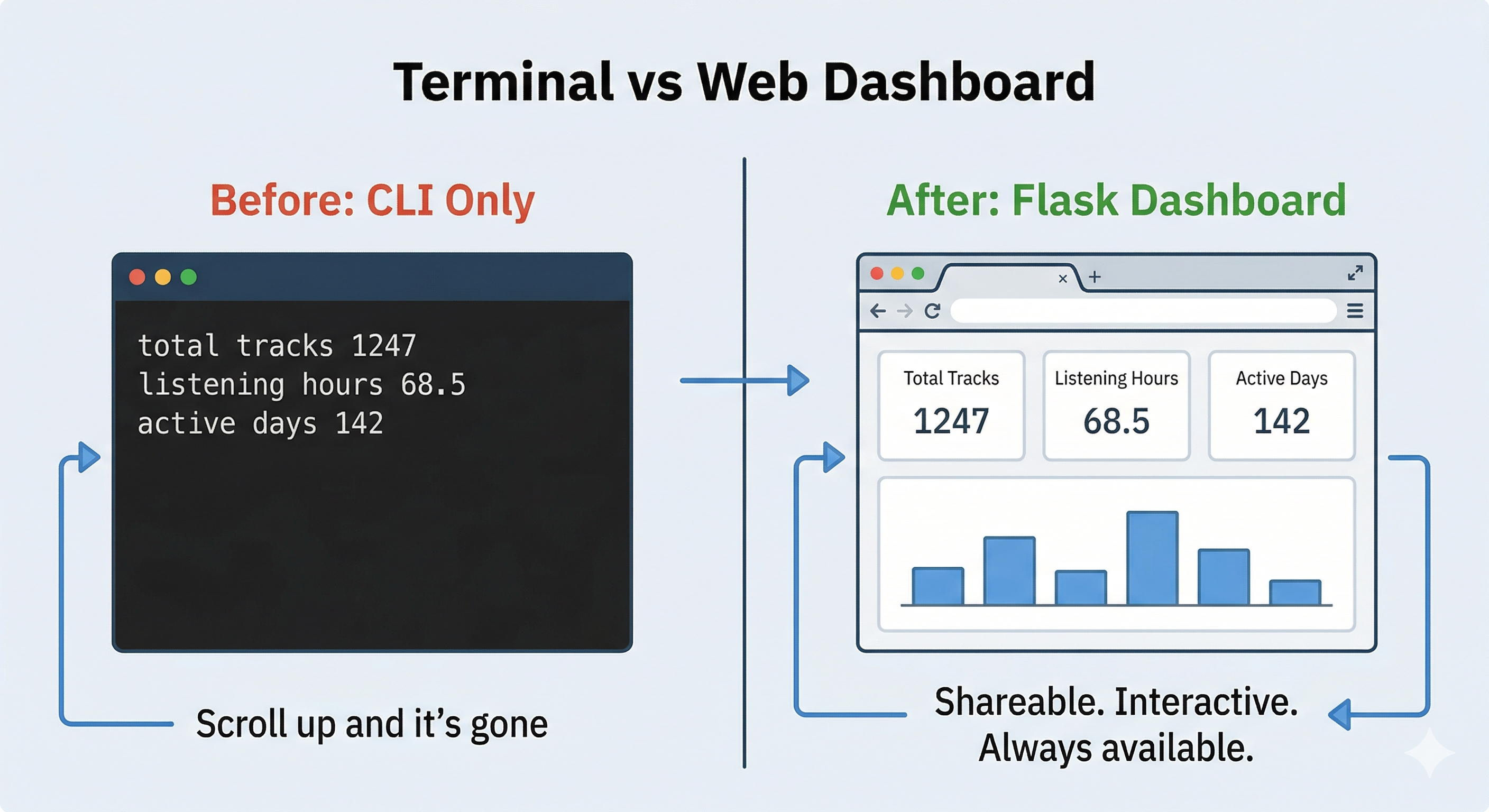
This chapter transforms your command-line application into a web dashboard. You'll add Flask, a lightweight Python web framework, to handle HTTP requests, design clean interfaces that work on mobile and desktop, create interactive visualizations with Chart.js, and connect everything to the SQLite database you built in Chapter 16. The functionality stays the same, but the presentation makes all the difference.
Avoiding the "Full Stack" Trap
Building a dashboard usually forces you to become a designer, a frontend engineer, and a backend developer all at once. For a Python developer focused on data and APIs, this is often a recipe for burnout and abandoned projects.
You didn't buy this book to learn CSS Grid debugging or to spend three hours centering a navigation bar. You want to build meaningful projects that showcase your API and database skills, not get lost in frontend minutiae.
To keep this manageable while still delivering a professional result, this chapter uses a "Backend-First" strategy:
The CSS Starter Kit
You won't waste time typing 300 lines of CSS manually. I've provided a professional stylesheet (dashboard.css) that handles responsive layouts, cards, buttons, and chart containers. You'll import it as an asset and focus on connecting your data, not debugging margins and padding. The starter kit gives you professional results in minutes, not hours.
Modular Templates
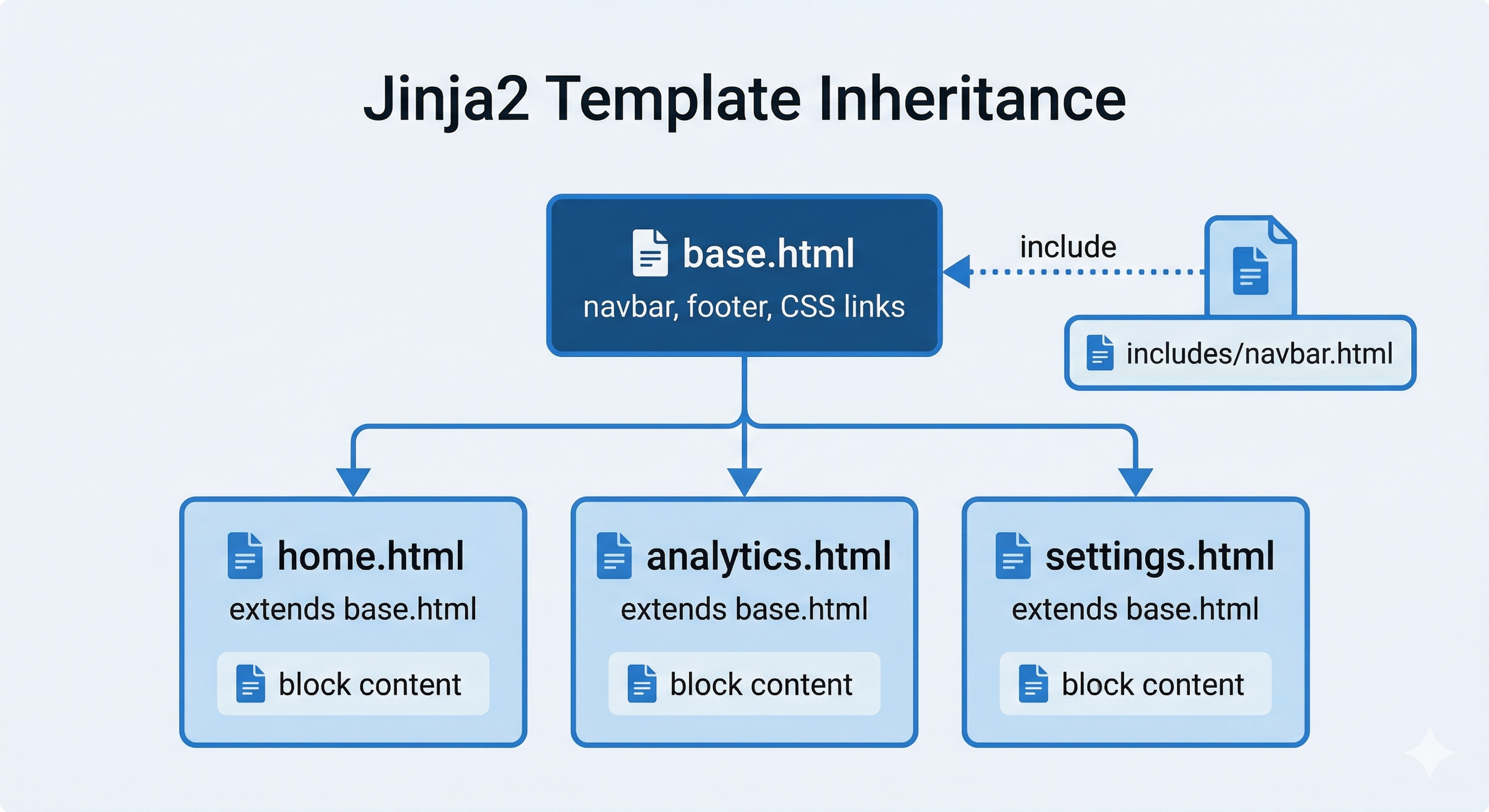
You'll break HTML into small, reusable pieces using Jinja2's
{% include %}
feature. Create the navigation bar once, include it everywhere. Change one file, update every page. This approach eliminates copy-paste errors and makes maintenance effortless. You'll never repeat the same 50 lines of navigation HTML across five different files.
Progressive Enhancement
You'll build features using simple HTML forms first, then upgrade them to modern interactive buttons (AJAX) only when necessary. This approach ensures your application works even if JavaScript fails, provides better accessibility, and lets you focus on backend logic before adding frontend polish. HTML forms get you working functionality in five minutes. AJAX enhancement comes later.
Professional developers don't write everything from scratch. They use component libraries (Bootstrap, Tailwind), template systems (Jinja2, Django templates), and progressive enhancement to ship products faster. This chapter teaches you real-world development workflows, not academic exercises.
The Backend-First strategy mirrors how actual product teams work: designers provide CSS, backend engineers connect data, frontend specialists add interactivity. You're learning the backend engineer's role, which means focusing on Flask, database queries, and API integration, not becoming a CSS expert.
Chapter Roadmap
This chapter takes you from terminal-only Python to a working web dashboard. Here's the journey:
Flask Fundamentals & Project Setup
Install Flask, write your first route, and learn how URLs map to Python functions. Master routing with URL parameters, the request/response cycle, url_for(), and custom error pages — the core mechanics behind every Flask application.
CSS Starter Kit & Template System
Set up the provided dashboard.css stylesheet, organize static files, then build a reusable template system with Jinja2 — template inheritance, modular components, and flash messages that eliminate repetition across pages.
Building the Home Dashboard
Plan, route, and build the complete Home Dashboard page — stat cards, a Chart.js timeline visualization, and responsive layout. This is where Flask concepts come together into a real, working interface.
Connecting to Chapter 16 Modules
Wire your dashboard to the existing backend — import your database and API modules, add session-based OAuth for the browser, implement the full Spotify web flow, and add defensive error handling so routes never crash.
Testing & Looking Forward
Run the development server, debug with browser dev tools, solve the most common Flask errors, then review what you've built and preview how Chapter 18 extends these patterns to three more dashboard pages.
What You'll Build in This Chapter
This chapter focuses on building one complete dashboard page: the Home Dashboard. You'll learn every Flask concept needed to build web applications: routing, templates, static files, sessions, and database integration, by creating a single, polished page that works perfectly.
The complete Music Dashboard will eventually have four pages, but you'll build the remaining three in Chapter 18 using the same patterns you master here. This focused approach prevents overwhelm while ensuring you understand the fundamentals deeply.
Home Dashboard (Built in This Chapter)
The landing page shows your musical identity at a glance. Current stats display your total listening time, track count, and active listening days. A timeline chart visualizes your monthly listening patterns over the past year. Quick action buttons let you navigate to analytics and playlist pages. This page answers "What's happening with my music?" in five seconds.
Evolution Analytics (Chapter 18)
This page reveals how your taste changes over time. Interactive line charts plot your audio feature preferences (energy, valence, danceability) month by month. A genre distribution pie chart shows shifts in your listening categories. You'll learn advanced Chart.js techniques and data filtering patterns.
Playlist Manager (Chapter 18)
Generate and manage all your Time Machine playlists from one interface. Create Forgotten Gems playlists with adjustable time ranges. Build mood-based playlists by adjusting sliders for energy, valence, and tempo. You'll learn HTML form handling and AJAX-based progressive enhancement.
Settings & Data Management (Chapter 18)
Control how the Time Machine operates. View and manage your OAuth connection to Spotify. Configure data collection schedules. Export your database for backup. You'll learn to handle destructive operations safely with confirmation flows and proper security practices.
By the end of this chapter, you'll have a working Home Dashboard that demonstrates all core Flask concepts. Chapter 18 applies these same patterns to build the remaining pages, no new fundamental concepts, just practice and refinement.
Flask: Turning Python Scripts Into Websites
You've written Python programs that run in the terminal. You type python analytics.py, it fetches data, prints results, and stops. That works fine for you. But what if you want other people to use your work? What if you want to see your data in a browser, click buttons instead of typing commands, view charts instead of reading text output?
That's what Flask does. Flask is a Python library that turns your existing Python code into something browsers can talk to. It's a translator between web requests and your Python functions.
Before Flask: Terminal-Only
Your Music Time Machine scripts work in the terminal. You run python analytics.py --time-range 6months and get text output showing listening statistics. Functional, but isolated. Nobody else can use it. You can't visualize the data. It's trapped in the command line.
With Flask: Web-Accessible
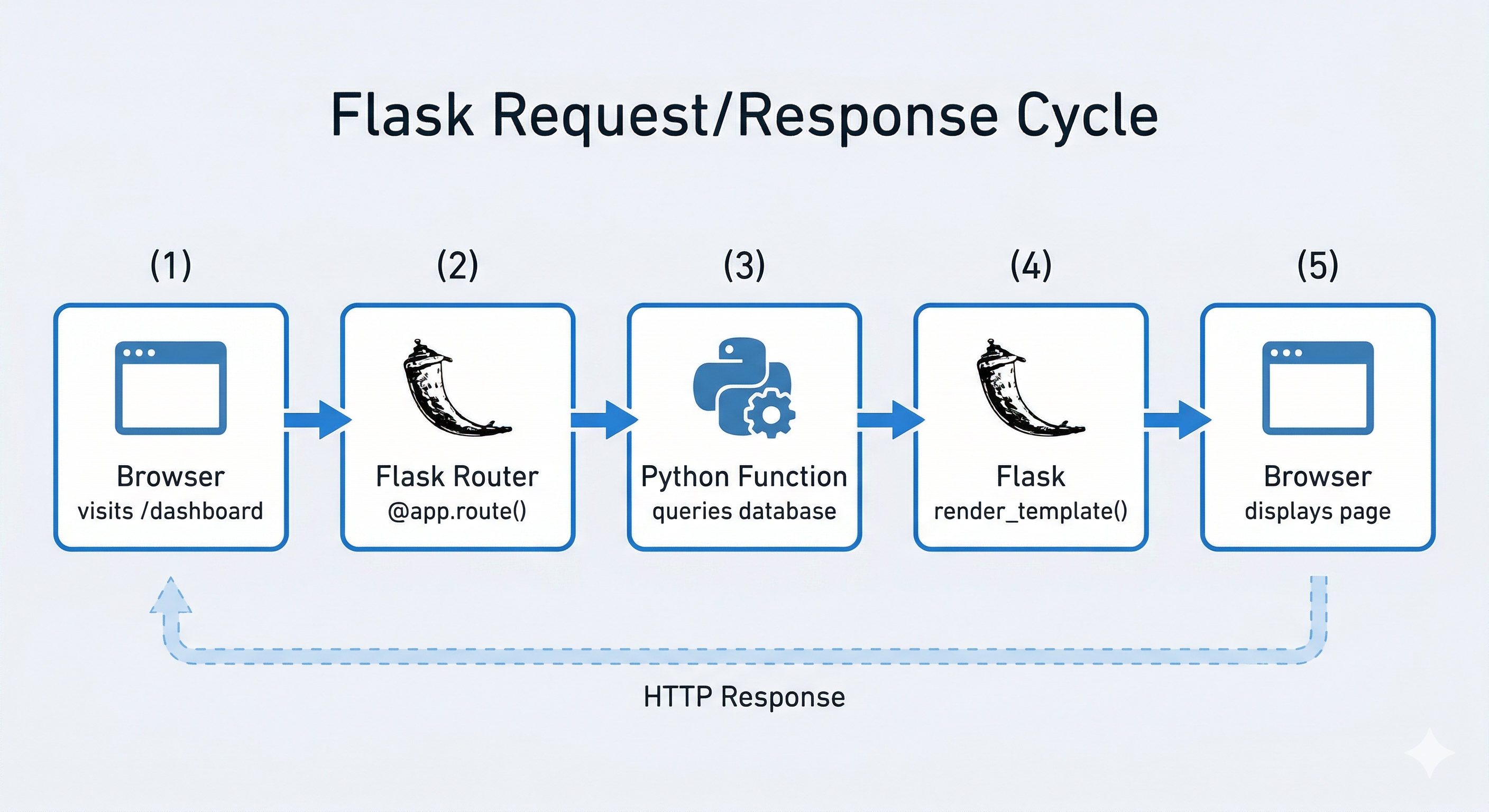
Your analytics function becomes @app.route('/analytics'). Someone visits yoursite.com/analytics in their browser. Flask notices the request, calls your analytics function, and sends back an HTML page with interactive charts. Same logic, different interface.
Flask acts as a receptionist for your Python code. When a browser requests a URL, Flask checks: "Which Python function handles this?" It calls that function, takes whatever the function returns (HTML, JSON, a redirect), and sends it to the browser. That's the entire job. Everything else (database queries, API calls, calculations) is just regular Python code you already know how to write.
Python has several web frameworks. Django gives you everything: admin panels, authentication systems, database management, form handling. It's powerful but opinionated. You build applications "the Django way." FastAPI excels at building modern APIs with automatic documentation and type validation, perfect for backend services.
Flask is deliberately minimal. It handles HTTP routing (mapping URLs to functions), template rendering (HTML with dynamic data), and session management (keeping users logged in). That's it. You add what you need, when you need it. This makes Flask:
- Faster to learn: Fewer concepts, less framework-specific knowledge required
- More transparent: When you write
@app.route('/home'), you understand exactly what's happening - Perfect for dashboards and APIs: You control the complexity, not the framework
- Production-ready: Companies like Pinterest, LinkedIn, and Netflix use Flask for real applications
For this project, Flask hits the sweet spot: powerful enough for a professional dashboard, simple enough to master in one chapter. You're learning production patterns, not building academic exercises.
You're not rewriting your backend. The modules you built in Chapter 16 (spotify_client.py for API calls, database.py for queries, playlist_generator.py for creating playlists) contain pure business logic. That code doesn't change.
Flask sits on top as a presentation layer. Your database queries now power chart data instead of terminal output. Your OAuth flow becomes browser redirects instead of copy-pasted tokens. Your playlist generation gets triggered by button clicks instead of command-line arguments. Same functions, different interface.
This architectural separation (business logic independent of presentation) is how professional applications work. The core logic stays stable. The user interface can evolve. Web dashboard today, mobile app tomorrow, Slack bot next month. Same Python functions powering everything.
By the end of this chapter, you'll understand Flask well enough to build any web application. The patterns you learn here (routing, templates, sessions, database integration) apply universally. Whether you're building a personal dashboard, a team tool, or a client project, these fundamentals don't change.
Learning Objectives
By the end of this chapter, you'll be able to:
- Build Flask web applications with proper routing, template rendering, and static file serving following production patterns
- Design responsive layouts using a CSS starter kit and Jinja2 modular templates that work on mobile, tablet, and desktop
- Pass data securely from Python backend to JavaScript frontend using the JSON handoff pattern with proper type conversion
- Create interactive data visualizations with Chart.js using data from your SQLite database, including proper configuration and responsive behavior
- Implement Flask session management to maintain OAuth state across requests and keep users authenticated
- Debug frontend issues using the Browser Console (F12) instead of relying solely on the Python terminal
- Structure web projects with clear separation between routes, templates, static files, and business logic modules
These skills transfer directly to other web frameworks and professional development environments. Flask teaches fundamental web concepts that apply to Django, FastAPI, Express.js, and any other framework you might encounter in your career.