Chapter 14: OAuth and Authentication Fundamentals

Building Trust Between Apps and APIs

1. Why APIs Need Permission Systems

At some point in your development career, you will build an application that needs to access someone else's private data through an API. When that happens, you face a fundamental challenge: how can your application obtain access to user data without requiring users to share their account credentials with you?

Chapter Roadmap

This chapter takes you from understanding why OAuth exists to building a fully working GitHub OAuth tool in Python. You'll progress through theory, security concepts, token management, and hands-on implementation.

1

The Problem and the Protocol

Sections 1–2 • Foundation

Understand why password sharing was broken, how OAuth 2.0 emerged as the solution, and learn the four roles and the Authorization Code flow that powers modern API access.

OAuth 2.0 Authorization Code Flow Four Roles
2

Security and Permissions

Section 3 • Security

Master the security mechanisms that protect OAuth flows — scopes for limiting access, state parameters for CSRF protection, redirect URI validation, token storage best practices, and PKCE for public clients.

Scopes CSRF Protection PKCE Redirect URIs
3

Token Lifecycles and Management

Section 4 • Architecture

Learn how access tokens and refresh tokens work together, build a TokenManager class that handles expiration and automatic renewal, and implement token revocation for clean disconnects.

Access Tokens Refresh Tokens Token Manager Revocation
4

Hands-On with GitHub OAuth

Section 5 • Project Build

Register an OAuth app with GitHub, implement the full authorization flow step by step, and build the complete Dev GitHub Tool — a CLI that lists repositories, checks issues, and displays pull requests using OAuth tokens.

GitHub API App Registration Dev GitHub Tool Debugging
5

Review and Next Steps

Section 6 • Consolidation

Consolidate your understanding with a summary of key concepts, test yourself with a checkpoint quiz, and preview how OAuth foundations connect to the Spotify integration project in the next chapter.

Key Takeaways Checkpoint Quiz Spotify Preview

Learning Objectives

What You'll Master in This Chapter

By the end of this chapter, you'll be able to:

  • Explain the OAuth 2.0 Authorization Code flow in plain language and understand why each step exists
  • Register OAuth applications with API providers to obtain Client IDs and Secrets
  • Implement the complete OAuth flow to exchange authorization codes for access tokens
  • Apply OAuth security best practices including state parameters, scope minimization, and redirect URI validation
  • Build token managers that handle expiration and automatic refresh
  • Debug common OAuth errors like redirect URI mismatches, invalid scopes, and expired tokens
  • Distinguish between Authentication and Authorization to understand who you are versus what you can do

The Dev GitHub Tool

Consider a practical example you will build in this chapter: a Python command-line tool (Dev GitHub Tool) that helps developers manage their GitHub accounts. The tool lists repositories, checks open issues, and displays recent pull requests. To provide this functionality, it needs permission to read the developer's GitHub profile and repository data.

👤
You Resource Owner
Uses App
Authorisation Needed
⚙️
Dev GitHub Tool Client App
Access Blocked
🐱
GitHub API Resource Server

The Dev GitHub Tool needs permission to read your repositories — but it should never ask for your password.

The tool must access private data on behalf of the user, but it should never ask for or store the user's GitHub password. This is the core problem that OAuth 2.0 solves: enabling secure, limited, revocable access to user resources without credential sharing.

Before OAuth: The Password Sharing Era

To appreciate OAuth 2.0, you need to understand what came before it. In the mid-2000s, third-party applications had no choice but to ask users for their actual passwords.

If you wanted to use TweetDeck to manage multiple Twitter accounts, Hootsuite to schedule tweets, or analytics tools to track engagement, every single application required the same thing: your Twitter username and password. You handed over your credentials, and the application logged in as you with full account access.

This approach created severe security and usability problems. Users had to trust third-party applications with credentials that granted full account access. Revoking access required changing your password, which broke every application using it. Applications stored passwords in their databases, creating security vulnerabilities. Users had no way to limit what an application could do or audit which applications had access.

Every major platform faced the same challenge. Twitter, Facebook, Google, Flickr, and LinkedIn all needed a way to let third-party applications access user data without requiring password sharing. The solution that emerged was OAuth (Open Authorization), an open standard that allows users to grant third-party applications limited, revocable access to their data without sharing passwords.

OAuth 1.0 launched in 2007. By 2012, OAuth 2.0 replaced it as the industry standard, simplifying implementation while maintaining security. Today, when you click "Sign in with GitHub" or "Connect to Google," you are using OAuth 2.0. It has become the dominant authorization framework for modern APIs.

Start with the problem, then the solution. The next section explains what OAuth 2.0 is and precisely how it works.
2. What is OAuth 2.0?

Core Principles

OAuth 2.0 is an authorization framework, not an authentication system. Its purpose is granting permission (allowing apps to access your resources), not proving identity (verifying who you are to a third party). The framework enables applications to obtain limited access to user resources—such as API endpoints or private user data—without requiring the user's actual credentials.

Think of OAuth 2.0 like valet parking. You hand your car key to the valet, but you don't give them your house key or your trunk key. They can drive your car, but they can't open your garage or access your personal belongings in the trunk. OAuth works the same way: you grant specific, limited access instead of handing over complete control.

Authentication vs Authorization

Authentication answers "Who are you?" It proves your identity through passwords, fingerprints, or security keys.

Authorization answers "What can you access?" It determines permissions after identity is established.

OAuth 2.0 handles authorization only. When you see "Sign in with GitHub," that's authentication happening before OAuth grants access. OAuth then handles what the app can do with your GitHub data, not proving you own the GitHub account.

The Four Roles

OAuth defines four distinct roles. Understanding who does what prevents confusion when implementing flows.

1.

Resource Owner (The User)

The person who owns the data. If you're connecting your Spotify account to an app that analyzes listening history, you are the resource owner. You own your Spotify playlists, listening data, and saved songs.

2.

Client (Your Application)

The application requesting access to protected resources. This is the app you're building. It could be a web app, mobile app, or command-line tool. The client makes API requests on the user's behalf after receiving authorization.

3.

Authorization Server (The Gatekeeper)

The server that authenticates the user and issues access tokens. When you see "Connect to GitHub" and get redirected to github.com/login/oauth, you're interacting with GitHub's authorization server. It verifies who you are and what permissions you're granting.

4.

Resource Server (The API)

The API that hosts protected resources. This is typically the same service as the authorization server (GitHub serves both roles), but OAuth separates them conceptually. The resource server accepts access tokens and returns data if the token is valid.

When building OAuth integrations, you write code for the Client role. The Authorization Server and Resource Server already exist (provided by GitHub, Spotify, Google, etc.). The Resource Owner is your user.

The Authorization Code Flow

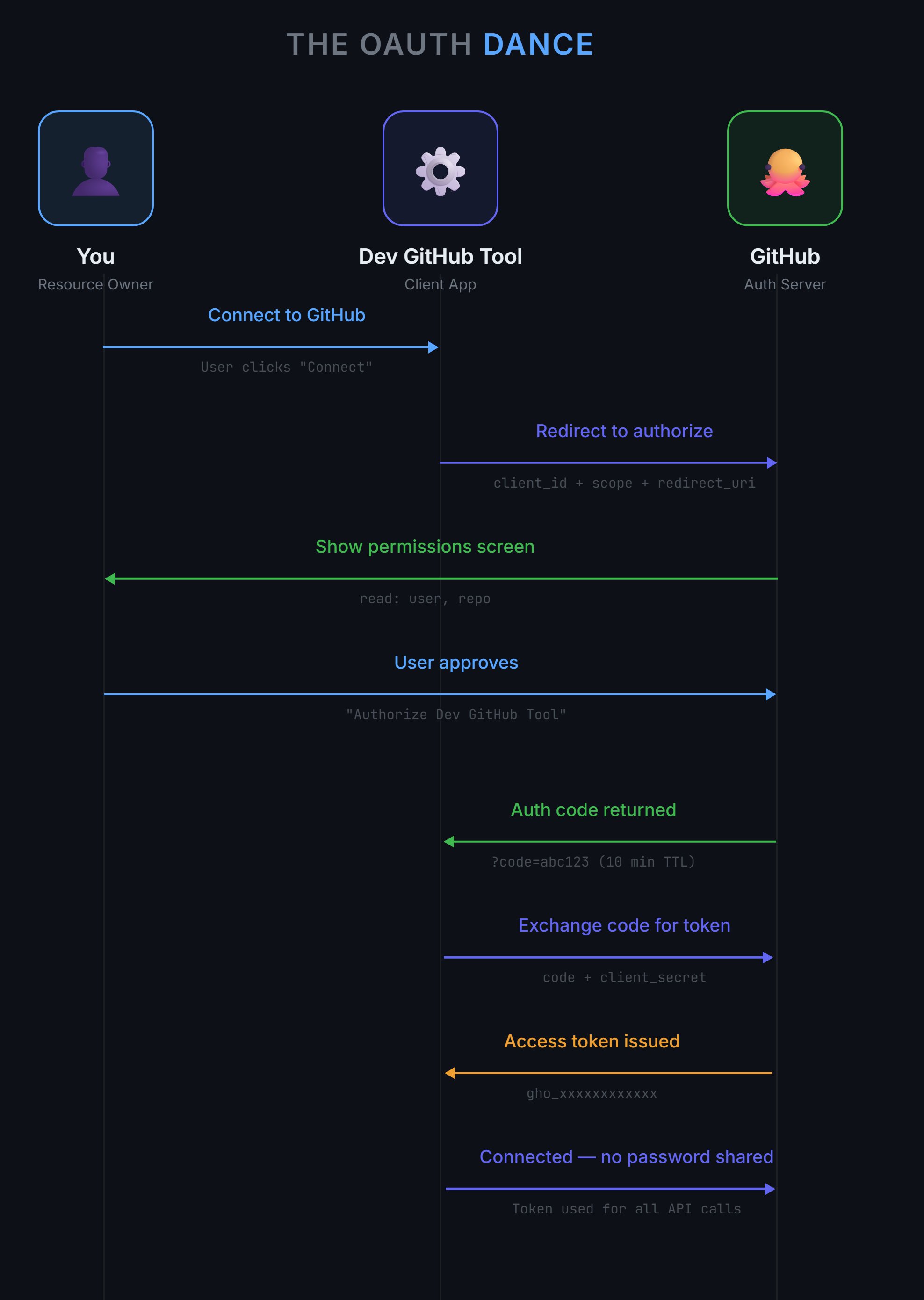
OAuth 2.0 defines several flows for different scenarios. The Authorization Code flow is the most secure and most common for web and mobile applications. Here's how it works step by step.

Sequence diagram showing the eight steps of the OAuth 2.0 Authorization Code flow between You (Resource Owner), the Dev GitHub Tool (Client App), and GitHub (Auth Server). Steps progress from Connect to GitHub, through the redirect, permissions screen, user approval, auth code return, code-for-token exchange, access token issued, and finally Connected with no password shared.
The OAuth 2.0 Authorization Code flow separates user consent from API access through a two-step token exchange.
1.

User Clicks "Connect"

Your application presents a button or link: "Connect to GitHub." When clicked, you redirect the user to GitHub's authorization URL with specific parameters: your client_id, requested scopes, and a redirect_uri where GitHub will send the response.

2.

User Authorizes on Provider's Site

GitHub displays what permissions your app is requesting. The user sees exactly what you'll be able to access: "This app will be able to read your public repositories." Users review and click "Authorize." This consent screen is controlled by GitHub, not by your application, which prevents phishing attacks.

3.

GitHub Returns Authorization Code

After authorization, GitHub redirects the user back to your redirect_uri with an authorization code in the URL: https://yourapp.com/callback?code=abc123. This code is temporary (usually expires in 10 minutes) and single-use.

4.

Exchange Code for Token

Your application makes a server-to-server POST request to GitHub's token endpoint, sending: the authorization code, your client_id, and your client_secret. GitHub validates everything and responds with an access token. Your app uses this token to make API requests on the user's behalf.

Why Authorization Codes Instead of Tokens Directly?

The two-step process (authorization code → access token) prevents token theft in the redirect. The authorization code travels through the user's browser, which could be compromised. But the code itself is useless without your client_secret, which never leaves your server. This separation keeps access tokens more secure than if GitHub sent them directly in the browser redirect.

The Key Pieces Your App Tracks

Throughout the OAuth flow, your application manages several credentials and tokens. Here's what each one does and when you use it.

Credential What It Is When You Use It Security Level
Client ID Public identifier for your app Every authorization request 🟢 Public (safe to commit to Git)
Client Secret Password for your app Token exchange only 🔴 Private (never commit, never expose)
Authorization Code Temporary code from user consent Once to get access token 🟡 Short-lived (expires in ~10 minutes)
Access Token Proof of permission to access API Every API request 🔴 Private (treat like passwords)
Refresh Token Token to get new access tokens When access token expires 🔴 Private (more powerful than access token)

The Client ID is like your username—it identifies your app but isn't secret. The Client Secret is like your password—it proves your app is legitimate and must never be exposed. Access tokens are what you actually use for API calls, while refresh tokens let you get new access tokens without bothering the user again.

Knowing the pieces is one thing — knowing how attackers exploit them is another. Section 3 shows you where OAuth implementations break and the security patterns that prevent it.

3. OAuth Security and Permissions

OAuth provides a secure framework, but real-world breaches almost always come from small implementation mistakes: a missing state check, an overly broad scope request, sloppy redirect URI configuration, or accidentally logging tokens. This section shows you how to avoid these pitfalls by understanding how attackers exploit OAuth vulnerabilities and applying the security patterns that protect your users.

Understanding Scopes

Scopes are the heart of OAuth's permission system. They define exactly what your app can and cannot do with the user's data. Think of them as the restrictions on a valet key: this key can start the engine but cannot open the trunk.

How Scopes Work

When you request authorization, you specify a list of scopes. Each API defines its own scope vocabulary. GitHub's common scopes include:

Scope Permission Granted Example Use Case
user Read user profile info Show user's name and avatar
user:email Read email addresses Send notifications to user
repo Read private repositories List all repos including private ones
public_repo Read public repositories only Analyze public code patterns
delete_repo Delete repositories Cleanup tool (very sensitive)

The Principle of Least Privilege

Always request the minimum scopes needed for your application to function. If you only need to read public repositories, do not ask for repo (which includes private repos). If you only need profile information, do not ask for delete_repo.

Users are rightfully suspicious of apps that ask for excessive permissions. Would you trust an app that says "I just want to show your GitHub stats" but requests permission to delete your repositories? Neither would your users.

Progressive Authorization

Start with minimal scopes, then request additional permissions only when users choose features that require them. For example:

  • Initial authorization: Request only user to show basic profile info
  • When user clicks "Analyze my repos": Request repo with clear explanation of why it's needed
  • When user enables notifications: Request user:email at that moment

This pattern builds trust. Users grant permissions when they see the value, not upfront when the request seems arbitrary.

Scopes Are Visible to Users

When a user authorizes your app, GitHub shows them exactly what you are requesting in plain language: "This app will be able to read your private repositories and delete repositories." Users will cancel the authorization if your scope requests seem unreasonable for what your app does.

This transparency is a feature, not a bug. It helps users make informed decisions about which apps to trust.

State Parameters and CSRF Protection

The state parameter is a security mechanism that prevents Cross-Site Request Forgery (CSRF) attacks. Understanding how attackers exploit missing state validation shows you why this parameter is non-negotiable.

The Attack Without State

Here's how an attacker exploits an OAuth flow that doesn't validate state:

  1. An attacker (Eve) starts an OAuth flow with your app using her GitHub account
  2. She completes the GitHub consent screen and lands on your callback URL with a valid authorization code
  3. Instead of finishing the flow, she takes that code and builds a link: https://yourapp.com/callback?code=eves_code
  4. She tricks a victim (Alice) into clicking the link through phishing, social engineering, or embedded in a malicious site
  5. Alice's browser hits your callback endpoint with Eve's code
  6. Your app exchanges that code for tokens and stores them on Alice's account

The Consequences

From this point on:

  • When Alice uses your app, she sees Eve's data, not her own
  • If your app posts insights publicly, Eve can monitor what Alice does inside your app
  • If your app charges per analysis, Alice pays for processing Eve's account
  • Support tickets start appearing: "Why is my dashboard showing someone else's data?"

The core problem: your app had no way to tell whether the user who started the flow is the same user who finished it.

How State Parameters Stop the Attack

The state parameter ties the beginning and end of the OAuth flow together:

  1. Alice clicks "Connect GitHub" in your app
  2. Your app generates a random state (e.g. state_alice_xyz123) and stores it in her session
  3. You include that state value in the authorization URL you send Alice to on GitHub
  4. After Alice approves, GitHub redirects back to your callback with the code and the same state
  5. Your app compares "returned state" versus "stored state" for Alice's session
  6. If they match, the flow is genuine. If they don't match, you reject the request

Eve cannot predict Alice's random state value or inject her own, so her malicious link fails the check and gets rejected.

State Implementation Checklist
  • ✅ Generate state with a cryptographically secure function (e.g. Python's secrets module)
  • ✅ Store state on the server (session, database, or secure cookie) before redirecting the user
  • ✅ Include the state parameter in every authorization URL you create
  • ✅ On callback, verify that the returned state matches the stored value
  • ✅ If state doesn't match, abort the flow—do not exchange the code
  • ✅ Clear the state value after a successful check to prevent replay attacks

Redirect URI Validation

The redirect URI is where the API sends the user after they authorize your app. It's also one of the most common sources of OAuth errors and security vulnerabilities. Understanding why redirect URIs must match exactly prevents both attacks and debugging headaches.

Why Redirect URIs Must Match Exactly

When you register your OAuth app with GitHub, you specify one or more allowed redirect URIs, such as:

  • http://localhost:8000/callback for local development
  • https://musicapp.com/auth/callback for production

When GitHub redirects the user back with the authorization code, it sends them to the URI you specified in your authorization request. But GitHub will only redirect to URIs you pre-registered. If you try to use http://localhost:8000/different-callback without registering it first, GitHub refuses the request.

This prevents a critical attack: an attacker cannot hijack your client_id and redirect users to their own malicious website to steal authorization codes.

The Matching Rules Are Strict

GitHub (and most OAuth providers) requires exact matches for redirect URIs. These will fail:

Registered URI Request URI Result
http://localhost:8000/callback http://localhost:8000/callback/ ❌ Trailing slash
http://localhost:8000/callback https://localhost:8000/callback ❌ http vs https
http://localhost:8000/callback http://localhost:8001/callback ❌ Different port
http://localhost:8000/callback http://127.0.0.1:8000/callback ❌ localhost vs 127.0.0.1

This strictness is intentional. It prevents attackers from exploiting small variations to redirect authorization codes to malicious endpoints.

Common Redirect URI Mistakes and Solutions
  • Problem: Your code uses localhost but you registered 127.0.0.1
    Solution: Pick one and use it consistently everywhere
  • Problem: Development uses http, production uses https
    Solution: Register both URIs separately in your OAuth app
  • Problem: Port numbers change during development
    Solution: Fix your dev port or register multiple port variations
  • Problem: Trailing slashes appear inconsistently
    Solution: Choose with or without slash, enforce it in code

Token Storage Best Practices

Access and refresh tokens are sensitive credentials. Anyone who obtains a valid token can act as that user until the token is revoked or expires. Storing tokens securely is not a "nice to have"—it's a baseline requirement for any app that integrates with OAuth.

Never Do This

These approaches are common in quick demos but are not acceptable in real projects:

  • ❌ Hardcoded in source code: access_token = "gho_abc123..." inside a file committed to Git
  • ❌ Logged to console: print(f"Token: {token}") where logs might be shipped to third-party services
  • ❌ Stored in plain text files: tokens.txt sitting unencrypted in your project directory
  • ❌ Shared in chat: Pasting tokens into email, Slack, or issue trackers where they become searchable and archived

Platform-Specific Storage Strategies

The right storage approach depends on where your application runs:

1.

Development: Environment Variables

Store tokens in environment variables or .env files (git-ignored). Use libraries like python-dotenv to load them:

Python
# .env file (git-ignored)
GITHUB_CLIENT_ID=your_client_id_here
GITHUB_CLIENT_SECRET=your_secret_here
ACCESS_TOKEN=gho_your_token_here

# In your Python code
from dotenv import load_dotenv
import os

load_dotenv()
client_id = os.getenv("GITHUB_CLIENT_ID")
access_token = os.getenv("ACCESS_TOKEN")
2.

Production: Secrets Managers

For production applications, use dedicated secrets management services:

  • AWS Secrets Manager or Systems Manager Parameter Store
  • Google Cloud Secret Manager
  • Azure Key Vault
  • HashiCorp Vault

These services provide encryption at rest, access logging, automatic rotation, and fine-grained access control.

3.

Database Storage: Encrypt at Rest

If you store tokens in a database for long-lived sessions, encrypt them before writing to disk:

Python
from cryptography.fernet import Fernet

# Generate encryption key (store this securely, not in code!)
encryption_key = Fernet.generate_key()
cipher = Fernet(encryption_key)

# Encrypt before storing
encrypted_token = cipher.encrypt(access_token.encode())
db.store_token(user_id, encrypted_token)

# Decrypt when needed
encrypted_token = db.get_token(user_id)
access_token = cipher.decrypt(encrypted_token).decode()
4.

Logging: Mask Sensitive Data

Never log full tokens. If you must log for debugging, mask most of the token:

Python
def mask_token(token):
    """Show only first and last 4 characters for logging."""
    if not token or len(token) < 12:
        return "[REDACTED]"
    return f"{token[:4]}...{token[-4:]}"

logger.info(f"Making API request with token: {mask_token(access_token)}")
logger.info("Token refresh successful")  # Don't log the new token

PKCE: Enhanced Security for Public Clients

PKCE (Proof Key for Code Exchange, pronounced "pixie") is an extension to OAuth 2.0 that prevents authorization code interception attacks. It's especially important for mobile and single-page applications where you cannot securely store a client secret.

The Problem PKCE Solves

In mobile apps and browser-based apps, attackers can potentially intercept authorization codes through malicious apps or browser extensions. Without PKCE, an intercepted authorization code could be exchanged for tokens by the attacker.

PKCE works by creating a secret that only the legitimate app knows. The app generates a random code_verifier, hashes it to create a code_challenge, and sends the challenge with the authorization request. When exchanging the code for tokens, the app proves it started the flow by sending the original verifier.

PKCE in Practice

Many OAuth providers now require PKCE for public clients. GitHub supports it, Spotify requires it for certain grant types, and Google recommends it for all applications. Chapter 16's Spotify project demonstrates PKCE implementation in detail. For now, understand that it adds an extra verification step that prevents code interception attacks.

4. Token Lifecycles and Management

You've obtained an access token and used it to call an API. That's enough for a demo, but it's not enough for a production application. Tokens expire. Users revoke access. APIs return errors. Understanding token lifecycles and building automatic refresh mechanisms transforms fragile proof-of-concept code into reliable production systems.

Access Tokens vs Refresh Tokens

Most OAuth 2.0 providers issue two types of tokens, each with a different purpose and lifespan.

Access Tokens: Short-Lived, Powerful

Access tokens are what you send with API requests. They prove that your app is allowed to act on a user's behalf. Because they're so powerful, many providers make them short-lived—typically 15 minutes to 2 hours.

GitHub is unusual: classic GitHub OAuth access tokens don't expire by default. That makes our examples easier to run, but it also means that token revocation is the main way access ends. In contrast, providers like Spotify and Google issue access tokens that expire on a regular schedule.

Refresh Tokens: Long-Lived, Narrowly Scoped

Refresh tokens exist for one purpose: to get new access tokens without bothering the user again. They:

  • Last much longer than access tokens (weeks, months, or until revoked)
  • Cannot be used to call APIs directly—only to request new access tokens
  • Let your app keep working without sending the user back through the OAuth flow
  • Can be revoked by the user at any time in their account settings
Why Two Types of Tokens?

Splitting duties between access and refresh tokens is a defense-in-depth strategy:

  • Access tokens are exposed often (every API request), so they're made short-lived to limit damage if stolen
  • Refresh tokens are used rarely (only when refreshing), so they can live longer without as much exposure, which reduces how often users need to re-authorize

If an attacker steals an access token, they only get a small window of time before it expires. If they steal a refresh token, they still can't call the API directly—they can only ask for new access tokens, which might trigger rate limits, anomaly detection, or other security checks on the provider's side.

Understanding Token Lifecycles

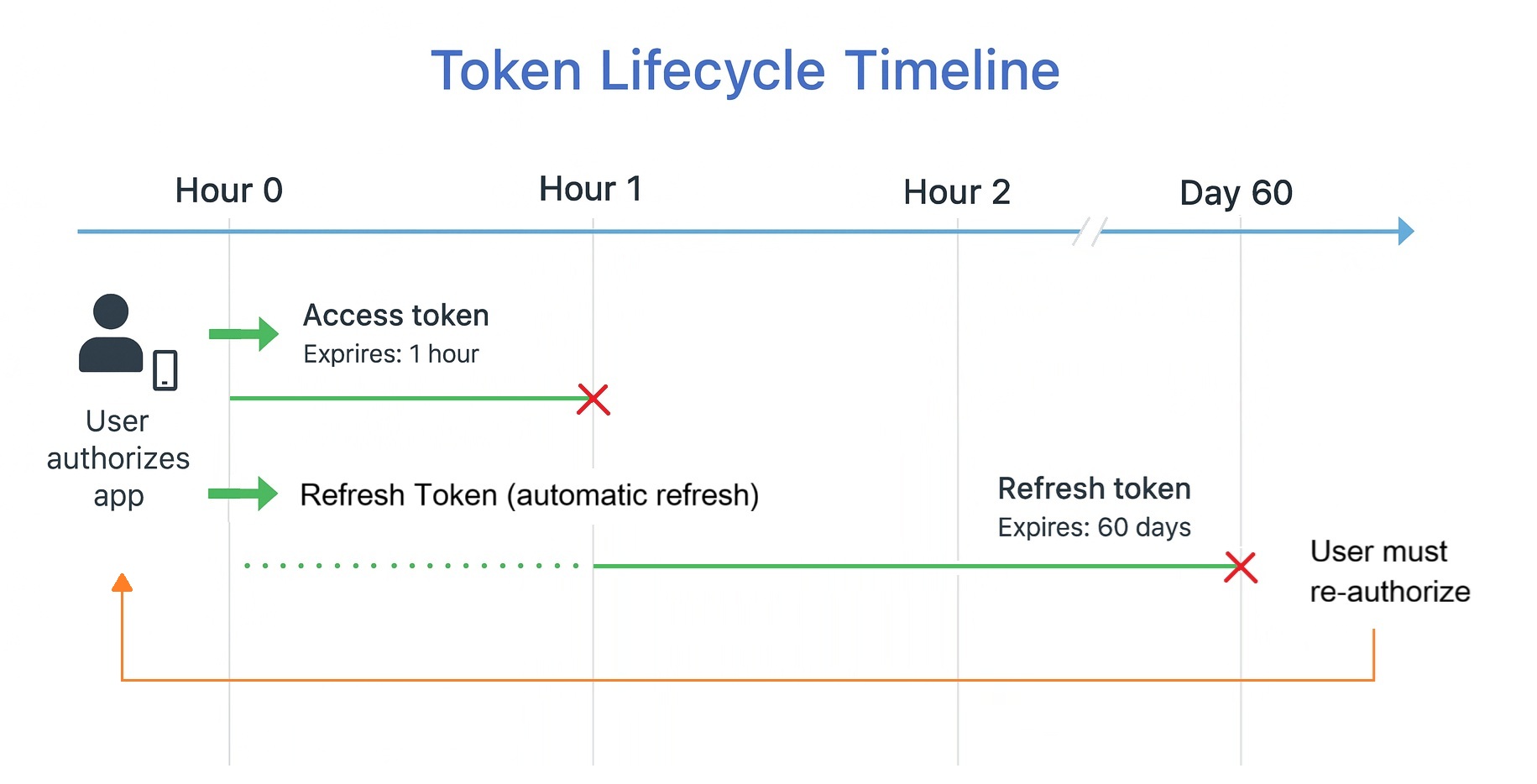
OAuth tokens have expiration times for security, but the lifecycle can be confusing. Here's how tokens work together over time:

Timeline diagram showing two parallel token tracks over 60 days. The access token track shows repeated short cycles of roughly one hour each, refreshing automatically. The refresh token track shows a single long bar spanning the full 60 days. At day 60 the refresh token expires and the user must re-authorize.
Access tokens expire frequently (often 1 hour), but refresh tokens last much longer (30-90 days), allowing your app to get new access tokens without bothering the user.

The Token Lifecycle in Action

Let's walk through a concrete timeline to see how this works in practice:

Hour 0

User Authorizes App

The user completes the OAuth flow. Your app receives an access token (expires in 1 hour) and a refresh token (expires in 60 days). Both are stored securely on your backend.

Hour 0-1

App Uses Access Token

Your app makes multiple API calls using the access token in the Authorization header. All requests succeed—the token is valid and hasn't expired yet.

Hour 1

Access Token Expires

The access token hits its expiration time. The next API call returns 401 Unauthorized. Your token manager automatically uses the refresh token to request a new access token from the provider's token endpoint. The provider responds with a fresh access token (also expires in 1 hour).

Hour 1-2

App Uses New Access Token

API calls resume normally with the new access token. From the user's perspective, nothing changed—they didn't need to log in again or approve permissions. The refresh happened silently in the background.

Day 60

Refresh Token Expires

The refresh token reaches its maximum lifetime and expires. When your app tries to use it to get a new access token, the provider returns an error. The only solution: send the user back through the full OAuth authorization flow to obtain new tokens.

This pattern explains why long-running applications need to handle token refresh gracefully. If your app only runs for a few minutes at a time (like a CLI tool), you might never encounter token expiration. But if your app runs continuously (like a web server or background service), token refresh becomes essential infrastructure.

Building a Token Manager

Professional applications centralize token management in a reusable class that handles expiration checking, automatic refresh, and API request retries. This pattern works with any OAuth provider that issues refresh tokens.

OAuthTokenManager - Production-Ready Token Management
Python
import requests
from datetime import datetime, timedelta

class TokenManager:
    """
    Manages OAuth tokens with automatic refresh.
    
    This class handles:
    - Token expiration tracking
    - Automatic refresh when needed
    - Graceful handling of refresh failures
    """
    
    def __init__(self, client_id, client_secret, token_endpoint):
        self.client_id = client_id
        self.client_secret = client_secret
        self.token_endpoint = token_endpoint
        
        self.access_token = None
        self.refresh_token = None
        self.expires_at = None
    
    def store_tokens(self, access_token, refresh_token=None, expires_in=3600):
        """Store tokens and calculate expiration."""
        self.access_token = access_token
        if refresh_token:
            self.refresh_token = refresh_token
        
        # Add 5-minute safety buffer
        self.expires_at = datetime.now() + timedelta(seconds=expires_in - 300)
    
    def is_token_expired(self):
        """Check if token is expired or about to expire."""
        if not self.expires_at:
            return False
        return datetime.now() >= self.expires_at
    
    def refresh_access_token(self):
        """Use refresh token to get new access token."""
        if not self.refresh_token:
            return False
        
        payload = {
            "client_id": self.client_id,
            "client_secret": self.client_secret,
            "grant_type": "refresh_token",
            "refresh_token": self.refresh_token
        }
        
        try:
            response = requests.post(self.token_endpoint, data=payload)
            response.raise_for_status()
            data = response.json()
            
            self.store_tokens(
                data.get("access_token"),
                data.get("refresh_token", self.refresh_token),
                data.get("expires_in", 3600)
            )
            return True
        except requests.exceptions.RequestException:
            return False
    
    def get_valid_token(self):
        """Get a valid access token, refreshing if needed."""
        if self.is_token_expired():
            if not self.refresh_access_token():
                return None
        return self.access_token
    
    def make_api_request(self, url, method="GET", **kwargs):
        """Make API request with automatic token refresh."""
        token = self.get_valid_token()
        if not token:
            return None
        
        headers = kwargs.get("headers", {})
        headers["Authorization"] = f"Bearer {token}"
        kwargs["headers"] = headers
        
        response = requests.request(method, url, **kwargs)
        
        # Retry once if we get 401 (token might have expired between check and use)
        if response.status_code == 401 and self.refresh_access_token():
            headers["Authorization"] = f"Bearer {self.access_token}"
            response = requests.request(method, url, **kwargs)
        
        return response
How This Token Manager Works
  • Proactive refresh: store_tokens() subtracts 5 minutes from expiration to refresh before the token actually expires, preventing mid-request failures
  • Automatic rotation: refresh_access_token() handles providers that issue new refresh tokens on each refresh by updating both tokens
  • Retry logic: make_api_request() automatically refreshes and retries once on 401 errors, handling race conditions where tokens expire between the check and the request
  • Graceful failure: If refresh fails (user revoked access, refresh token expired), returns None instead of crashing, allowing your application to handle re-authorization

Using the Token Manager

Instead of making requests directly with requests, your application calls the token manager:

Python
# Initialize once with tokens from OAuth flow
token_manager = TokenManager(
    client_id="your_client_id",
    client_secret="your_client_secret",
    token_endpoint="https://provider.com/oauth/token"
)

token_manager.store_tokens(
    access_token="access_token_from_oauth",
    refresh_token="refresh_token_from_oauth",
    expires_in=3600
)

# Make requests - token refresh happens automatically
response = token_manager.make_api_request("https://api.provider.com/v1/user")
if response and response.status_code == 200:
    user = response.json()
    print(f"User: {user.get('name')}")
else:
    print("Need to re-authorize user")

Token Revocation

Users can revoke your app's access at any time through their account settings. When this happens, both access and refresh tokens become invalid immediately. Your application needs to handle revocation gracefully.

Detecting Revocation

You'll know tokens were revoked when:

  • API requests return 401 Unauthorized even with seemingly valid tokens
  • Refresh token requests return errors like "invalid_grant" or "token_revoked"

Handling Revocation

When you detect revocation, there's only one solution: send the user back through the full OAuth flow to obtain new tokens. Your application should:

  1. Clear all stored tokens for that user
  2. Display a message explaining they need to reconnect: "Your connection to Spotify has been disconnected. Please reconnect to continue."
  3. Provide a clear path to re-authorize (a "Connect" button that starts the OAuth flow)
  4. Never automatically redirect users to OAuth—let them choose when to reconnect

You now have everything you need to understand OAuth — the flow, the security, the token lifecycle. Section 5 puts it all into practice by building the Dev GitHub Tool from scratch.

5. Hands-On with GitHub OAuth

Why GitHub First

Chapter 16's Spotify project uses OAuth extensively. But we're starting with GitHub for a specific reason: GitHub's OAuth implementation is simpler and more forgiving, making it perfect for learning.

GitHub has fewer moving parts than Spotify. You won't get distracted by music-specific concepts like playlists, track URIs, or audio features. You'll focus purely on OAuth itself: the authorization URL, the code exchange, the token usage. Once you've mastered the pattern with GitHub, applying it to Spotify (or Google, or Facebook, or any other OAuth provider) becomes straightforward.

Think of it like learning to drive: you start in an empty parking lot, not rush-hour traffic. GitHub is our empty parking lot.

Step 1: Register Your OAuth App

Before you can use GitHub's OAuth, you need to register your application with GitHub to obtain a Client ID and Client Secret.

Registration Process

  1. Go to GitHub Settings → Developer settings → OAuth Apps
  2. Click "New OAuth App"
  3. Fill in the application details:
    • Application name: Dev GitHub Tool
    • Homepage URL: http://localhost:8000
    • Authorization callback URL: http://localhost:8000/callback
  4. Click "Register application"
  5. GitHub displays your Client ID immediately
  6. Click "Generate a new client secret" to get your Client Secret
  7. Save both values securely—you'll need them for your code
Client Secret Security

Your Client Secret is like a password for your application. Never commit it to Git, never share it publicly, and never expose it in client-side code. Store it in environment variables or a secrets manager as shown in Section 3.

Step 2: Generate the Authorization URL

The authorization URL is where you send users to grant permissions. Your application constructs this URL with specific parameters.

1_generate_auth_url.py
Python
import secrets

# Your OAuth app credentials (load from environment variables in production)
CLIENT_ID = "your_client_id_here"
REDIRECT_URI = "http://localhost:8000/callback"

# Generate a random state for CSRF protection
state = secrets.token_urlsafe(32)
print(f"Generated state: {state}")
print("Store this in the user's session!")

# Request minimal scopes
scopes = "user repo"

# Build the authorization URL
auth_url = (
    f"https://github.com/login/oauth/authorize"
    f"?client_id={CLIENT_ID}"
    f"&redirect_uri={REDIRECT_URI}"
    f"&scope={scopes}"
    f"&state={state}"
)

print("\nAuthorization URL:")
print(auth_url)
print("\nOpen this URL in your browser to authorize the app.")

Run this script and open the generated URL in your browser. GitHub walks you through two screens before your app receives a single token.

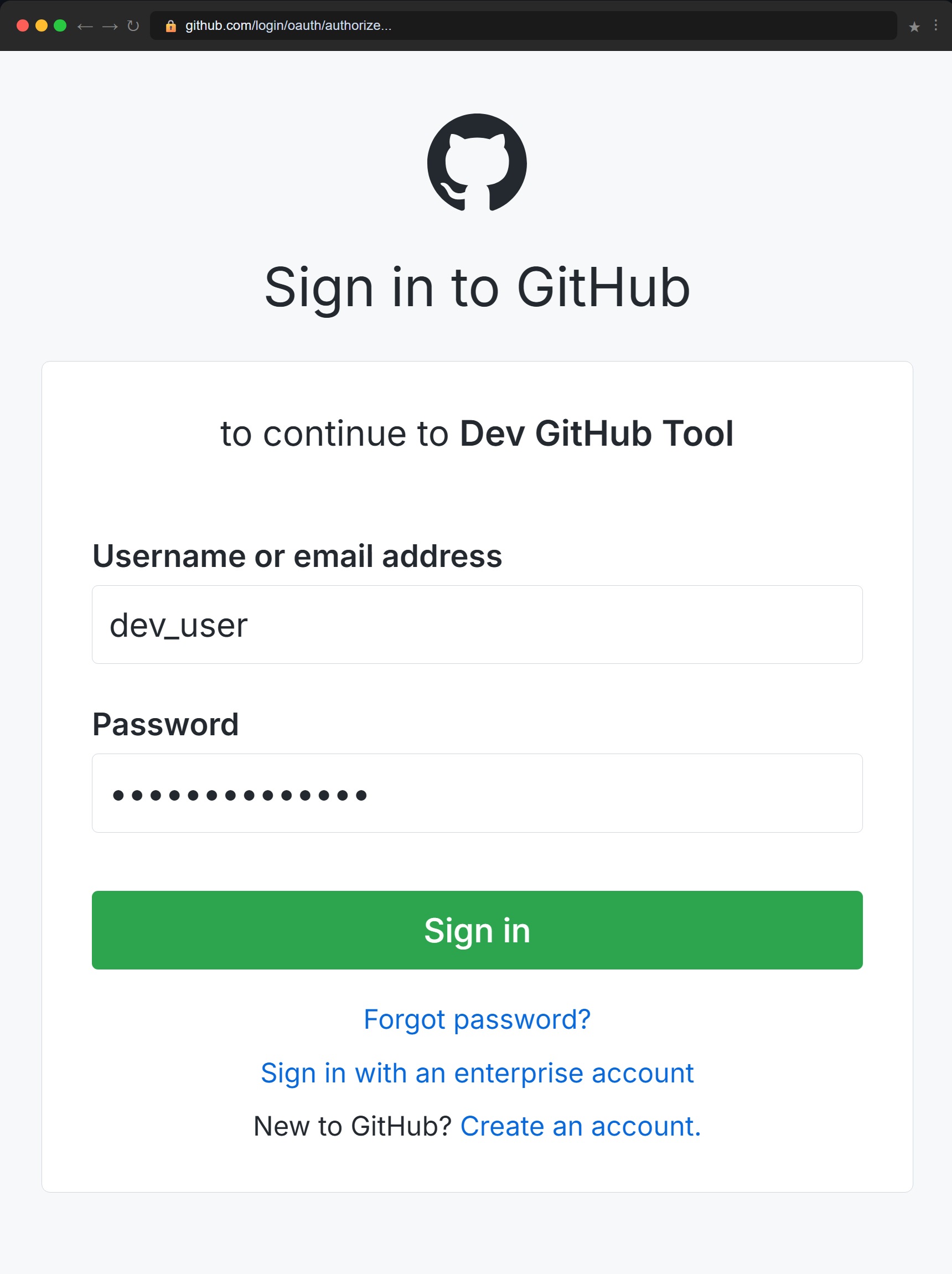
Screen 1 — Sign In to GitHub

If you're not already logged in, GitHub shows its standard sign-in form. Notice the URL bar: you're on github.com, not on your application's domain. GitHub controls this screen entirely — your app never sees the username or password the user types.

GitHub sign-in page showing the URL github.com/login/oauth/authorize in the browser bar, a username field containing dev_user, a password field with hidden characters, and a green Sign In button. The form header reads 'to continue to Dev GitHub Tool'.
GitHub's sign-in screen — your app never sees these credentials.

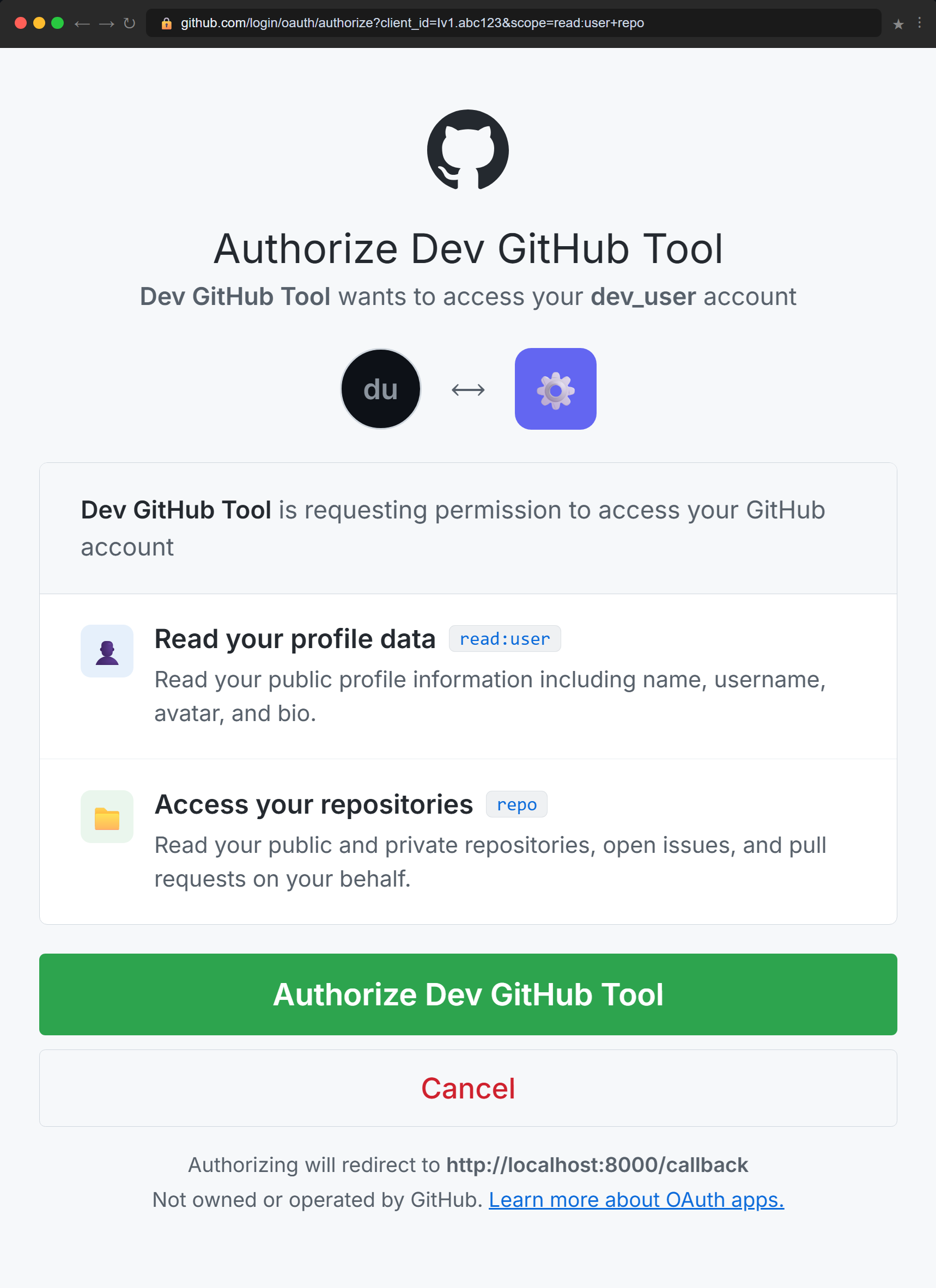
Screen 2 — The Permissions Consent Screen

After signing in, GitHub shows the authorization screen. This is the heart of OAuth: the user can see exactly what your app is requesting before granting access. In this case, read:user to read their profile and repo to access their repositories. They click Authorize Dev GitHub Tool and GitHub redirects back to your callback URL with the authorization code.

GitHub OAuth authorization screen showing 'Authorize Dev GitHub Tool' as the heading. Two permission rows are visible: 'Read your profile data' with scope read:user, and 'Access your repositories' with scope repo. A green Authorize button and a red Cancel button appear at the bottom. The footer shows the callback URL http://localhost:8000/callback.
The consent screen — users approve exactly what your app can access before any token is issued.

Once the user clicks Authorize, GitHub sends a short-lived authorization code to http://localhost:8000/callback. Your application exchanges that code for an access token in Step 3 — server-side, never exposed in the browser.

Step 3: Exchange Authorization Code for Token

After you authorize the app, GitHub redirects you to your callback URL with a code parameter. Your application exchanges this code for an access token.

2_exchange_code_for_token.py
Python
import requests

# Your OAuth app credentials
CLIENT_ID = "your_client_id_here"
CLIENT_SECRET = "your_client_secret_here"

# The authorization code from the callback URL
authorization_code = input("Enter the authorization code from the URL: ")

# The state parameter from the callback (verify it matches what you generated!)
returned_state = input("Enter the state parameter from the URL: ")
# In a real app, compare returned_state with the stored state before proceeding

# Exchange code for access token
token_url = "https://github.com/login/oauth/access_token"
payload = {
    "client_id": CLIENT_ID,
    "client_secret": CLIENT_SECRET,
    "code": authorization_code,
}
headers = {"Accept": "application/json"}

response = requests.post(token_url, data=payload, headers=headers)

if response.status_code == 200:
    token_data = response.json()
    
    if "error" in token_data:
        print(f"Error: {token_data['error']}")
        print(f"Description: {token_data.get('error_description', 'N/A')}")
    else:
        access_token = token_data["access_token"]
        print(f"\nSuccess! Access token: {access_token}")
        print("\nStore this token securely. You'll use it to make API requests.")
else:
    print(f"HTTP error: {response.status_code}")
    print(response.text)

This script prompts you to paste the code and state from the callback URL, then exchanges the code for an access token. In a production web application, your server would extract these values automatically from the incoming HTTP request.

Step 4: Use the Access Token

Now that you have an access token, you can make authenticated API requests on the user's behalf.

3_use_access_token.py
Python
import requests

# Your access token from Step 3
ACCESS_TOKEN = "your_access_token_here"

# Make authenticated API request
headers = {
    "Authorization": f"Bearer {ACCESS_TOKEN}",
    "Accept": "application/vnd.github+json",
}

# Get user information
response = requests.get("https://api.github.com/user", headers=headers)

if response.status_code == 200:
    user = response.json()
    print(f"\nAuthenticated as: {user['login']}")
    print(f"Name: {user.get('name', 'Not set')}")
    print(f"Public repos: {user['public_repos']}")
    print(f"Followers: {user['followers']}")
else:
    print(f"Error: {response.status_code}")
    print(response.text)

# List user's repositories
print("\n--- Your Repositories ---")
repos_response = requests.get("https://api.github.com/user/repos", headers=headers)

if repos_response.status_code == 200:
    repos = repos_response.json()
    for repo in repos[:5]:  # Show first 5 repos
        print(f"\n{repo['name']}")
        print(f"  Description: {repo.get('description', 'No description')}")
        print(f"  Stars: {repo['stargazers_count']}")
        print(f"  Language: {repo.get('language', 'Not specified')}")
else:
    print(f"Error fetching repos: {repos_response.status_code}")

This demonstrates the OAuth flow's end goal: your application can now access private user data (their repositories, email, etc.) without ever knowing their password. The user granted specific permissions, can revoke them at any time, and GitHub tracks exactly what your app is doing.

Step 5: Build the Complete Dev GitHub Tool

The three scripts above taught you each step of the OAuth flow in isolation. Now it's time to bring everything together into the actual tool introduced at the start of this chapter: a Python command-line program that authenticates with GitHub and displays your repositories, open issues, and recent pull requests — without ever asking for your password.

This script does something the earlier scripts couldn't: it runs a local web server to catch the OAuth callback automatically, so you don't need to copy-paste URLs by hand. This is how real desktop applications handle OAuth — open a browser, wait for the redirect, handle it programmatically.

dev_github_tool.py
Python
import os
import secrets
import webbrowser
import requests
from urllib.parse import urlencode, urlparse, parse_qs
from http.server import HTTPServer, BaseHTTPRequestHandler

# ── Credentials (load from environment variables) ────────────────────────────
CLIENT_ID     = os.environ.get("GITHUB_CLIENT_ID")
CLIENT_SECRET = os.environ.get("GITHUB_CLIENT_SECRET")
REDIRECT_URI  = "http://localhost:8000/callback"
SCOPES        = "user repo"

# ── OAuth Flow ────────────────────────────────────────────────────────────────

def get_access_token():
    """Run the full OAuth flow and return an access token."""

    # Step 1: Generate a state value for CSRF protection
    state = secrets.token_urlsafe(32)

    # Step 2: Build the authorization URL and open it in the browser
    params = {
        "client_id":    CLIENT_ID,
        "redirect_uri": REDIRECT_URI,
        "scope":        SCOPES,
        "state":        state,
    }
    auth_url = "https://github.com/login/oauth/authorize?" + urlencode(params)

    print("Opening GitHub authorization in your browser...")
    print("If it doesn't open automatically, visit:\n")
    print(f"  {auth_url}\n")
    webbrowser.open(auth_url)

    # Step 3: Start a local server to catch the callback
    auth_result = {}

    class CallbackHandler(BaseHTTPRequestHandler):
        def do_GET(self):
            """GitHub redirects here with ?code=...&state=..."""
            parsed   = urlparse(self.path)
            params   = parse_qs(parsed.query)

            auth_result["code"]  = params.get("code",  [None])[0]
            auth_result["state"] = params.get("state", [None])[0]

            # Send a success page back to the browser
            self.send_response(200)
            self.send_header("Content-type", "text/html")
            self.end_headers()
            self.wfile.write(b"""
                <html><body style="font-family:sans-serif;padding:2rem;background:#0d1117;color:#e6edf3">
                <h2>✓ Authorized</h2>
                <p>You can close this tab and return to the terminal.</p>
                </body></html>
            """)

        def log_message(self, format, *args):
            pass  # Silence the default server log output

    server = HTTPServer(("localhost", 8000), CallbackHandler)
    print("Waiting for GitHub to redirect back...")
    server.handle_request()  # Handle exactly one request then stop

    # Step 4: Validate the state parameter
    if auth_result.get("state") != state:
        raise ValueError("State mismatch — possible CSRF attack. Aborting.")

    code = auth_result.get("code")
    if not code:
        raise ValueError("No authorization code received from GitHub.")

    # Step 5: Exchange the authorization code for an access token
    print("Exchanging authorization code for access token...")
    response = requests.post(
        "https://github.com/login/oauth/access_token",
        data={
            "client_id":     CLIENT_ID,
            "client_secret": CLIENT_SECRET,
            "code":          code,
        },
        headers={"Accept": "application/json"},
    )
    response.raise_for_status()
    token_data = response.json()

    if "error" in token_data:
        raise ValueError(f"Token exchange failed: {token_data['error']}")

    return token_data["access_token"]


# ── GitHub API Helpers ────────────────────────────────────────────────────────

def github_get(url, token):
    """Make an authenticated GET request to the GitHub API."""
    headers = {
        "Authorization": f"Bearer {token}",
        "Accept":        "application/vnd.github+json",
    }
    response = requests.get(url, headers=headers)
    response.raise_for_status()
    return response.json()


# ── Display Functions ─────────────────────────────────────────────────────────

def show_profile(token):
    """Display the authenticated user's profile."""
    user = github_get("https://api.github.com/user", token)
    print(f"\n{'─' * 50}")
    print(f"  Authenticated as: {user['login']}")
    if user.get("name"):
        print(f"  Name:             {user['name']}")
    print(f"  Public repos:     {user['public_repos']}")
    print(f"  Followers:        {user['followers']}")
    print(f"{'─' * 50}")


def show_repositories(token):
    """List the user's repositories sorted by most recently updated."""
    repos = github_get(
        "https://api.github.com/user/repos?sort=updated&per_page=5",
        token
    )
    print("\n📁  YOUR REPOSITORIES  (5 most recent)\n")
    for repo in repos:
        stars = f"⭐ {repo['stargazers_count']}" if repo["stargazers_count"] else ""
        lang  = repo.get("language") or "—"
        visibility = "🔒 Private" if repo["private"] else "🌐 Public"
        print(f"  {repo['name']}  {stars}")
        print(f"    {visibility}  ·  Language: {lang}")
        if repo.get("description"):
            print(f"    {repo['description']}")
        print()


def show_open_issues(token, repo_full_name):
    """Display open issues for a given repository."""
    issues = github_get(
        f"https://api.github.com/repos/{repo_full_name}/issues?state=open&per_page=5",
        token
    )
    # GitHub returns pull requests in the issues endpoint — filter them out
    issues = [i for i in issues if "pull_request" not in i]

    print(f"\n🐛  OPEN ISSUES  ({repo_full_name})\n")
    if not issues:
        print("  No open issues.")
        return
    for issue in issues:
        labels = ", ".join(l["name"] for l in issue.get("labels", []))
        print(f"  #{issue['number']}  {issue['title']}")
        if labels:
            print(f"    Labels: {labels}")
        print()


def show_recent_pull_requests(token, repo_full_name):
    """Display recent pull requests for a given repository."""
    pulls = github_get(
        f"https://api.github.com/repos/{repo_full_name}/pulls?state=open&per_page=5",
        token
    )
    print(f"\n🔀  OPEN PULL REQUESTS  ({repo_full_name})\n")
    if not pulls:
        print("  No open pull requests.")
        return
    for pr in pulls:
        print(f"  #{pr['number']}  {pr['title']}")
        print(f"    By: {pr['user']['login']}  ·  Branch: {pr['head']['ref']} → {pr['base']['ref']}")
        print()


# ── Main ──────────────────────────────────────────────────────────────────────

def main():
    if not CLIENT_ID or not CLIENT_SECRET:
        print("Error: Set GITHUB_CLIENT_ID and GITHUB_CLIENT_SECRET as environment variables.")
        return

    print("\n╔══════════════════════════════════╗")
    print("║       Dev GitHub Tool  v1.0      ║")
    print("╚══════════════════════════════════╝\n")

    # Authenticate via OAuth
    token = get_access_token()
    print("✓ Connected — no password shared\n")

    # Show profile dashboard
    show_profile(token)

    # Show the user's repositories
    show_repositories(token)

    # Ask the user which repo to inspect
    repo_name = input("Enter a repo name to inspect (e.g. my-project): ").strip()
    user_info = github_get("https://api.github.com/user", token)
    repo_full_name = f"{user_info['login']}/{repo_name}"

    show_open_issues(token, repo_full_name)
    show_recent_pull_requests(token, repo_full_name)

    print("\n✓ Done. Your GitHub password was never used or shared.")


if __name__ == "__main__":
    main()
How This Tool Ties the Chapter Together
  • State parameter: Generated with secrets.token_urlsafe(32) and validated on callback — exactly as Section 3 described
  • Local callback server: HTTPServer handles the redirect automatically, catching the ?code= and ?state= parameters without manual copy-pasting
  • Token exchange: The code is exchanged server-side using the client secret — the access token never touches the browser
  • Scoped access: Only user and repo scopes are requested — the minimum needed for the three features
  • Environment variables: Credentials are loaded from the environment, never hardcoded — the pattern you learned in Chapter 7
Running the Tool

Set your credentials as environment variables, then run:

$ export GITHUB_CLIENT_ID=your_client_id_here
$ export GITHUB_CLIENT_SECRET=your_client_secret_here
$ python dev_github_tool.py

The tool opens your browser, waits for you to authorize, catches the callback, exchanges the code for a token, and displays your repositories — all without ever asking for your GitHub password.

Common OAuth Errors and Solutions

OAuth implementations frequently encounter these errors. Here's how to debug them systematically.

Error Common Causes Solution
redirect_uri_mismatch Authorization URL redirect_uri doesn't exactly match registered URI Check for trailing slashes, http vs https, port numbers, localhost vs 127.0.0.1
invalid_client Wrong client_id or client_secret in token exchange Verify credentials match your OAuth app settings, check for copy-paste errors
invalid_grant Authorization code already used or expired Codes are single-use and expire in ~10 minutes. Start the flow again to get a new code
401 Unauthorized Access token invalid, expired, or revoked Use refresh token to get new access token, or re-authorize user if refresh fails
insufficient_scope API endpoint requires scopes not granted Request additional scopes in authorization URL, user must re-authorize
bad_verification_code State parameter doesn't match Ensure you're comparing the returned state with the value you generated and stored
OAuth Debugging Checklist

When you encounter OAuth errors, work through this checklist systematically:

  1. Verify your client_id and client_secret are correct and match your OAuth app settings
  2. Check that all redirect URIs match exactly (protocol, domain, port, path, trailing slash)
  3. Confirm you're using the authorization code immediately—they expire quickly
  4. Ensure state parameters are generated securely and validated properly
  5. Verify requested scopes exist and are spelled correctly for the provider
  6. Check that access tokens are included in the Authorization header with correct format
  7. Test with the provider's API documentation examples first before custom code

6. Chapter Summary

What You've Mastered

You now understand OAuth 2.0 at a level that prepares you for production API integration. Here's what you've accomplished:

Core Skills Acquired
  • OAuth flow mastery: You can explain why OAuth uses authorization codes instead of returning tokens directly, why state parameters prevent CSRF attacks, and how the two-step exchange keeps tokens secure
  • Security implementation: You understand how to validate redirect URIs exactly, generate cryptographically secure state parameters, request minimal scopes, and store tokens safely using environment variables, encryption, or secrets managers
  • Token lifecycle management: You can build token managers that track expiration, refresh automatically, handle 401 errors with retry logic, and gracefully handle revocation by clearing state and prompting re-authorization
  • Hands-on integration: You've registered OAuth apps, generated authorization URLs, exchanged codes for tokens, and made authenticated API requests with GitHub
  • Error debugging: You know how to diagnose and fix redirect URI mismatches, invalid grants, insufficient scopes, and state validation failures using systematic troubleshooting
  • Best practices: You apply progressive authorization (starting with minimal scopes), PKCE for public clients, masked logging, and proper secret management
  • Architectural thinking: You understand the four OAuth roles, the difference between authentication and authorization, and when to use different OAuth flows
  • Production readiness: You can identify when refresh fails require re-authorization, detect token revocation, and build resilient applications that handle OAuth edge cases gracefully

Checkpoint Quiz

Test your understanding with these questions. If you can answer them confidently, you're ready for Chapter 15.

Select question to reveal the answer:
Why does OAuth 2.0 use authorization codes instead of returning access tokens directly in the browser redirect?

Two-step process keeps tokens secure: The authorization code travels through the browser, which could be compromised by malicious extensions or scripts. But the code itself is useless without the client_secret, which never leaves your server. This two-step process (code → token exchange) keeps access tokens more secure than if they appeared directly in URLs where browser history, proxies, or referrer headers could expose them.

Your app requests user scope during authorization but later tries to access /user/repos (which requires repo scope). What happens and how do you fix it?

Insufficient scope error requires re-authorization: The API returns 403 Forbidden or insufficient_scope. To fix it, request additional scopes by sending the user back through the OAuth flow with an updated scope list that includes both user and repo. Use progressive authorization: explain why you need the additional permission before redirecting.

You registered http://localhost:8000/callback but your code uses http://localhost:8000/callback/ (with trailing slash). What error occurs and why?

Exact URI matching prevents redirect_uri_mismatch: GitHub returns redirect_uri_mismatch error because OAuth providers require exact character-for-character matches on redirect URIs for security. The trailing slash makes them different URIs. Fix it by ensuring your registered URI and your code's redirect_uri parameter match exactly.

An attacker tricks a user into clicking a link with the attacker's authorization code. How does the state parameter prevent this attack?

State parameter prevents CSRF attacks: When your app starts the OAuth flow, it generates a random state value and stores it in the user's session. The attacker's code was generated from a different session with a different state value. When the victim's browser hits your callback with the attacker's code, the state won't match what's stored in the victim's session, so your app rejects it. The attacker can't predict or forge the victim's state value.

Your access token expires in 1 hour but you need your app to run for 8 hours. How do you handle this using refresh tokens?

Token manager handles automatic refresh: Implement a token manager that tracks when the access token expires (minus a safety buffer). Before each API request, check if the token is expired or about to expire. If so, use the refresh token to request a new access token from the provider's token endpoint. Update your stored access token with the new one and continue making requests. This happens automatically in the background—users never see it.

Looking Forward

OAuth answers the question "Who can access what?" You can now safely connect users' accounts, request precisely scoped permissions, and call APIs on their behalf. But right now, most of your programs are still ephemeral: they fetch data, print results, and then disappear.

To build real applications, you need persistence. You need somewhere to put the data you fetch so you can work with it over time—caching, aggregating, analyzing, and visualizing it.

In the next chapter, Chapter 15: Database Fundamentals with SQLite, you'll learn how to store and query data using a lightweight, file-based database. You'll build a weather API cache that shows how APIs and databases complement each other: the API gives you fresh data, the database gives your application memory.

Then in Chapter 16, everything comes together: OAuth + APIs + Databases + a Web Interface = the Spotify Music Time Machine. You'll build a portfolio-ready project that tracks your listening history, analyzes patterns over time, and visualizes your musical journey in a way that would be impossible with APIs alone.

You've learned how to connect safely. Next, you'll learn how to remember.